User’s Manual MAGNER150
- 29 -
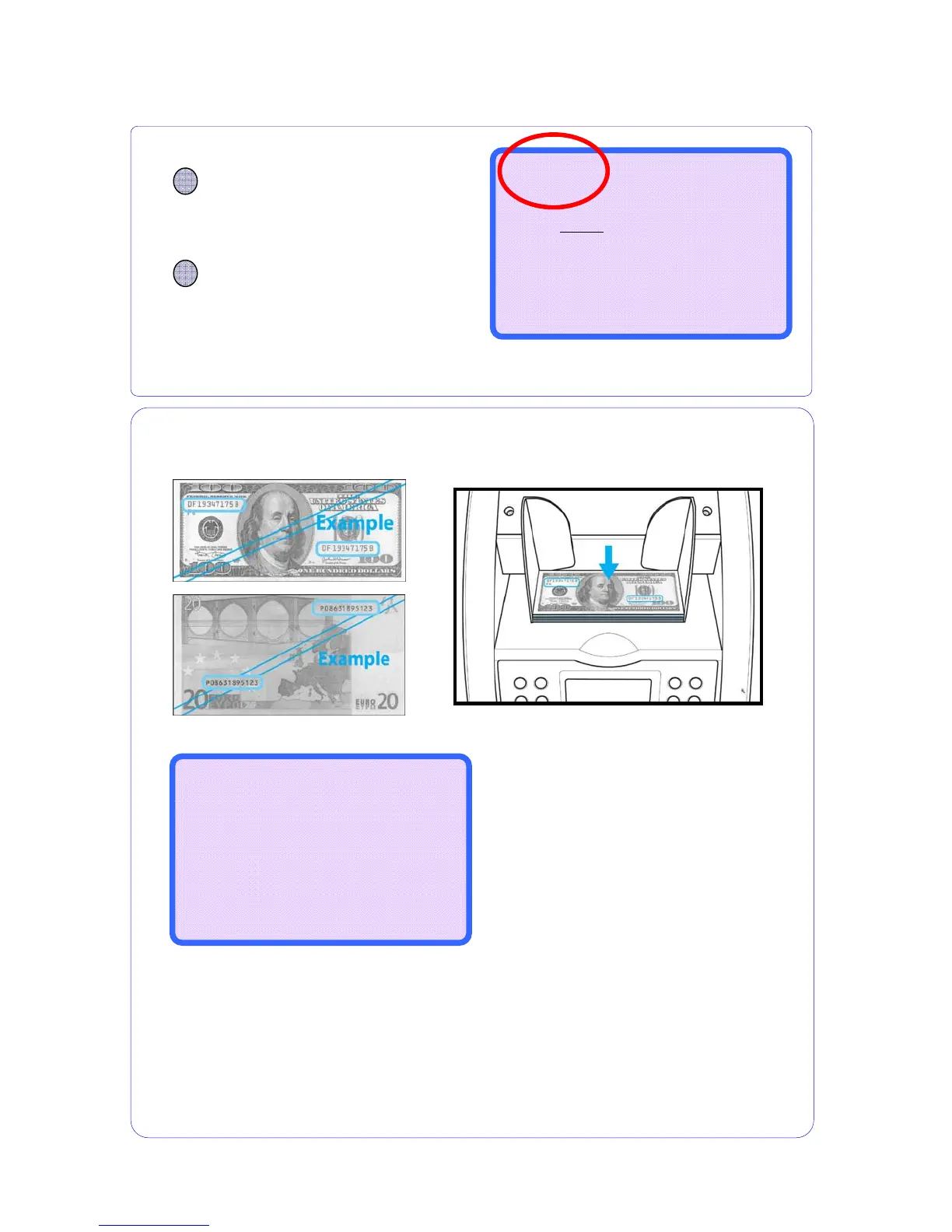
5-11. Serial Number Print Mode
Before counting in serial number print mode, please arrange the notes that the serial number
printed side is faced upward.
For example, USD is front side and Euro is rear side.
▶In this mode, the machine could not detect the counterfeit.
▶This mode operates only for be exist SRAM in MAIN BOARD. (Option)
▶ If you want to know more detail of serial printer, refer to CHAPER 6.
After counting, the LCD Display will display the message as below.
If you wants to count other notes continually, place the note on the HOPPER not remove the
notes in the Stacker Pocket.
The printer prints out the serial number successively.
After finishing counting if you remove the notes from the Stacker Pocket, prints out the total
notes.
---------------------
|Please Wait..... |
|Printing serial number...|
--------------------------
CURRENCY
Press CURRENCY key and
choose the mode, EURO or
USD
You can count all denomination of selected
currency without any selection.
MODE
Press the MODE key and
choose Serial mode
Serial RJP CF
--------------------
0
0
$
0
--------------------
B100 ---



 To Next Page