User’s Manual MAGNER150
- 40 -
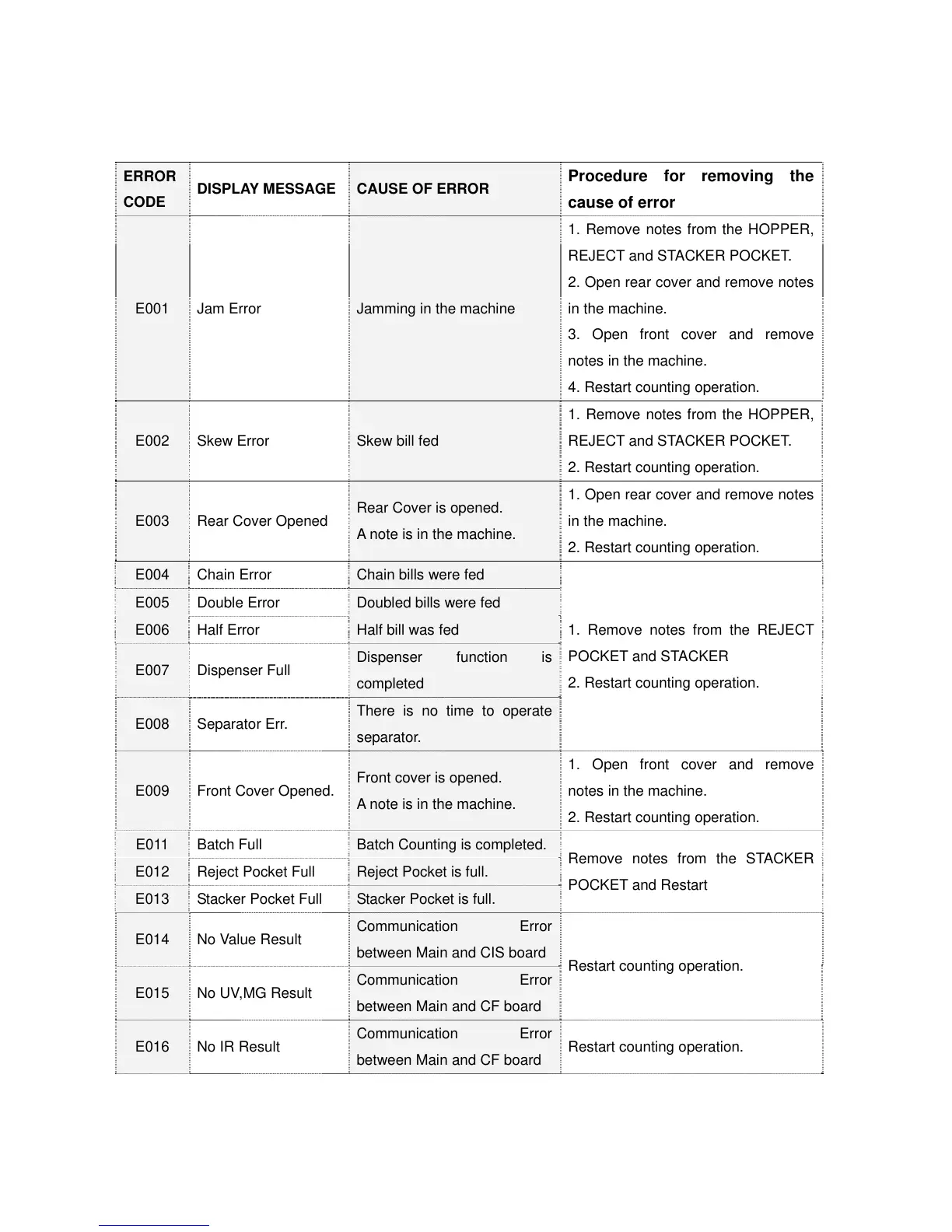
- ERROR CODE AND DISPLAY MESSAGE
ERROR
CODE
DISPLAY MESSAGE
CAUSE OF ERROR
Procedure for removing the
cause of error
E001 Jam Error Jamming in the machine
1. Remove notes from the HOPPER,
REJECT and STACKER POCKET.
2. Open rear cover and remove notes
in the machine.
3. Open front cover and remove
notes in the machine.
4. Restart counting operation.
E002 Skew Error Skew bill fed
1. Remove notes from the HOPPER,
REJECT and STACKER POCKET.
2. Restart counting operation.
E003 Rear Cover Opened
Rear Cover is opened.
A note is in the machine.
1. Open rear cover and remove notes
in the machine.
2. Restart counting operation.
E004 Chain Error Chain bills were fed
1. Remove notes from the REJECT
POCKET and STACKER
2. Restart counting operation.
E005 Double Error Doubled bills were fed
E006 Half Error Half bill was fed
E007 Dispenser Full
Dispenser function is
completed
E008 Separator Err.
There is no time to operate
separator.
E009 Front Cover Opened.
Front cover is opened.
A note is in the machine.
1. Open front cover and remove
notes in the machine.
2. Restart counting operation.
E011 Batch Full Batch Counting is completed.
Remove notes from the STACKER
POCKET and Restart
E012 Reject Pocket Full Reject Pocket is full.
E013 Stacker Pocket Full Stacker Pocket is full.
E014 No Value Result
Communication Error
between Main and CIS board
Restart counting operation.
E015 No UV,MG Result
Communication Error
between Main and CF board
E016 No IR Result
Communication Error
between Main and CF board
Restart counting operation.



 To Next Page