50
How to play with IR version Starter
I. How to control Starter under default mode
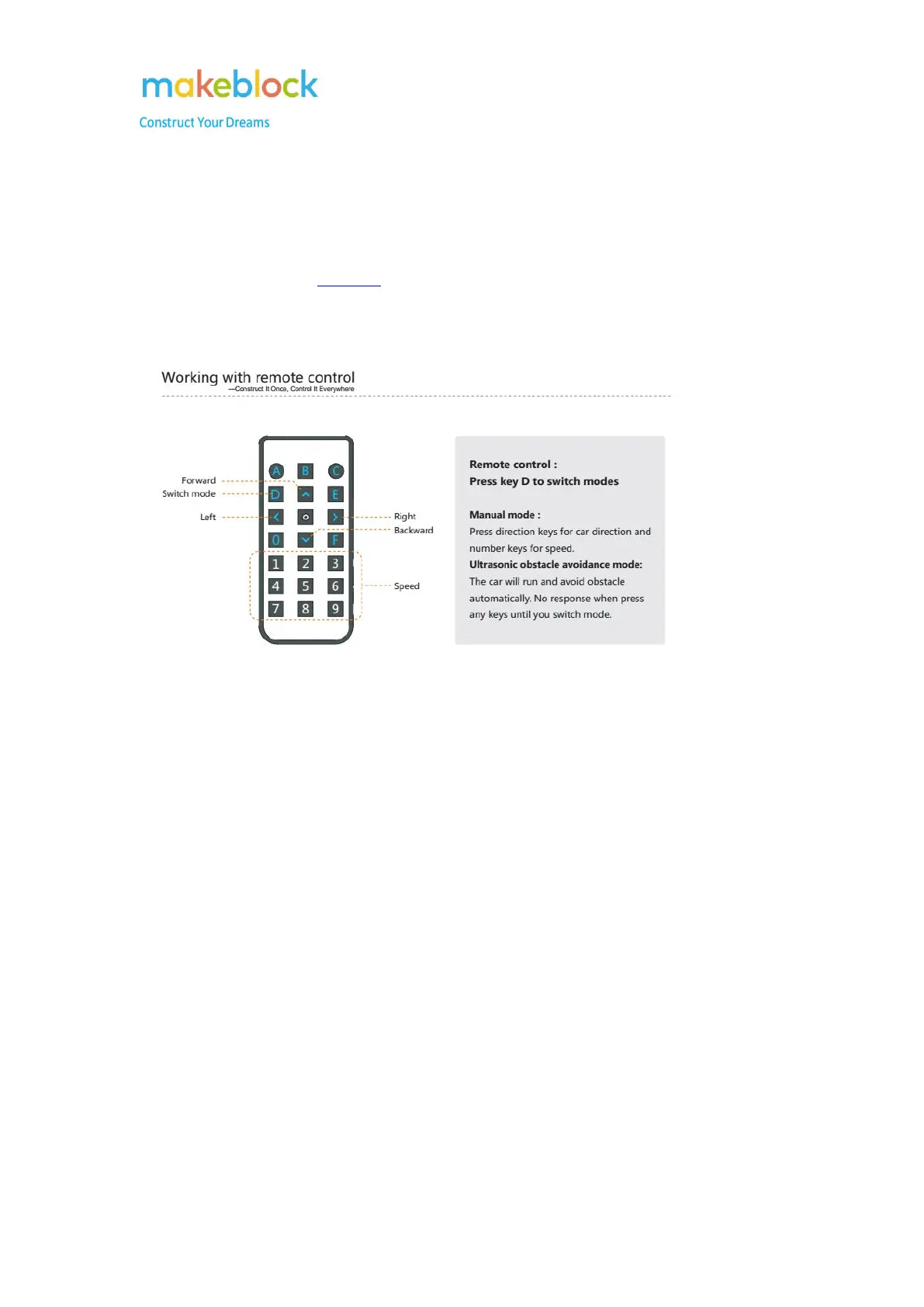
Below is the command of each key on the IR controller. If it is not working, please use mBlock 3
to reset default program as this guide.
If it works in the PC software mBlock but not with the IR controller, please test if the IR controller
and IR module is working or not.
a. Make sure the IR controller has installed correct number and correct type of batteries. Open the
camera application on an Android phone, and put the Infrared head on the IR remote controller
toward to the camera on the Android phone, then press the key on the IR remote controller.
Meanwhile, through the camera on Android phone, notice if you can see the red light from the
Infrared head. If there is red light means the IR remote controller is working.
Note: the red light should be always on (or a very quick flash) when you keep holding a button on
IR Controller.
b. Test the communication between the remote and the Infrared Receiver.
Turn on the power switch of Starter. Long press the number button on remote. The
indicator D3 should have blue light on.
The blue light should be off once you released the button.



 To Next Page