87
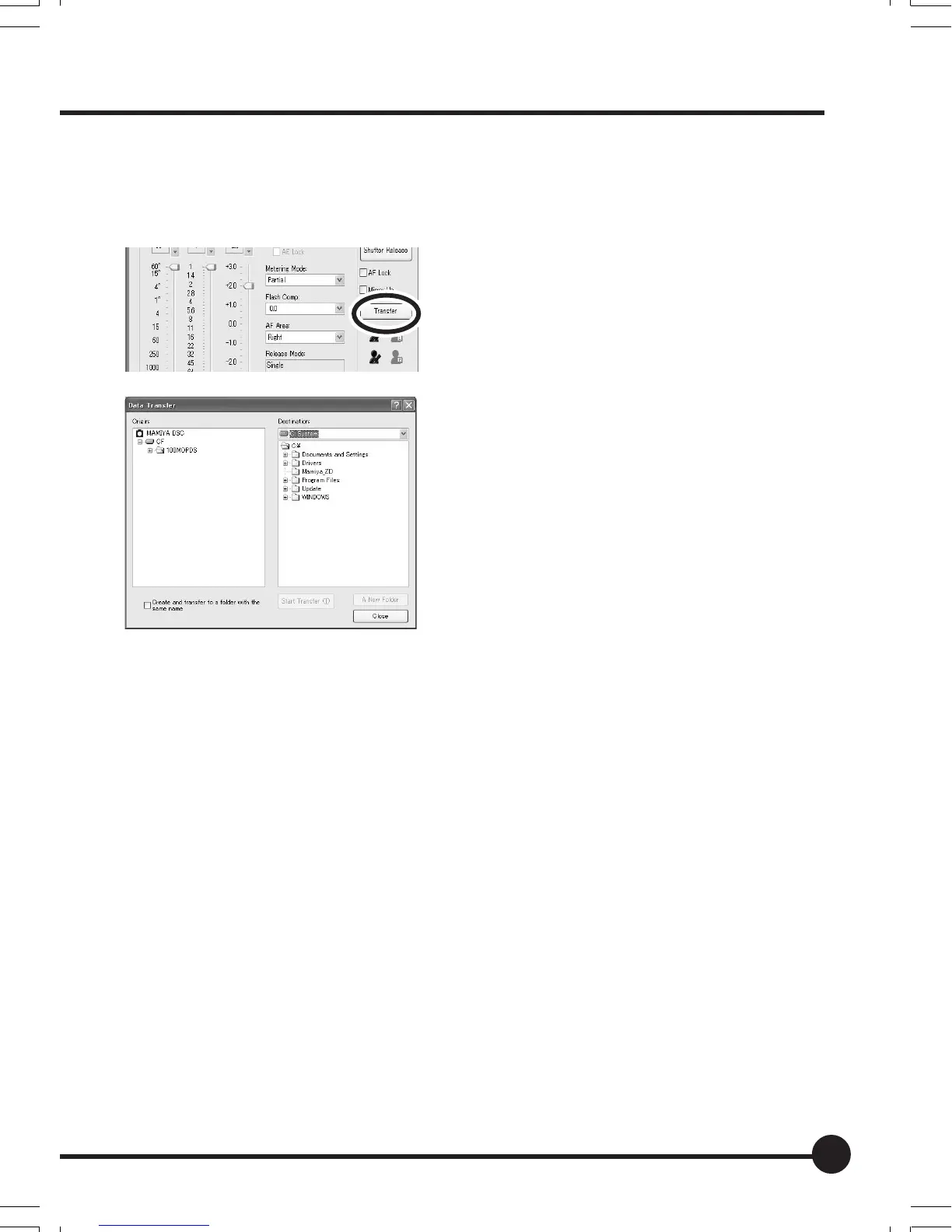
Transferring images using Mamiya Digital PhotoStudio
Connect this unit to the PC and transfer the images from this unit memory card
to the PC using the Mamiya Digital PhotoStudio image transfer function.
1. Click the [Transfer] button in the [Re-
mote Capture] screen.
The [Data Transfer] screen appears.
2. Select a folder in the camera memory
card from the [Origin] tree.
3. Select a drive in the computer from
the [Destination] list.
A folder tree of the selected drive ap-
pears below the list.
4. Select a folder to be transferred to and click the [Start Transfer] but-
ton.
• When creating a new folder, click the [A New Folder] button and enter the folder
name into the screen that appears.
• Adding a check mark to [Create and transfer to a folder with the same name]
transfers the entire folder.
07_ZD back_E_p083-088 07/3/9, 20:4387



 To Next Page