WHEN THE MICROPROCESSOR IS REPLACED WITH A NEW ONE
When the U-PRO (Microprocessor) or the Flash ROM is replaced, conrm the following.
PCB Name Ref. No. Description
After
replaced
Remark
HDMI IC1023 R5F56108VNFP
D
SOFTWARE: Main
HDMI U1006 EN29LV160DBTI
B
SOFTWARE: DSP ROM
HDMI IC1012 EPM3032A-TC44
B
SOFTWARE: AUDIO PLD
HDMI IC1008
MX25L3206EM2I-12G(U/K) /
MX25L6406EM2I-12G(N)
D
SOFTWARE: GUI ROM
HDMI U2603 H27U1G8F2BTR-BC
D
SOFTWARE: DM860A
After replacing
A
: Mask ROM (With software). No need for write-in of software to the microprocessor.
B
: Flash ROM (With software). Usually, no need for write-in of software. But, when the software was updated, you should
write the new software on the microprocessor or ash ROM. Please check the software version.
C
: Empty Flash ROM (Without software). You should write the software on the microprocessor or ash ROM.
Refer to "Update procedure" or "writing procedure", when you write the software.
D
: Flash ROM (With software). But you should write to the latest version of each region.
PROCEDURE FOR UPGRADING THE VERSION OF THE FIRMWARE
NOTE:
When the following are replaced, always rewrite with updated rmware using DFW. (Refer to parts list of "
HDMI
PCB UNIT ASS'Y
"
• PCB HDMI ASSY
• IC1023 (R5F56108VNFP)
• U1006 (EN29LV160DBTI)
• IC1012 (EPM3032A-TC44)
• IC1008 (MX25L3206EM2I-12G(U/K) / MX25L6406EM2I-12G(N))
• U2603(H27U1G8F2BTR-BC)
When U2603 is replaced, update the rmware and then run
“Network Initialization mode”
.
(
47 page)
1. How to update by DFW
[NR1504U, N, K models]
1.1. Preparations before starting the operation
(1) Personal Computer (Installed "DFW_0013_NR1504_(Rev.X.X.X).exe".
(2) RS-232C cable (9P (Male), Straight).
(3) 8U-210100S WRITING KIT.
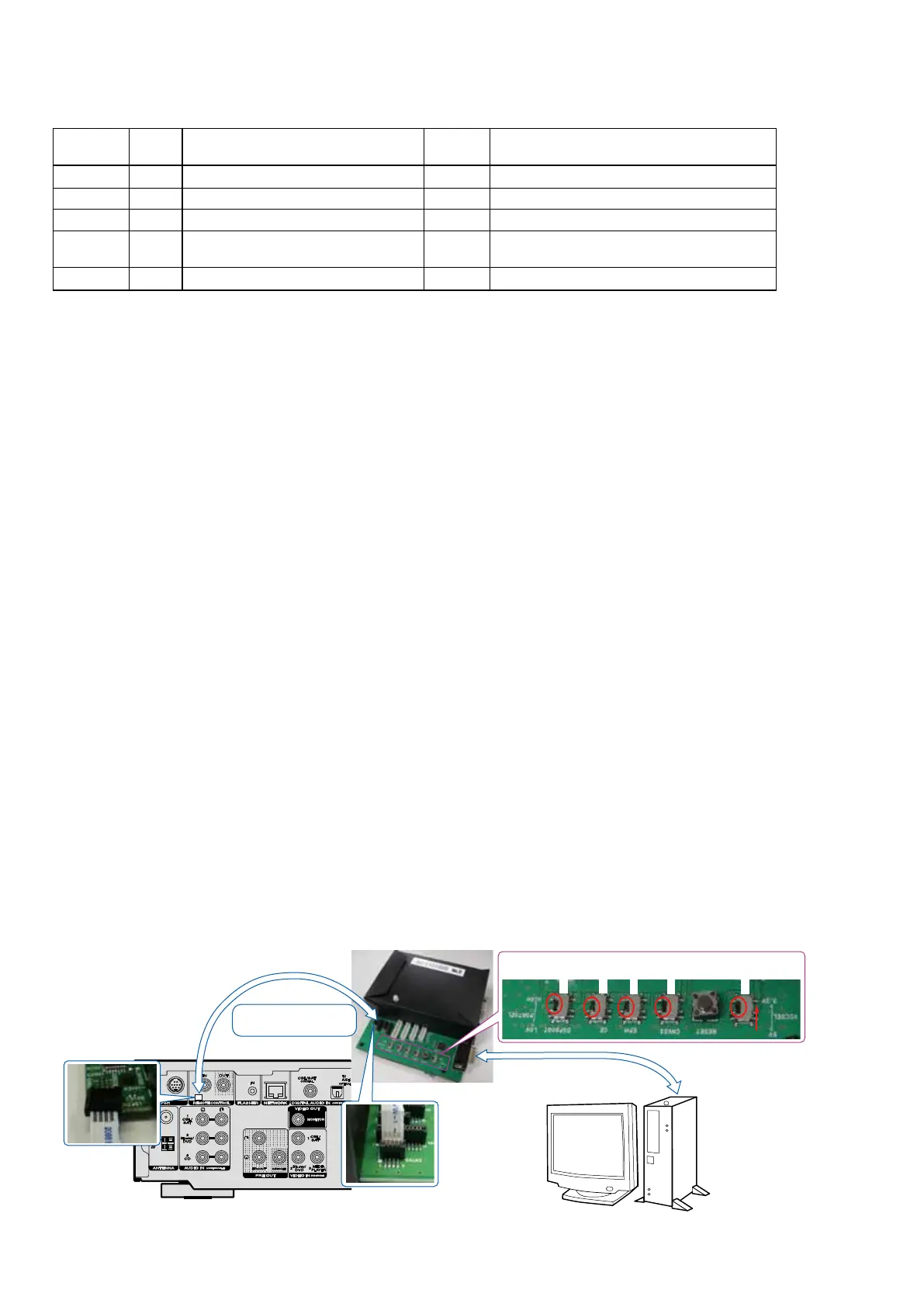
1.2. Connection of AV receiver
(1) Conrm the power on/off switch of the AV receiver is turning off.
(2) Connect the update terminal of AV receiver with the "WRITING KIT".
(3) Connect the RS-232C cable from PC with the "WRITING KIT".
s
s
s
s
PC
WRITING KIT
RS-232C Cable
4P FFC Cable
This side is contacts of
flexible card cable.
S709
S708
S707
S706
S702
S706-709 : No Preference
S702 : 3.3V
50















 To Next Page