EasyManua.ls Logo

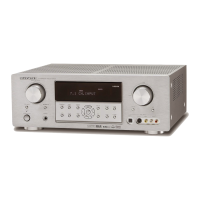
Marantz SR4500 - Service Manual

Marantz SR4500
84 pages
Print Icon
To Next Page IconTo Next Page
Loading...
AV Surround Receiver
SR4500
/
PS4500
Part no. 90M07BW855010
First Issue 2004.06
ecm
Service
Manual
SR4500 /A1B/N1B/U1B
K1G/L1G/N1G
A1S/N1S/U1S
Please use this service manual with referring to the user guide (D.F.U) without fail.
SR4500
TABLE OF CONTENTS
SECTION PAGE
1. TECHNICAL SPECIFICATIONS ............................................................................................ 1
2. TECHNICAL DESCRIPTION ................................................................................................. 4
3. WIRING DIAGRAM ................................................................................................................7
4. BLOCK DIAGRAM .................................................................................................................9
5. SCHEMATIC DIAGRAM ........................................................................................................11
6. PARTS LOCATION .............................................................................................................. 27
7. IC DATA ................................................................................................................................ 38
8. EXPLODED VIEW AND PARTS LIST .................................................................................. 45
9. POWER AMPLIFIER ADJUSTMENT ................................................................................... 52
10. SERVICE MODE .................................................................................................................. 53
11. SYSTEM ERROR ................................................................................................................ 55
12. UPDATE FIRMWARE .......................................................................................................... 56
13. ELECTRICAL PARTS LIST .................................................................................................. 58
SURROUND
AV SURROUND RECEIVER SR4500
DOWN
UP
VOLUME
INPUT SELECTOR
POWER ON/OFF PHONES
STANDBY
MUTE
7.1CH INPUT
S. SPEAKER B
ATT
PURE
SETUP
DIRECT
SIMPLE
AUTO
HT-EQ
MENU
ENTER
DISPLAY
MEMORY
CLEAR
T-MODE
EXIT
BAND
MODE
DISP MULTI AUTO TUNED ST V
OFF NIGHT PEAK ANALOG
DIGITAL
ATT
SLEEP
SURR
AUTO
DIRECT DISC 6.1 MTX 6.1 EQ
DIGITAL
SURROUND
PCM
L
C
R
SL S SR
LFE
PS4500 /F1N
AV Surround Amplifier
PS4500


Other manuals for Marantz SR4500

Questions and Answers

  • A
    Ana FinleyAug 26, 2025
    Why is there no Audio output from the center channel speaker on Marantz SR4500 Stereo Receiver?
    • N
      njenningsAug 26, 2025
      If you're not getting audio from the center channel speaker on your Marantz Stereo Receiver, try the following: * Ensure the center speaker cable is correctly connected. * If 'STEREO' is selected for Surround mode, choose another Surround mode. * Check that 'Center = NONE' is not selected in SETUP mode; correct the setting if needed.
  • M
    Morgan JonesAug 27, 2025
    Why is there no Audio output from the surround speakers on Marantz SR4500?
    • R
      ronald40Aug 27, 2025
      If you're not getting audio from the surround speakers on your Marantz Stereo Receiver, check these things: * Make sure the surround speaker cables are properly connected. * If STEREO is selected for Surround mode, choose another surround mode. * Ensure that Surround = NONE is not selected in SETUP mode; correct the setting if needed.
  • J
    Jennifer WilsonAug 27, 2025
    Why is there no Audio output from the surround back speakers on Marantz SR4500 Stereo Receiver?
    • M
      Mr. Kevin ReynoldsAug 28, 2025
      If you're experiencing no audio output from the surround back speakers on your Marantz Stereo Receiver, check the following: * Ensure the surround back speaker cable is correctly connected. * Set surround mode to EX/ES. * Make sure that Surround back = NONE is not selected in SPEAKERS SIZE SETUP; correct the setting if needed.
  • L
    Lisa JohnsonAug 28, 2025
    Why FM or AM reception fails on Marantz Stereo Receiver?
    • D
      david85Aug 29, 2025
      If you're not getting FM or AM reception on your Marantz Stereo Receiver, make sure the indoor FM and AM antennas are correctly connected to the FM and AM antenna outlets.
  • V
    valenzuelaseanAug 29, 2025
    Why is there no speaker output on Marantz SR4500 Stereo Receiver?
    • R
      Robin BennettAug 29, 2025
      If you're not getting any speaker output from your Marantz Stereo Receiver, check if headphones are connected to the headphone jack. Disconnect the headphones, as speakers will not output sound when headphones are connected.
  • J
    jake53Aug 30, 2025
    What to do if Incorrect Audio from a channel on Marantz SR4500 Stereo Receiver?
    • C
      Cindy DavisAug 30, 2025
      If the audio from a channel is incorrect on your Marantz Stereo Receiver, it may be due to the speaker cable being connected incorrectly. Refer to the connection diagram to connect the cable correctly.
  • J
    Jeremy TranAug 23, 2025
    What to do if control with the remote control unit fails on Marantz Stereo Receiver?
    • E
      Eric MahoneyAug 23, 2025
      If your Marantz Stereo Receiver remote control isn't working, try these steps: 1. Replace all the batteries with new ones. 2. Ensure you are selecting the correct function-key setting for the equipment you are controlling. 3. Move closer to the SR4500. 4. Remove any objects blocking the path between the remote and the SR4500.
  • R
    robin52Sep 1, 2025
    How to fix FM or AM reception failure on Marantz Stereo Receiver?
    • Z
      Zachary WilliamsSep 1, 2025
      If FM or AM reception fails on your Marantz Stereo Receiver, it might be due to an incomplete antenna connection. Ensure that the indoor FM and AM antennas are correctly connected to the FM and AM antenna outlets.
  • L
    Lisa CarlsonSep 2, 2025
    What to do if there is no output to Sub Woofer Out on Marantz Stereo Receiver?
    • C
      Crystal AndersonSep 2, 2025
      If there is no output to the subwoofer on your Marantz Stereo Receiver, check if "Sub-woofer = NONE" has been selected in the SETUP mode. If so, select "Sub-woofer = YES".
  • L
    Lindsey ZimmermanSep 3, 2025
    Why is there no audio from the center channel speaker on my Marantz Stereo Receiver?
    • N
      Nicholas ClarkeSep 3, 2025
      If there is no audio output from the center channel speaker of your Marantz Stereo Receiver, consider the following: * The center speaker cable connection might be incomplete. Connect the cable correctly. * "STEREO" might be selected for Surround mode. When STEREO is selected, no sound is output from the center speaker. Set another Surround mode. * "Center = NONE" might be selected in SETUP mode. Make the correct setting.

Summary

1. Technical Specifications

FM Tuner Section

Technical parameters for the FM tuner.

AM Tuner Section

Technical parameters for the AM tuner.

Audio Section

Audio output and input specifications.

Video Section

Video input and output specifications.

2. Technical Description

DTS Audio Technologies

Explanation of DTS, DTS-ES, and DTS 96/24 audio technologies.

Dolby and SRS Audio Technologies

Explanation of Dolby Digital EX, Pro Logic IIx, and SRS Circle Surround II.

3. Wiring Diagram

4. Block Diagram

5. Schematic Diagram

6. Parts Location

7. IC Data

NJW1157 IC Data

Pinout and function details for the NJW1157 IC.

CS49400 IC Data

Pinout and function details for the CS49400 IC.

H8 S2398 IC Data

Pinout and function details for the H8S2398 microcontroller.

NJU3430 FG1 IC Data

Pinout and function details for the NJU3430FG1 IC.

8. Exploded View and Parts List

9. Power Amplifier Adjustment

Idling Current Alignment

Procedure to set idling current for power amplifier channels.

11. System Error

DSP Communication Error

Error display for DSP communication issues.

DSP Code Error

Error display for DSP code issues.

EEPROM Communication Error

Error display for EEPROM communication issues.

12. Update Firmware

Firmware Update Modes

Details on updating CPU and DSP firmware.

Firmware Version Check

How to check installed firmware versions.

13. Electrical Parts List

Resistors

List of resistor parts and specifications.

Capacitors

List of capacitor parts and specifications.

Safety Notes for Parts

Important safety information regarding replacement parts.

Marantz SR4500 Specifications

General IconGeneral
Frequency Response10Hz-100kHz (+1, -3 dB)
Total Harmonic Distortion0.08%
Input Sensitivity200mV (line)
Tuning rangeFM, AM
Damping Factor100
Input Impedance47k ohms
Power Output90W per channel (8 ohms, 20Hz-20kHz, THD 0.08%)
Signal-to-Noise Ratio105dB (line)
Video ConnectionsComposite, S-Video
Digital inputsOptical, Coaxial
Speaker Impedance6-8 ohms

Related product manuals