Editing a Memory
By using the edit commands described in the following sections you can
enter new settings for the packing and grading memories or change the
existing settings.
Edit Commands – Packing
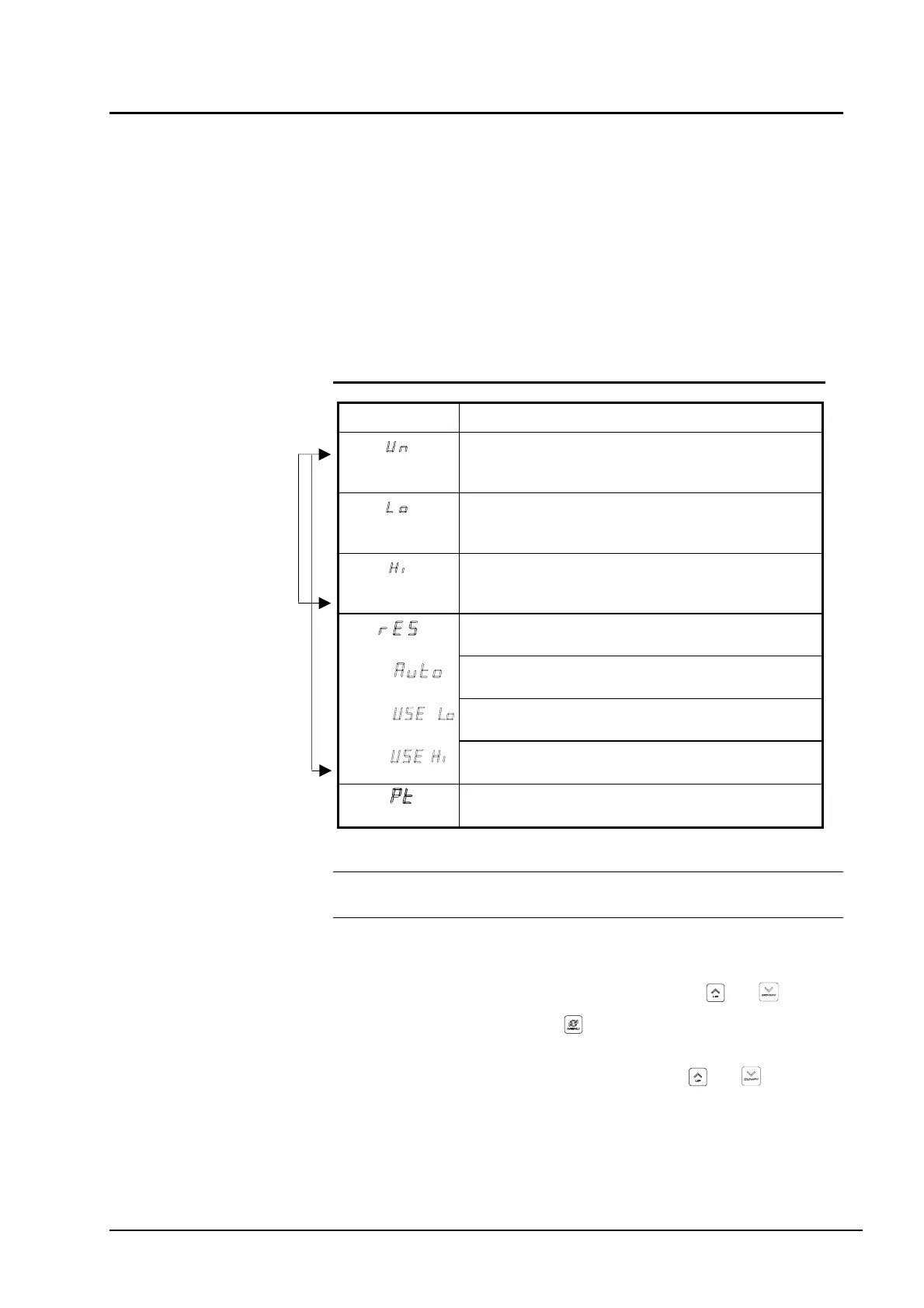
The edit commands for the packing memories are listed in the table
below. The commands are described in detail in the following sections.
Table 1 Edit commands – Packing.
Command: Description:
Unit.
To set the unit of weight for the target weight; kg, lb, g, or
oz.
Lower limit.
To set the lower weight limit. Weighing results above this
value are accepted.
Higher limit.
To set the upper weight limit. Weighing results below this
value are accepted.
Resolution (range).
To select single or multiple weighing range.
Automatic selection.
Automatic selection of weighing range.
Use Low.
Use lower weighing range; lower capacity.
Use High.
Use higher weighing range; higher capacity.
Preset Tare.
Preset Tare enabled.
Single range scales
ultiple range scales
Note: To edit a memory, you must first select the memory you wish to
edit.
To edit a memory
1
Select a memory by using the arrow keys and .
2 Press the MENU key for a few seconds. The first available
editing command appears on the Config Display.
3 Select a command with the arrow keys and .
4 Follow the instructions for each command in the following
sections.
User’s Guide Basic Operation • 27



 To Next Page