Rad-57 Signal Extraction Pulse CO-Oximeter Operator’s Manual
4-11
4
Operation
Normal Patient Monitoring
The following sections describe the function of the Rad-57 front panel controls during normal patient
monitoring.
Rad-57 Front Panel Control Operation
BUTTON FUNCTION
DISPLAY
DISPLAY
GR-14946
IC: 7362A-RAD87IC: 7362A-RAD87
FCC ID: VKF-RAD87FCC ID: VKF-RAD87
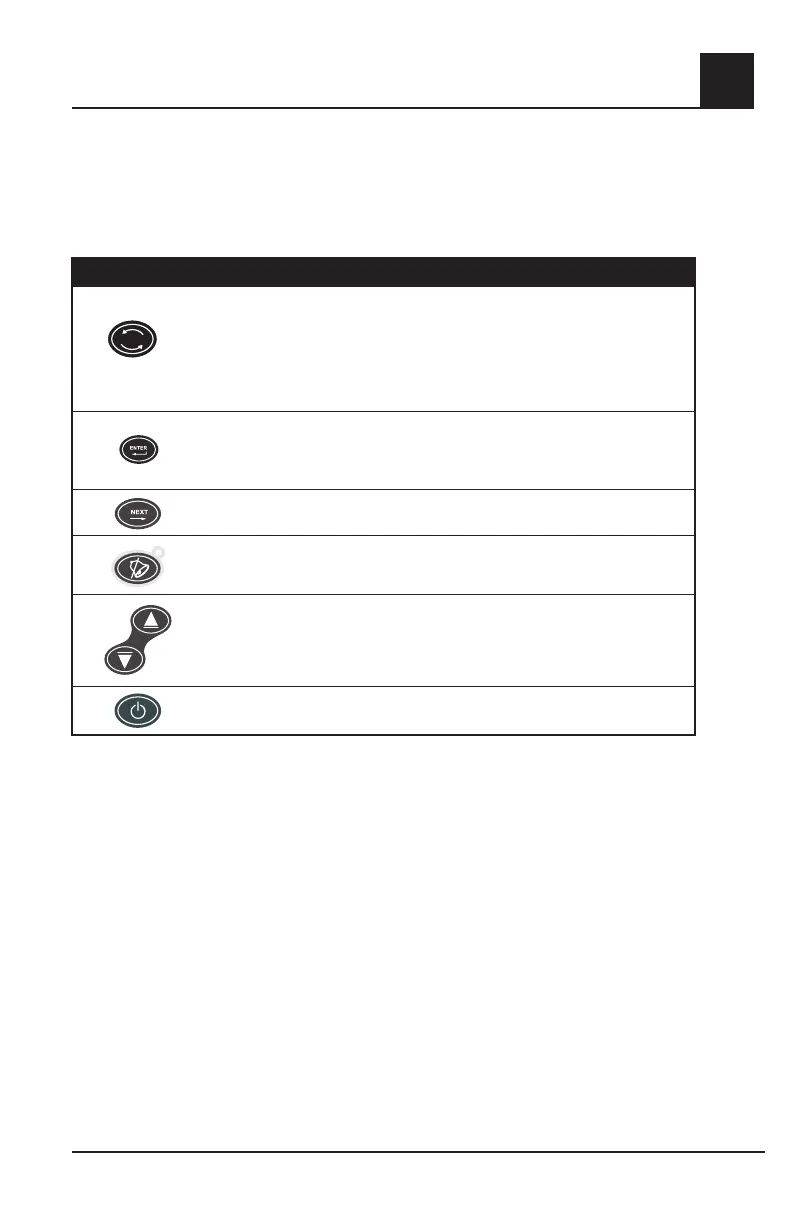
Pressing this button will cycle through the numeric values of the enabled parameters/
measurements.
NOTE: If any parameter/measurement breaches its pre-set alarm limit, the Rad-57 will
automatically display the alarming parameter/measurement. Pressing Display during
an alarm condition will enable the display of other parameters for 10 seconds.
DISPLAY
DISPLAY
GR-14946
IC: 7362A-RAD87IC: 7362A-RAD87
FCC ID: VKF-RAD87FCC ID: VKF-RAD87
Enters the Rad-57 setup/menu system. Refer to Setup Menus in this Section for
details.
GRAPHIC DOCUMENTATION AND APPROVAL
GR-11085
DRO-11386
CONFIDENTIAL AND PROPRIETARY
© 2001 Masimo Corporation
All Rights Reserved
Page 1 of 1
FRM 1379 Rev A
DRO 5201
Approvals
Approvals
Document
Number
TitleProgram
Date
Diana Yuan
GR-11085 Adobe Illustrator 10.0 (.eps)
Illustration, Rainbow, Buttons, 4/05
Illustration, Rainbow, Buttons, 6/05
4/1/05
Marketing Communications Date
Press to navigate through submenus.
GRAPHIC DOCUMENTATION AND APPROVAL
GR-11085
DRO-11386
CONFIDENTIAL AND PROPRIETARY
© 2001 Masimo Corporation
All Rights Reserved
Page 1 of 1
FRM 1379 Rev A
DRO 5201
Approvals
Approvals
Document
Number
TitleProgram
Date
Diana Yuan
GR-11085 Adobe Illustrator 10.0 (.eps)
Illustration, Rainbow, Buttons, 4/05
Illustration, Rainbow, Buttons, 6/05
4/1/05
Marketing Communications Date
Press once to temporarily silence the alarm for 120 seconds or to acknowledge low
battery or sensor off conditions. Press a second time to return the Instrument to
standard alarm monitoring.
GRAPHIC DOCUMENTATION AND APPROVAL
GR-11085
DRO-11386
CONFIDENTIAL AND PROPRIETARY
© 2001 Masimo Corporation
All Rights Reserved
Page 1 of 1
FRM 1379 Rev A
DRO 5201
Approvals
Approvals
Document
Number
TitleProgram
Date
Diana Yuan
GR-11085 Adobe Illustrator 10.0 (.eps)
Illustration, Rainbow, Buttons, 4/05
Illustration, Rainbow, Buttons, 6/05
4/1/05
Marketing Communications Date
During normal patient monitoring, the "Up" and "Down" Arrow keys control the
Pulse Tone volume. At the lowest setting, the pulse tone is muted. A low-pitch tone
indicates the highest or lowest setting has been reached.
In the setup/menu system, the "Up" and "Down" Arrow keys select among the options
for each setting.
GR-14720
DRO-16686
Graphic, Rad-57, Data Collection Unit buttons
Power "on/off" button. Press this button to turn the Instrument on.
Press-and-hold for 2 seconds to turn the Instrument off.
Setup Menu
This section gives an overview of the Rad-57 menu selections available. To navigate through the
menus, use the Enter, Next, Up and Down keys located on the front panel of the Pulse CO-Oximeter,
below the LED display. The following sub sections describe each menu item in more detail. The Pulse
CO-Oximeter has options that allow user configuration to suit specific needs.
Menu Navigation
The Rad-57 set-up and configuration options are accessed through the menu system. The Enter key
is used to enter the menu system and to move through the different menu levels. Within each level of
the system, the Next key is used to move from one option to the next. The Up and Down arrow keys
are used to select values within each option. The parameter/measurement is set/selected when either
the Enter or Next keys are pressed.


 To Next Page