4-16
Rad-57 Signal Extraction Pulse CO-Oximeter Operator’s Manual
4
Operation
Special Menu
This section gives an overview of the Rad-57 special menu selection available. To navigate through
the menu, use the Power, Next, Up and Down keys located on the front panel of the oximeter. The
oximeter has options that allow user configuration to suit specific needs. The following sub-section
describes this menu item in more detail.
Special Menu – Line Frequency Configuration
NOTE: The Instrument must be configured to match your local power line frequency (50 or 60 hz) to
operate properly. The Instrument default is set to 60 hz (standard for the United States).
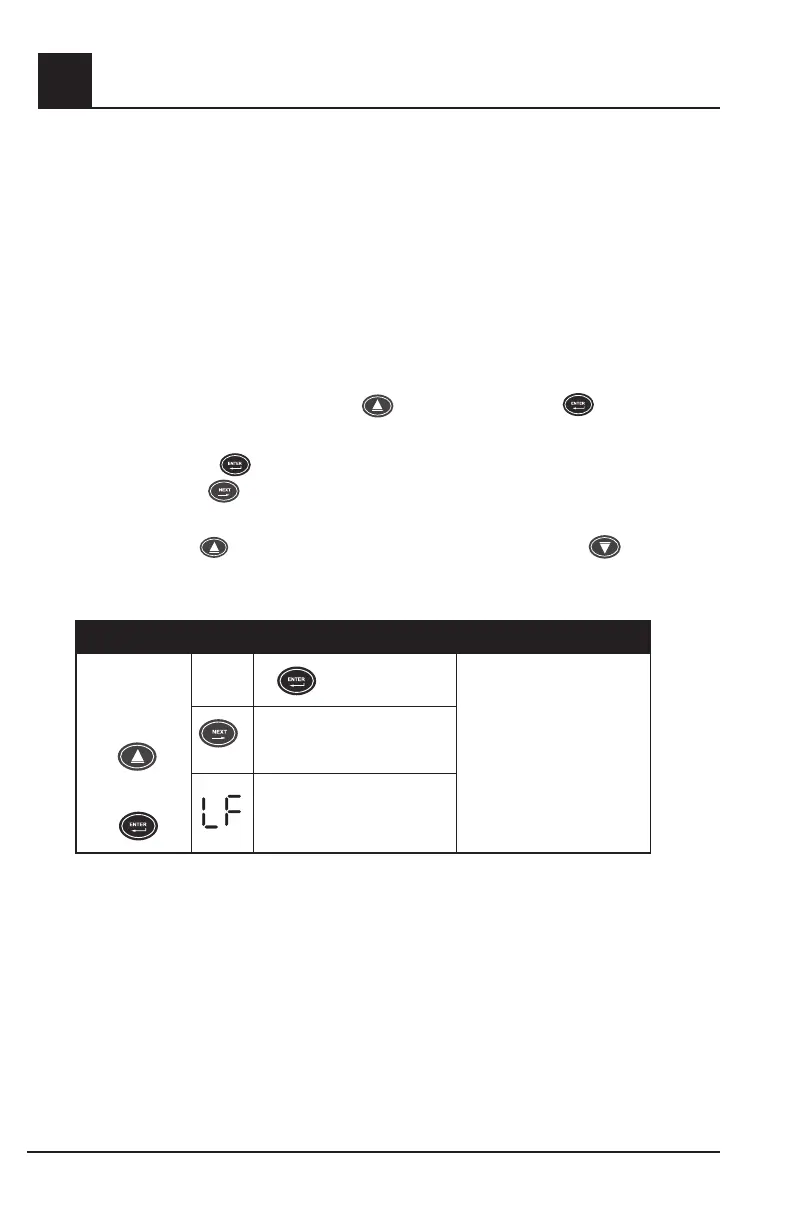
1. Turn the Rad-57 on and wait for the displays to scroll through the current settings.
2. Simultaneously press and hold the Up
Arrow key and the Enter
DISPLAY
DISPLAY
GR-14946
IC: 7362A-RAD87IC: 7362A-RAD87
FCC ID: VKF-RAD87FCC ID: VKF-RAD87
button.
3. "SEr " will be displayed.
4. Press the Enter
DISPLAY
DISPLAY
GR-14946
IC: 7362A-RAD87IC: 7362A-RAD87
FCC ID: VKF-RAD87FCC ID: VKF-RAD87
button once.
5. Push the Next
GRAPHIC DOCUMENTATION AND APPROVAL
GR-11085
DRO-11386
CONFIDENTIAL AND PROPRIETARY
© 2001 Masimo Corporation
All Rights Reserved
Page 1 of 1
FRM 1379 Rev A
DRO 5201
Approvals
Approvals
Document
Number
TitleProgram
Date
Diana Yuan
GR-11085 Adobe Illustrator 10.0 (.eps)
Illustration, Rainbow, Buttons, 4/05
Illustration, Rainbow, Buttons, 6/05
4/1/05
Marketing Communications Date
button 5 times. “LF” will be diplayed in the top LED display window and
the active line frequency will be displayed in the lower LED display window.
6. Push the Up
arrow to set the line frequency to 60 Hz and the Down arrow to set it
to 50 Hz.
7. Turn the Instrument off.
BUTTON SETTING
Simultaneously
press and hold
+
DISPLAY
DISPLAY
GR-14946
IC: 7362A-RAD87IC: 7362A-RAD87
FCC ID: VKF-RAD87FCC ID: VKF-RAD87
Press
DISPLAY
DISPLAY
GR-14946
IC: 7362A-RAD87IC: 7362A-RAD87
FCC ID: VKF-RAD87FCC ID: VKF-RAD87
Use Up or Down Arrow
Keys to adjust parameter to
desired setting.
NOTE: The parameter
is set/selected when the
Instrument is turned off.
GRAPHIC DOCUMENTATION AND APPROVAL
GR-12055
DRO-11793
CONFIDENTIAL AND PROPRIETARY
© 2001 Masimo Corporation
All Rights Reserved
Page 1 of 1
FRM 1379 Rev A
DRO 5201
Approvals
Author
Document
Number
TitleProgram
Date
Chris Coleman
GR-12055 Adobe Illustrator 10.0 (.eps)Illustration, Rad-57 Line Frequency Special Menu, 7/05
Illustration, Rad-57 Line Frequency Special Menu, 7/05
7/7/05
Marketing Communications Date
Service menu
Line frequency
5X
+
Hold
press
Enter Line Frequencey Menu
GRAPHIC DOCUMENTATION AND APPROVAL
GR-12055
DRO-11793
CONFIDENTIAL AND PROPRIETARY
© 2001 Masimo Corporation
All Rights Reserved
Page 1 of 1
FRM 1379 Rev A
DRO 5201
Approvals
Author
Document
Number
TitleProgram
Date
Chris Coleman
GR-12055 Adobe Illustrator 10.0 (.eps)Illustration, Rad-57 Line Frequency Special Menu, 7/05
Illustration, Rad-57 Line Frequency Special Menu, 7/05
7/7/05
Marketing Communications Date
Service menu
Line frequency
5X
+
Hold
press
Set Line Frequency


 To Next Page