MasterclockGMRUserManualv2–2016.12
58
Oncethetelnet/SSHsessionis
established,typein“?”toseealistof
commands.Typein“help”foramore
detailedexplanationofeach
command.
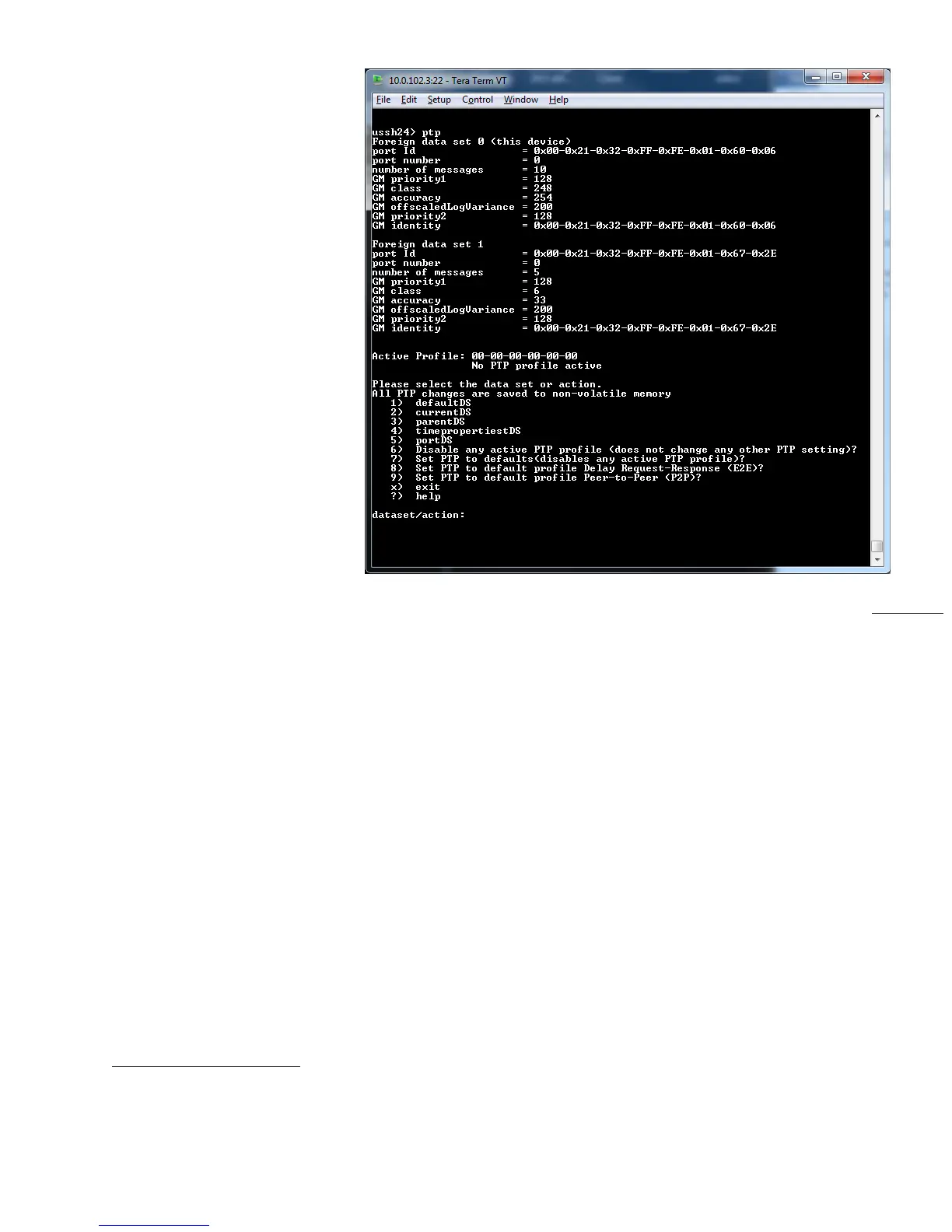
Toviewand/orchangePTPsettings,
enter“ptp”.Thiswillstartan
interactivesessionwithPTP.“Foreign
dataset0”arethevaluesforthis
device.Thenextdatasetlisted
containsthevaluesforthecurrent
grandmaster.Ifthisdeviceisthe
grandmasteronlyoneforeigndata
setwillbeshown.
Selectthedatasettoview/modify,or
actionyouwishtoperform.ThePTP
standarddefinesfivedatasets.The
defaultDS(defaultdataset)
and
currentDS(currentdataset)areper‐
clock.TheparentDS(parentdataset),
timepropertiesDS(timeproperties
dataset),andportDS(portdataset)
areper‐port.Eachdatasetmember
isstatic,dynamic,orconfigurable.DetaileddocumentationofthePTPdatasetsisavailableinthePTPstandard,
IEEEStd1588
‐2008.
Afterentering“ptp”,enterthenumberforoneoftheavailabledatasetsoractions.Optionsinclude:
1)defaultDS
2)currentDS
3)parentDS
4)timepropertiestDS
5)portDS
6)DisableanyactivePTPprofile(doesnotchangeanyotherPTPsetting)?
7)SetPTPtodefaults(disables
anyactivePTPprofile)?
8)SetPTPtodefaultprofileDelayRequest‐Response(E2E)?
9)SetPTPtodefaultprofilePeer‐to‐Peer(P2P)?
x)exit
?)help
1)defaultDS,DefaultDataSet
Selectwhichmembertomodify(1‐5),’x’togobackupalevel,‘?’forhelp
Thefollowingcannotbemodified:



 To Next Page