Matica Lamination Module MC-L2 User Manual
33
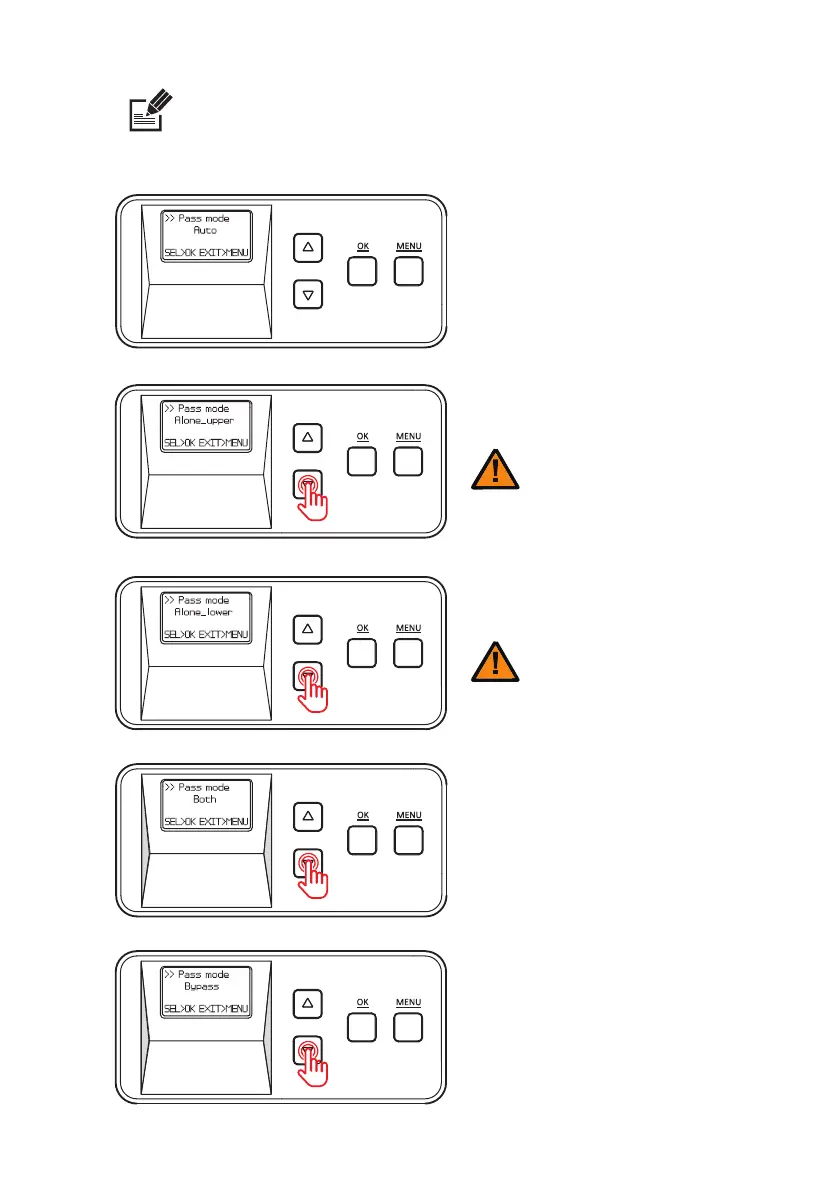
- In the Pass mode, you can choose ‘Auto’ , ‘Alone_upper’ ,
‘Alone_lower’ , ‘Both’ or ‘Bypass’ .
Use the menu navigation buttons to navigate the menu.
Note
Auto
Alone_uppper
Alone_lower
Both
Bypass
Select this option to laminate
a card automatically according
to the way of lm loading
(Default setting)
Select this option to laminate
the lower side only.
Select this option to laminate
both upper and lower sides.
Select this option to pass without
laminating either upper or lower
side.
Select this option to laminate
the upper side only.
- In the Alone Upper Mode, an error occurs
if any lm is loaded in the lower cartridge
Caution
- In the Alone Upper Mode, an error occurs
if any lm is loaded in the lower cartridge
Caution


 To Next Page