Appendix – Troubleshooting
T50/T100 PTM – User Guide – Version 2 Issue 1
36
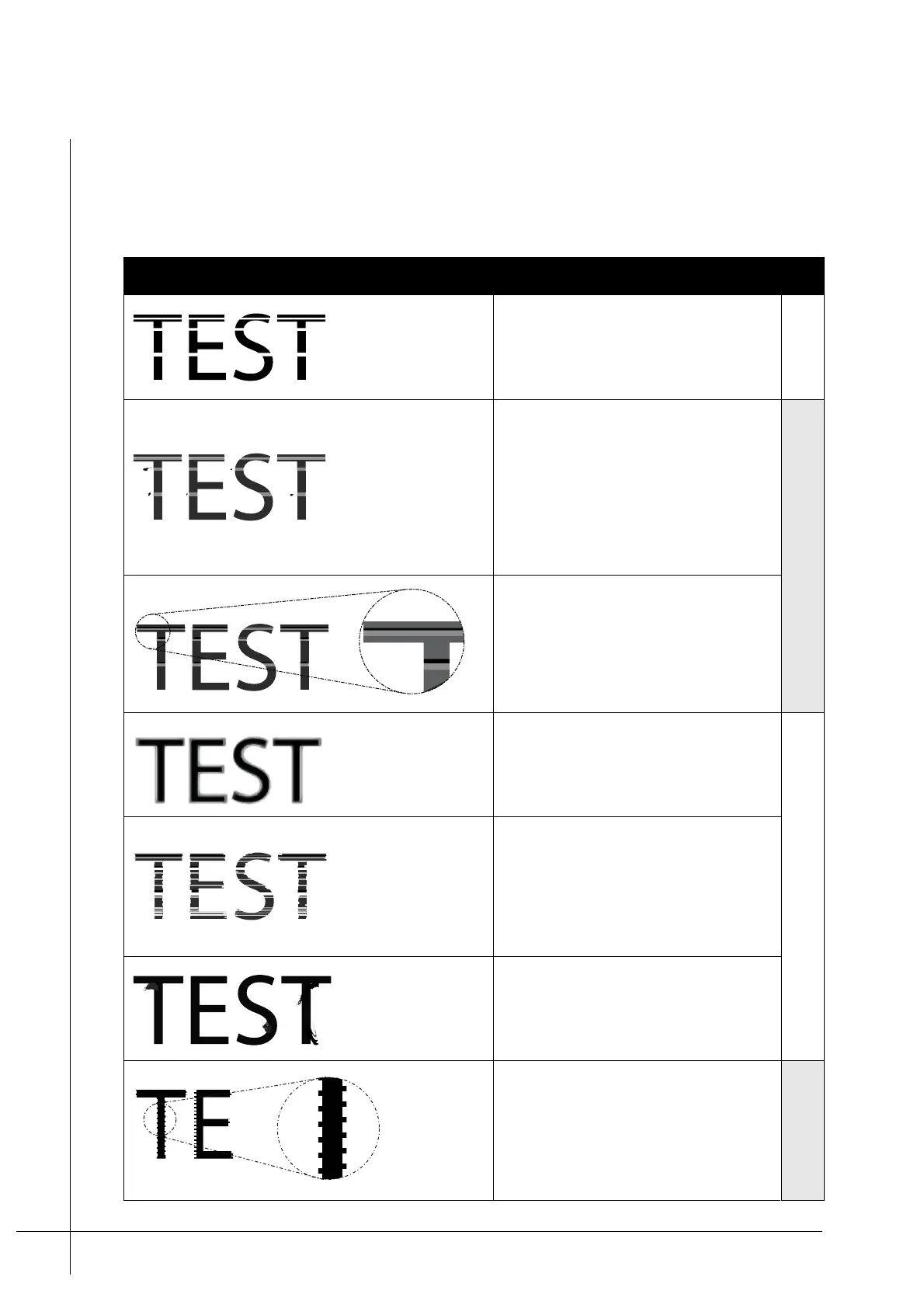
Examples of Poor Print Quality
Provided below is a list of poor print quality examples. The possible cause for the poor print
is also listed.
Table 4 - Examples of poor print
Example Possible Cause
Fix
Missing Droplet:
Thin white stripes are produced which are caused by the
loss of a jet(s) or air trapped in the ink system.
Trapped Air
Slow/Short Droplet:
A thin light stripe is produced. Secondary drops
of ink are often seen beside the light stripes.
Dust, dirt, or other small particles have entered
an orifice. This results in ink drops loosing their
velocity.
This is most often caused by the print target
hitting the print head and shredding small
particles which become trapped in the print head.
Clean Nozzles
Mis-aimed Droplet:
A thin light stripe is produced. Adjacent to it is a
darker stripe.
This is usually caused by a partial obstruction of
an orifice.
Over Bold:
The image appears faded around the edge. This
can be the result of: excessive substrate speeds,
throw distance, or type of material being printed
on.
Adjust Throw Distance
Blurred Image:
The image appears blurred. The image has a
combination of the above droplet malfunctions.
This occurs when the distance between the print
head and the print target is too great. Noticeably,
the number of droplet malfunctions are much
greater.
Smudged Image:
The image is smudged. This is caused by the
print target being too close to the print head. The
print target hits the print guides and cause the ink
to smudge.
Scalloped Edges:
The mark has a notched appearance at the
beginning and end of each character/mark.
This can result when the print direction setting of
the controller does not match that of the print
target, or the print target speed does not match
the print head’s printing speed (timing problem).
Encoder/Timing fault



 To Next Page