72
QM00991-1
SCREEN menu
Item Description
MyScreen Lock
Using the ▲/▼ buttons turns on/o the MyScreen lock function.
ON
ó
OFF
When the ON is selected, the item MyScreen is locked. Use this
function for protecting the current MyScreen.
• This function cannot be selected when the ON is selected to the
MyScreen PASSWORD item in SECURITY menu (
94).
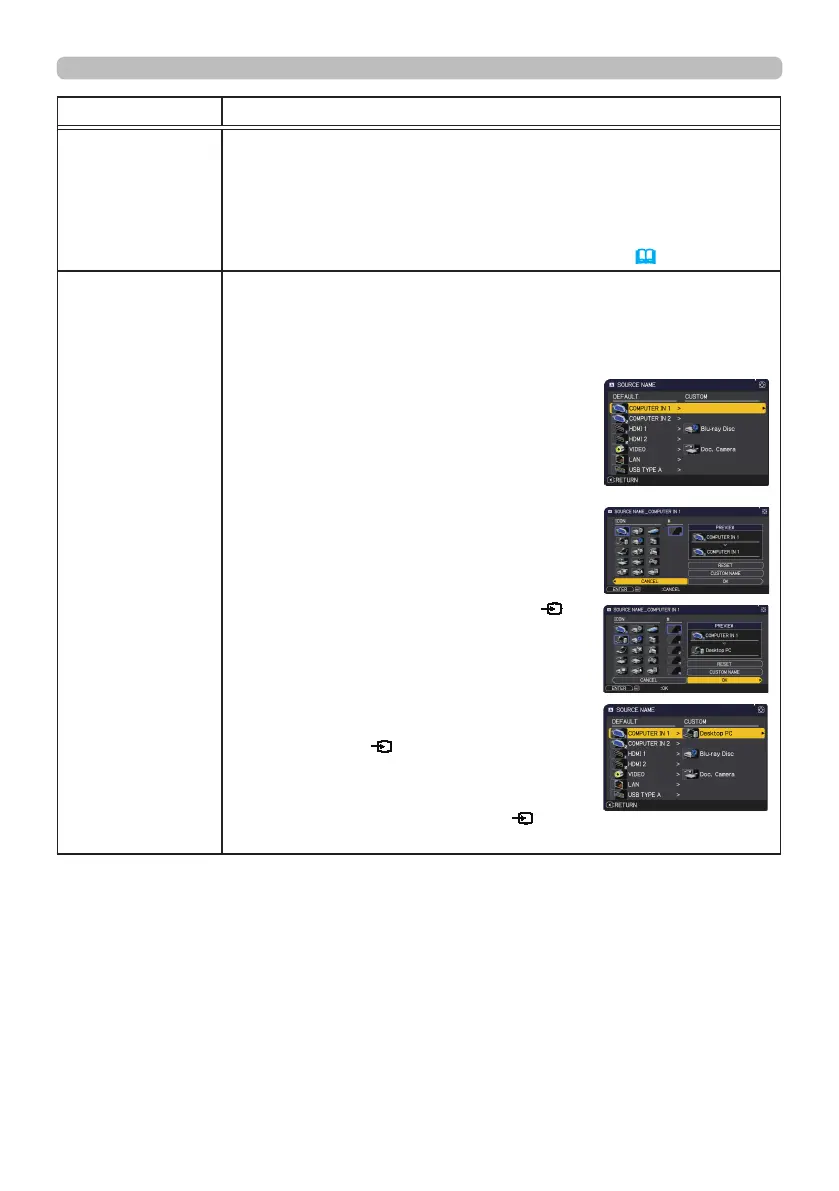
SOURCE NAME
Each input port for this projector can have a name applied to it.
(1) Use the ▲/▼ buttons on the SCREEN menu to select SOURCE
NAME and press the ► or ENTER button.
The SOURCE NAME menu will be displayed.
(2) Use the ▲/▼ buttons on the SOURCE
NAME menu to select the port to be named
and press the ► button. The SOURCE
NAME dialog will be displayed.
Right side of the menu is blank until a name
is specied.
(3) Select an icon you would like to assign to
the port in the SOURCE NAME dialog.
The name assigned to the port will also be
automatically switched according to your
icon selection. Press the ENTER or
button to determine your icon selection.
(4) Select a number you would like to assign
to the port along with the icon. You can
select the number either from blank (no
number assigned), 1, 2, 3, or 4. Then press
the ENTER or
button.
(5) If you would like to modify the name
assigned to the port, select CUSTOM
NAME and press the ENTER or
button.
(continued on next page)



 To Next Page