73
QM00991-1
SCREEN menu
Item Description
SOURCE NAME
(continued)
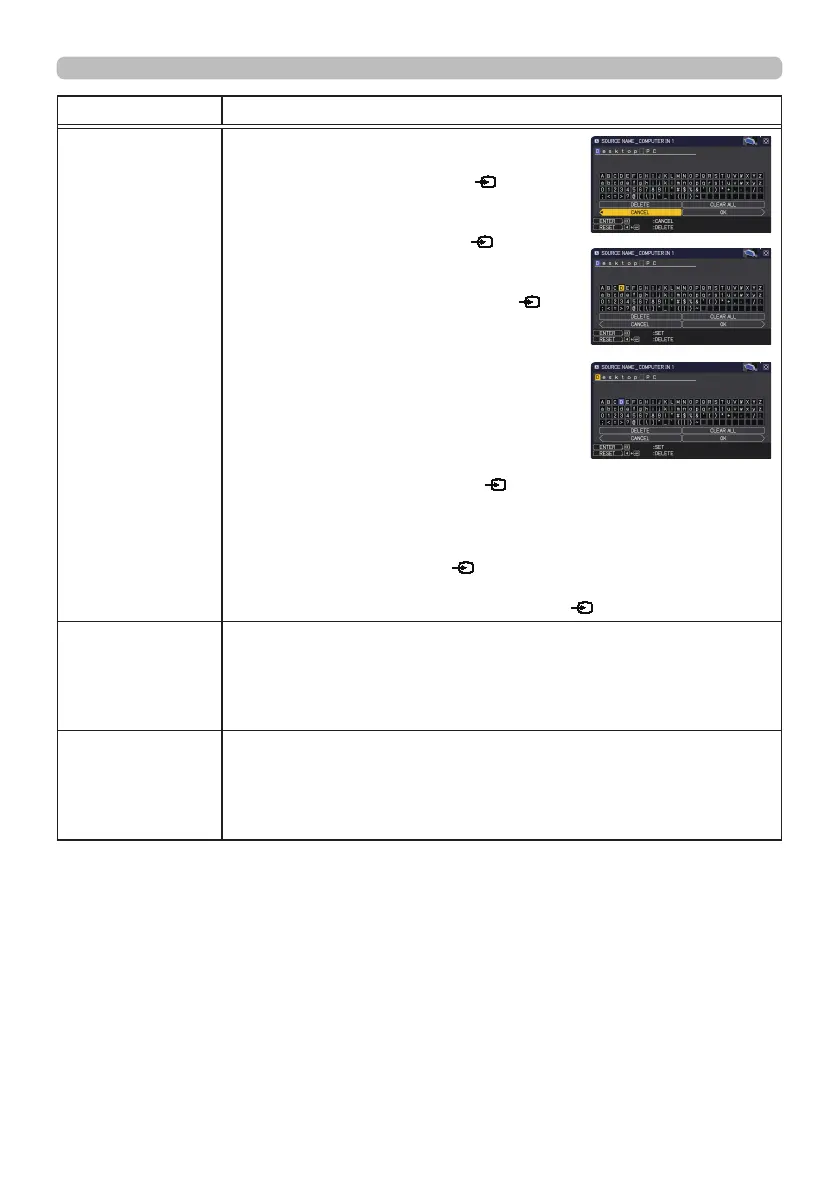
(6) The current name will be displayed
on the rst line. Use the ▲/▼/◄/►
buttons and the ENTER or
button to
select and enter characters. To erase 1
character at one time, press the RESET
button or press the ◄ and
button
at the same time. Also, if you move the
cursor to DELETE or CLEAR ALL on
screen and press the ENTER or
button, 1 character or all characters will
be erased. The name can be a maximum
of 16 characters.
(7) To change an already inserted character,
press the ▲ button to move the cursor to
the rst line, and use the ◄/► buttons to
move the cursor on the character to be
changed.
After pressing the ENTER or
button, the character is selected.
Then, follow the same procedure as described at the item (6)
above.
(8) To nish entering text, move the cursor to the OK on screen and
press the ►, ENTER or
button. To revert to the previous
name without saving changes, move the cursor to the CANCEL
on screen and press the ◄, ENTER or
button.
TEMPLATE
Using the ▲/▼ cursor buttons switches the mode for the template
screen.
Press the ► cursor (or the ENTER) button to display the selected
template, and press the ◄ cursor button to close the displayed
screen.
TIMER
Turns on the TIMER function.
Display position of the timer is set according to the MENU
POSITION settings.
The functions of simple mouse & keyboard other than PAGE UP/
PAGE DOWN are disabled while the timer is displayed.
(continued on next page)



 To Next Page