82
QM00991-1
OPTION menu
Item Description
SCHEDULE
(continued)
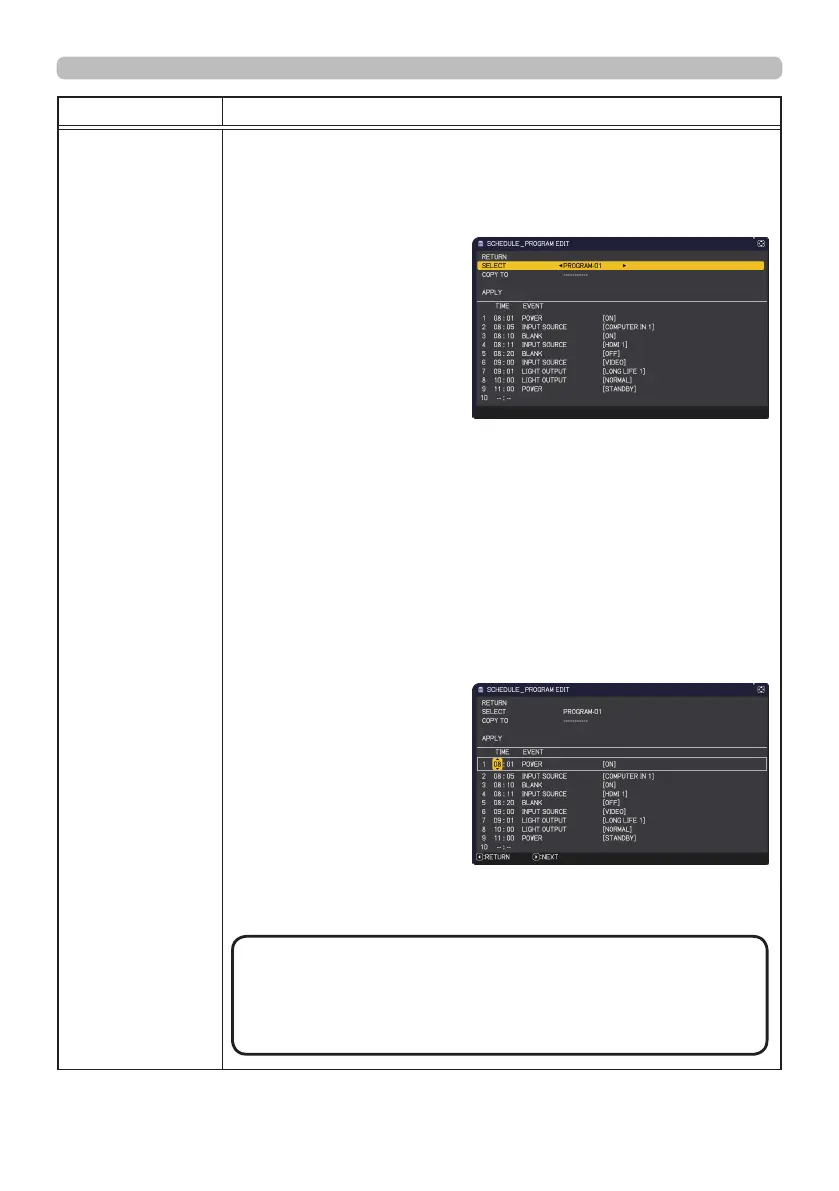
■ How to edit the selected PROGRAM
1. Select from 1 to 20 events.
Use the ▲/▼ cursor buttons to select.
Press the ► cursor button to set the TIME and EVENT.
2. Use the ◄/► cursor
buttons to select.
3. Use the ▲/▼ cursor
buttons to adjust.
EVENT can be selected as listed below.
◦ POWER − ON, STANDBY
◦ INPUT SOURCE − "input source" channel
◦ MY IMAGE − IMAGE-1 to 4, IMAGE OFF
◦ MESSENGER − TEXT-1 to 12, TEXT OFF
◦ LIGHT OUTPUT
−
NORMAL
, LONG LIFE 1, LONG LIFE 2,
WHISPER
◦ BLANK − ON, OFF
◦ SLIDESHOW - START, STOP
4. Press the ► cursor button to finish the settings.
5. Select APPLY to save the settings.
NOTE
(continued on next page)
•
Please refer to the actual on-screen display(OSD)
for appropriate operation.
• When the STANDBY MODE is set to NETWORK (WOL) or
SAVING, SCHEDULE function (Ex:POWER-ON) at STANDBY
MODE will not be operated.



 To Next Page