USER Manual
21
6.3.2 User interface (UI) screen composition and functions
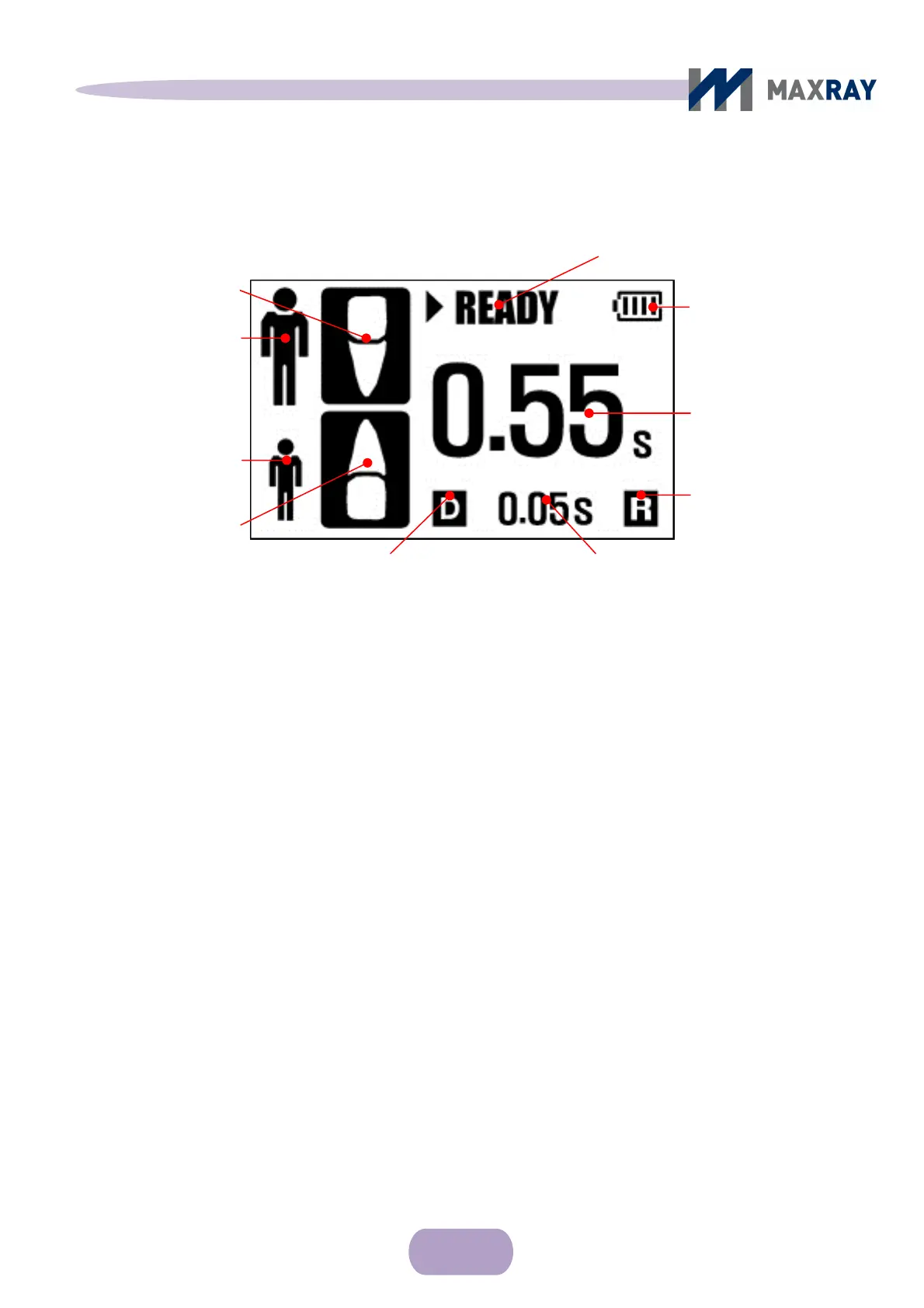
Figure 6.3 Main control screen
Adult image and adult tooth: Indicates recommended adult tooth by time setting.
Child image and child tooth: Indicates recommended child tooth by time setting.
Status: Indication of the present operation of the device.
Status of
battery: Indicates the remaining battery life by 4 steps.
Exposure setting time: Indicates X-ray irradiation time.
Film / digital mode icon: Apply ‘D’ in environment setup menu when using
digital sensor and apply ‘F’ when using film.
Time setting unit: Time unit is adjustable from 0.01 seconds to 0.1 seconds
and indicates the current setup.
Remote mode icon: When selecting remote control, an ‘"R" will appear.
Adult image
Exposure setting time
Child image
Child too
th
Status
Status of Battery
1
○ Main control screen
Adult tooth
Remote mode icon
Time setting unit Film / digital mode icon



 To Next Page