330
Controls in detail
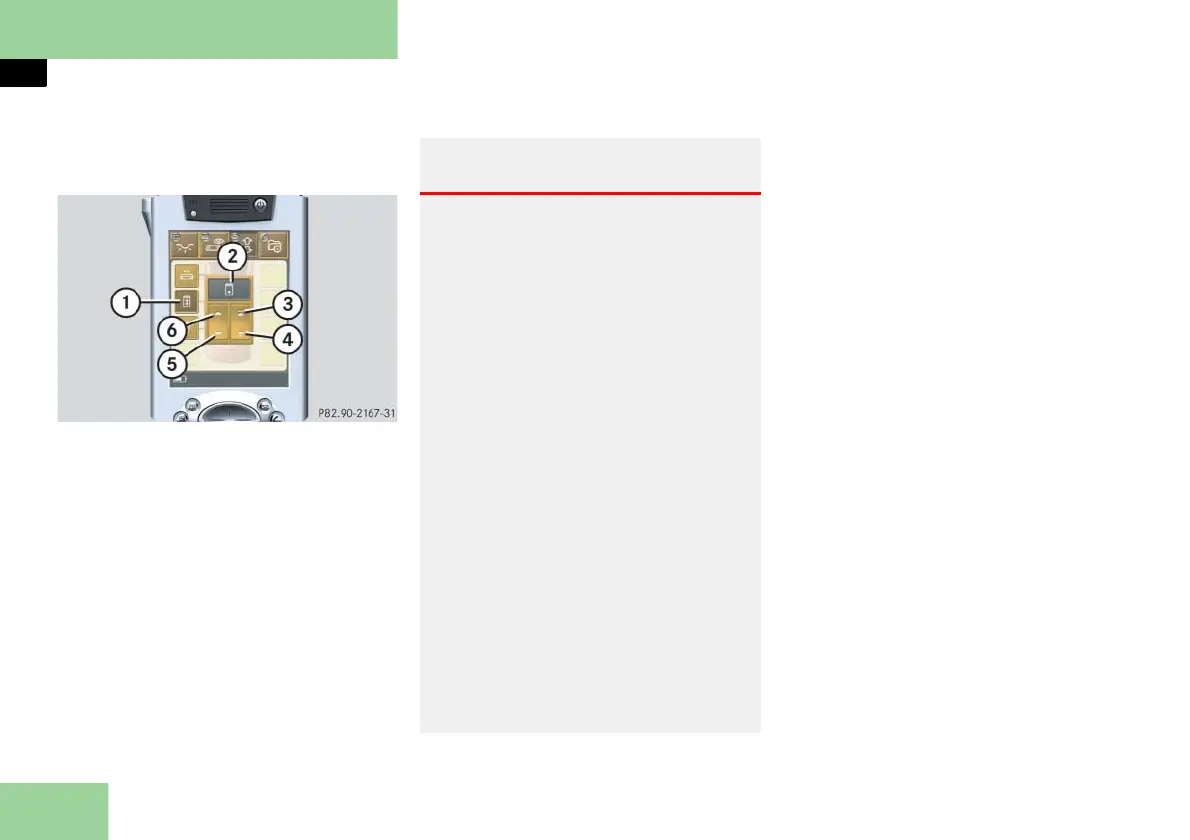
Pocket PC remote control*
Selecting submenu: Operating the elec-
trotransparent roof*
1 Submenu: Electrotransparent roof
screen
2 Settings menu
3 Press to open screen automatically
4 Press to close screen automatically
5 Press to slide screen closed
6 Press to slide screen open
Press submenu button: Electrotrans-
parent roof screen 1.
The selected symbol in button 1 is
highlighted in the display and you
will see the corresponding settings
menu 2.
Opening the screen
Press and hold symbol 6.
The screen opens until you release
symbol 6.
The electrotransparent roof lighting
is automatically turned off when the
screen is closed.
Closing the screen
Press and hold symbol 5.
The screen closes until you release
symbol 5.
The electrotransparent roof turns
opaque when the screen is closed.
Warning! G
When closing the screen, make sure no one
can be caught and/or injured.
In case of danger, release symbol 5 or
press symbol 4 again.
The electrotransparent roof is made out of
glass. In the event of an accident, the glass
may shatter. This may result in an opening
in the roof.
In a vehicle rollover, occupants not wear-
ing their seat belts or not wearing them
properly may be thrown out of the open-
ing. Such an opening also presents a po-
tential for injury for occupants wearing
their seat belts properly as entire body
parts or portions of them may protrude
from the passenger compartment.
When leaving the vehicle, always remove
the SmartKey or SmartKey with
KEYLESS-GO** from the starter switch,
take it with you, and lock the vehicle. Do
not leave children unattended in the vehi-
cle, or with access to an unlocked vehicle.
Unsupervised use of vehicle equipment can
cause an accident and/or serious personal
injury.



 To Next Page