331
Controls in detail
Pocket PC remote control*
Fully opening the screen (Express-open)
Briefly press symbol 3.
The screen opens completely and the
electrotransparent roof lighting is au-
tomatically turned off.
To stop the procedure, press
symbol 3 again.
Fully closing the screen (Express-close)
Briefly press symbol 4.
The screen closes completely and the
electrotransparent roof turns
opaque.
To stop the procedure, press
symbol 4 again.
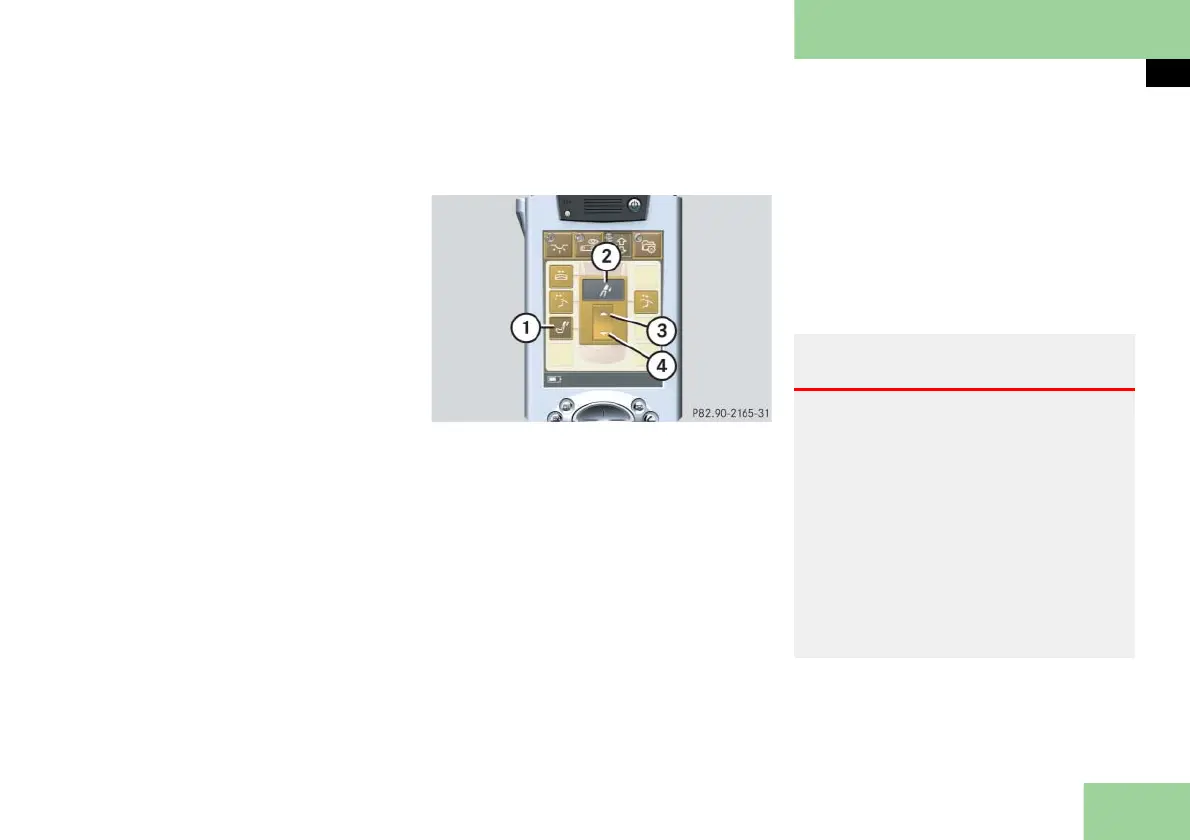
Selecting submenu: Extending/retract-
ing the rear center seat head restraint
1 Submenu: Rear center seat head re-
straint
2 Settings menu
3 To raise head restraint
4 To lower head restraint
Press submenu button: Rear center
seat head restraint 1.
The selected symbol in button 1 is
highlighted in the display and you
will see the corresponding settings
menu 2.
Press and hold symbol 3.
The rear center seat head restraint re-
tracts until you release symbol 3.
or
Press and hold symbol 4.
The rear center seat head restraint
extends until you release symbol 4.
Warning! G
For your protection, drive only with prop-
erly positioned head restraints.
Adjust head restraint so that the center of
the head restraint supports the back of the
head at eye level. This will reduce the po-
tential for injury to the head and neck in
the event of an accident or similar situa-
tion.
Do not drive the vehicle without the seat
head restraints. Head restraints are intend-
ed to help reduce injuries during an acci-
dent.



 To Next Page