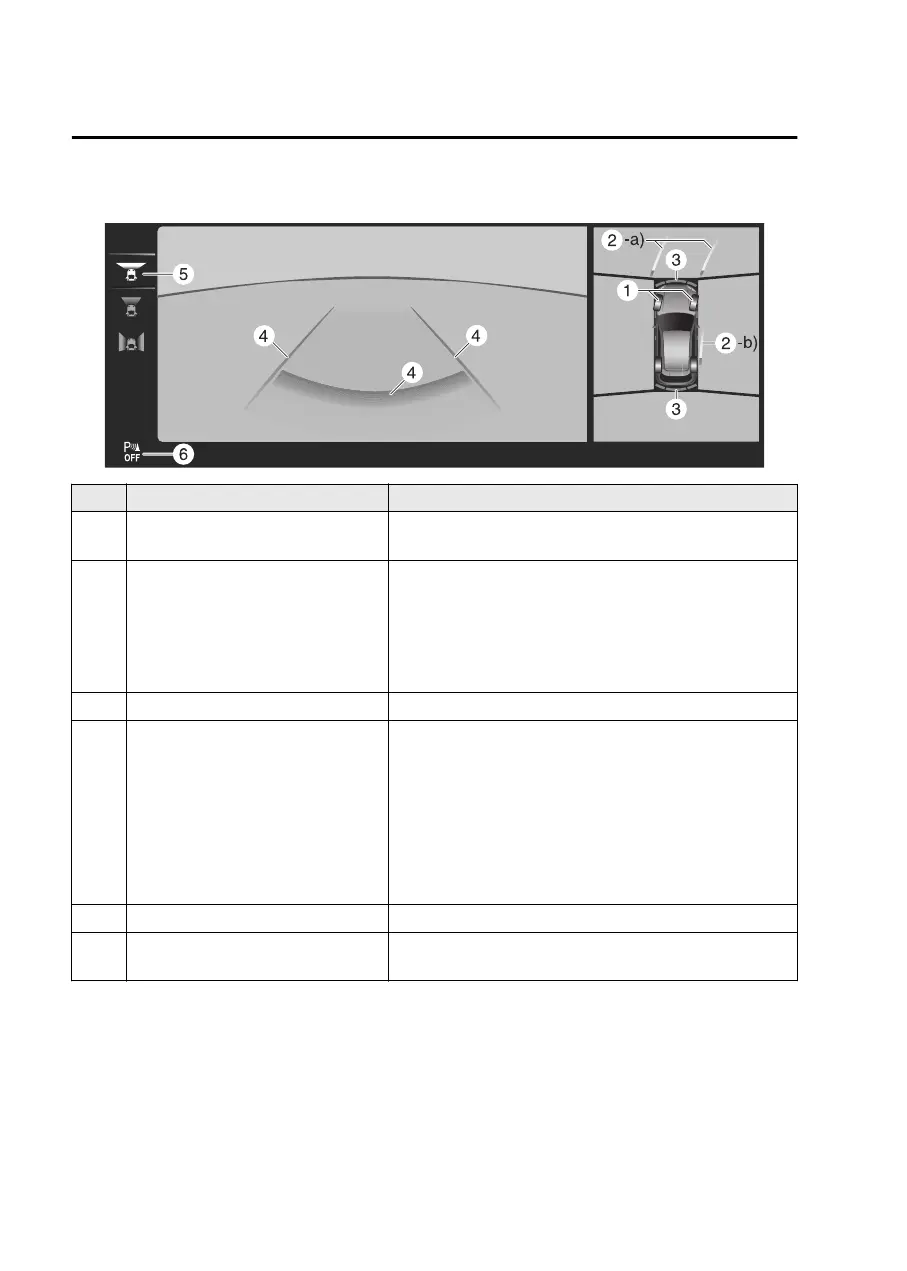
Top view, front wide view
Indication Content
1 Tire icon
Indicates the tire direction. Moves in conjunction with
the steering wheel operation.
2
Projected vehicle path lines (red/
yellow)
Indicates the approximate projected path of the vehicle.
Moves in conjunction with the steering wheel operation.
a) Indicates the path where the edge of the front bumper
is expected to travel.
b) Indicates the path where the inner side of the vehicle
is expected to travel.
3 Parking sensor detection indication Indicates the obstruction detection status.
4
Extended vehicle width lines and
distance guide lines (red/blue)
Indicates the approximate width of the vehicle and the
distance (from front end of bumper) in front of the vehi-
cle.
The red line indicates the point about 50 cm (19 in)
from the front end of the bumper.
The blue lines indicate the points from about 50 cm
(19 in) and up to 2 m (78 in) from the front end of the
bumper.
5 View status icon Indicates which image is selected.
6 Parking sensor status icon
Indicates that the parking sensor has a problem or it is
switched off.
NOTE
The front wide view displays the image in front of the vehicle at a wide angle and
corrects the image to help detect approaching obstructions from the side. Therefore,
it differs from the actual view.
Driving
360° View Monitor
5-186
Mazda3_8LX5-EA23E_Edition2_new 2023-4-17 20:22:43



 To Next Page