Home
MECOS
Controller
IMC15
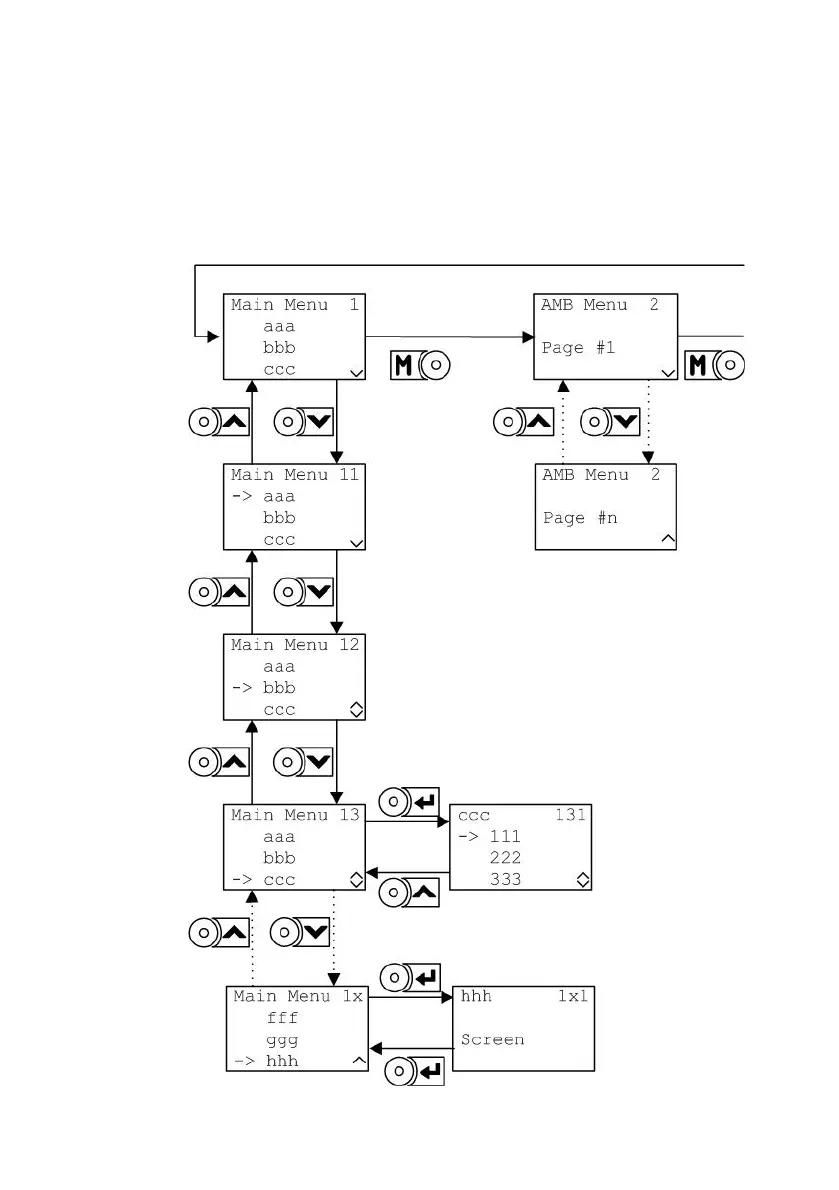
Page 20 (5.2 Navigation using the Keypad)
MECOS IMC15 - 5.2 Navigation using the Keypad
67 pages
Manual
Save Page as PDF
To Next Page
To Next Page
To Previous Page
To Previous Page
Loading...
IMC15
16
5.2
Navigation u
sing the Ke
ypad
T
h
e
n
a
v
i
g
a
t
i
o
n
i
s
b
a
s
e
d
o
n
s
c
r
e
e
n
s
,
w
h
i
c
h
a
r
e
o
r
g
a
n
i
s
e
d
i
n
4
m
o
d
e
s
t
o
f
o
r
m
a
m
e
n
u
s
t
r
u
c
t
u
r
e
.
B
y
u
s
i
n
g
t
h
e
k
e
y
p
a
d
,
screen
s ca
n be
displa
yed and
thei
r con
ten
ts be eith
er c
hosen
(activat
e
d) and
/or d
ispla
yed.
19
21
Table of Contents
Main Page
Table of Contents
3
System Overview
5
Remarks on Safety
6
UL Markings
6
Intended Use
8
Installation
9
Overview
9
Mounting
10
Electrical Connectors
11
Introduction
11
Magnetic Bearing Connectors
11
Motor Terminal Block
12
Line Terminal Block
13
Connectors of the Customer Specific Interfaces
14
EMC Issues
15
Operation
17
Display and Keypad
17
Navigation Using the Keypad
20
Menus
22
Menu Tree
22
Mode 1: Main Menu
23
Mode 2: AMB
25
Mode 3: Drive
25
Mode 4: Current Faults (Fault and Warning Monitor)
26
Fault and Warning Monitor
27
Introduction
27
Using the Fault and Warning Monitor
29
Fault History
31
Introduction
31
Using the Fault History
32
Updating the Firmware
34
Introduction
34
Flash Card and Handling
34
Complete Update
36
Inifile Update
38
Display Update
40
Troubleshooting
42
Fault Categories
42
Error Messages by Categories
43
Troubleshooting Procedures
44
Maintenance
57
Technical Data
58
Declaration of Conformity
61
Warranty
62
Appendix
63
Glossary
65


 To Next Page