IMC15
32
5.6.3 Complete Update
A complete update has to be carried out, if for any reason a
new firmware (program, inifiles, possibly display file) has to be
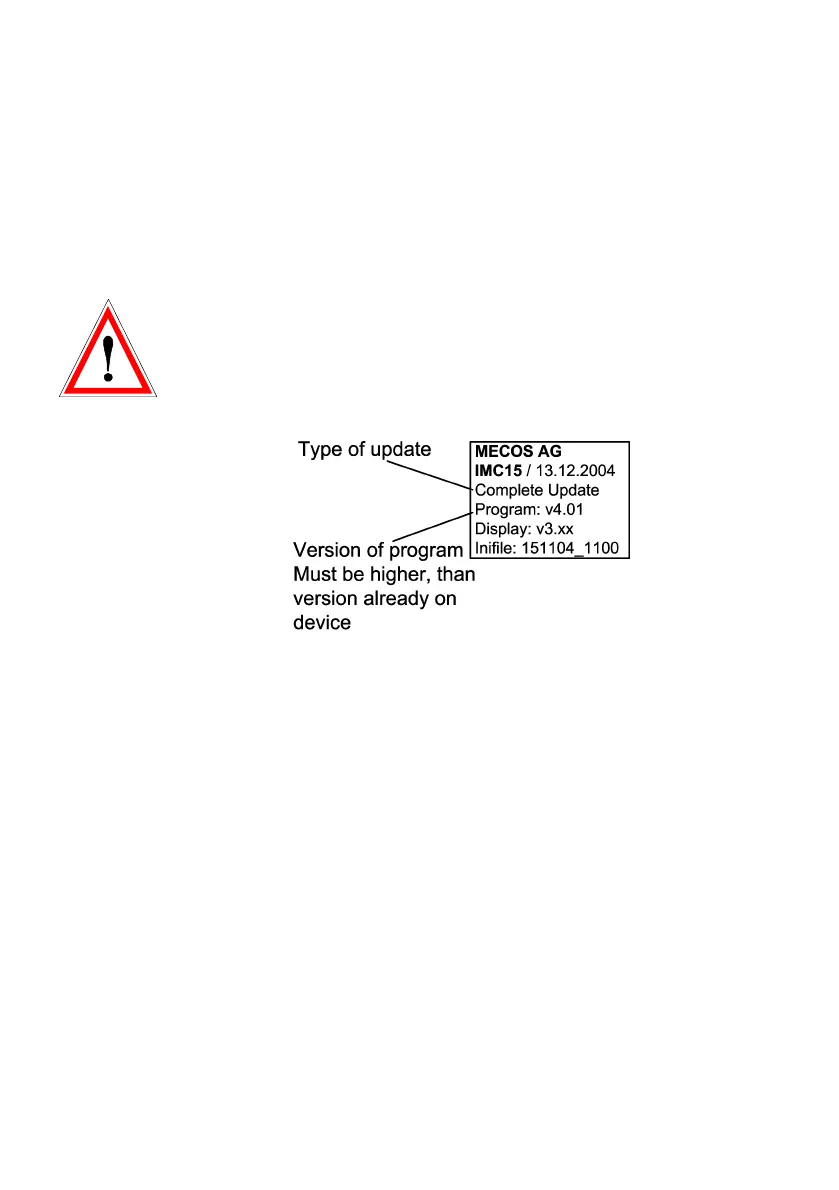
downloaded onto the IMC15. Pre-requisite for a complete
update is a flash card containing the latest firmware with a
program version higher than the one currently on the device.
If the version number of the program on the IMC15 (Menu
page 141 „Version Info“) and on the flash card correspond, no
update will be carried out, meaning that neither program nor
inifiles nor display files will be updated.
Marking of flash card (example):
Carrying out a complete update may take up to 1 minute.
Explanatory note:
Typically an update consists of an improvement of a current
firmware, therefore the version number of the update will be
higher than the one currently on the device. However it is pos-
sible to change to an older version by carrying out the exact
same procedure as for the update with a flash card having a
version number that is lower than the current one. The crucial
point for either update or backgrade is that the version num-
ber of the firmware stored on the flash card is different than
the one stored on the device.


 To Next Page