QuickStart
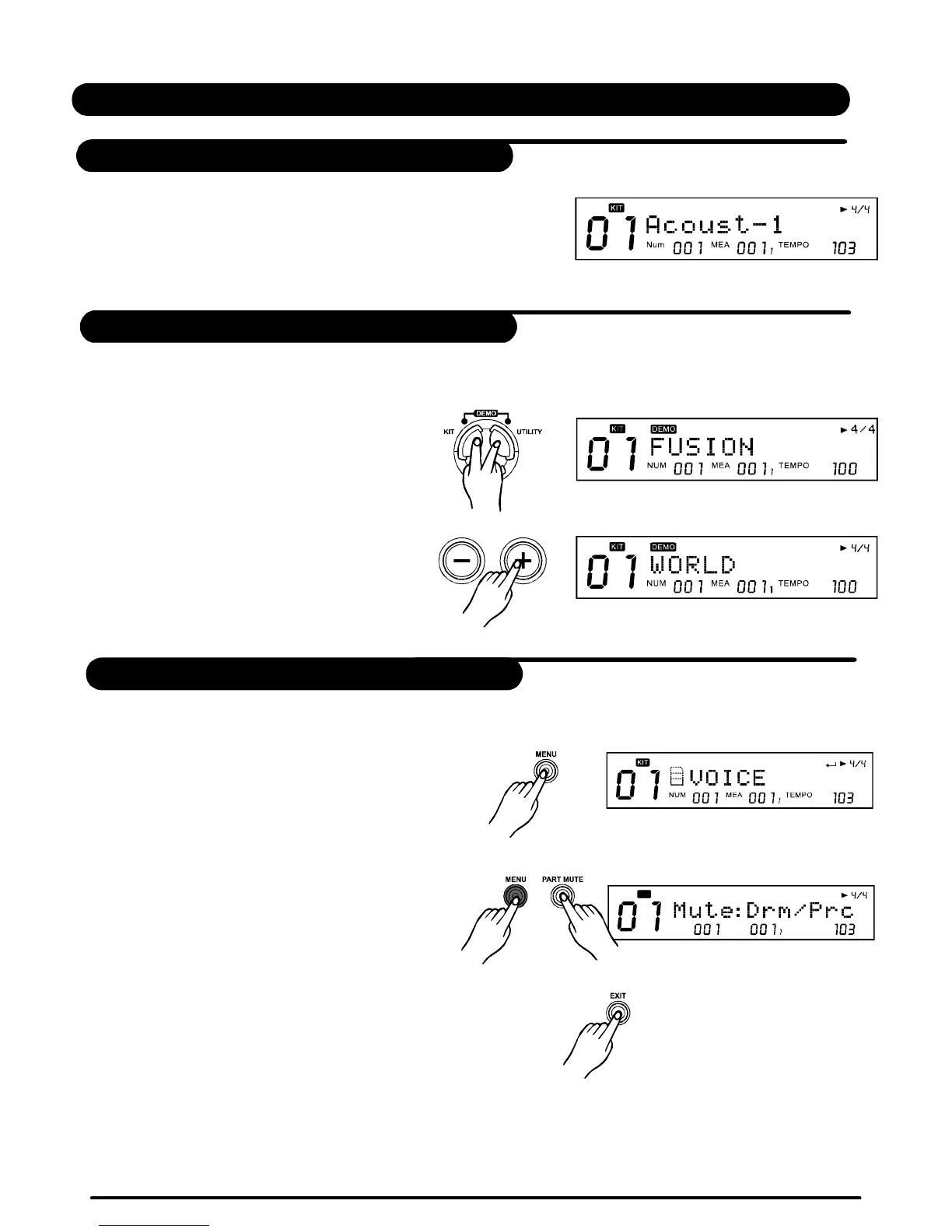
ConnecttheDC9VpoweradaptertotheDrumModule,
andthensetthepowerswitchtothe"ON"position.
Pressbuttonandbuttonsimultaneously
toenterDemoMode:
[KIT][UTILITY]
PressbuttonstoselectaDemotoplay;
usebuttoncontroltheplay.
[+]/[-]
[PLAY/STOP]
1.Pressbuttontoentercurrentmenu(referto
currentmode,forinstance:KITmode,Song
mode,etc)
2.Holdbuttonandthenpress
orbuttontoenterMuteMenuorClick
SettingMenu.
PressbuttontoExitfromthecurrentsub-menu
backtothesuperiorlevelmenu;
Orpressthecorrespondbuttons(suchas[KIT]or[Song]
.etc)toimmediatelyenteranothermenu.
[MENU]
[MENU][PARTMUTE]
[CLICK]
ExitMenu
[EXIT]
EnterMenu
POWERON
DEMO
BASICOPERATION
NUM MEA
TEMPO
KIT
ExitMenu
10
PDF created with pdfFactory Pro trial version www.pdffactory.com


 To Next Page