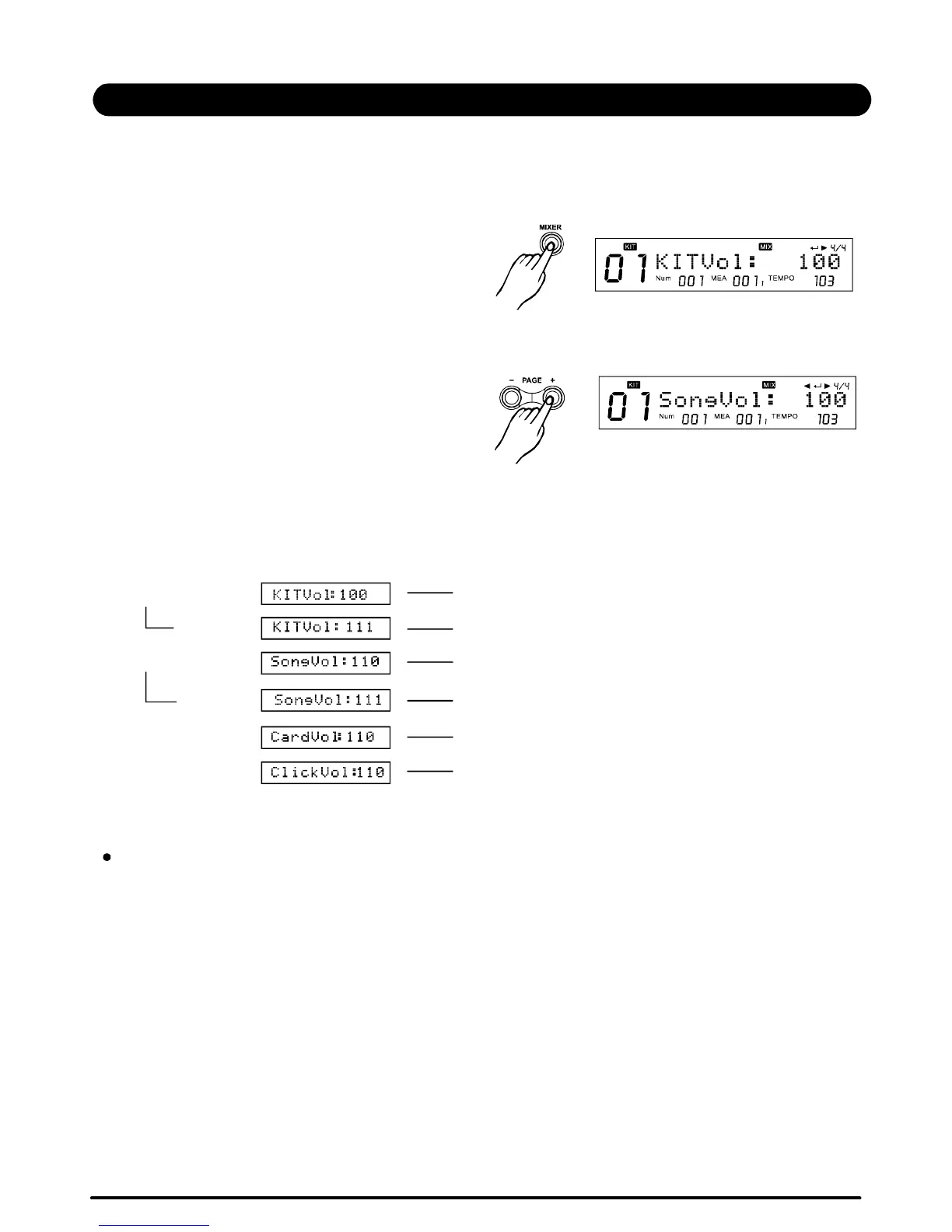
MasterKitvolume,AccompanimentVolume(=MasterSongplayvolume),ClickVolumeandCard
MIDIVolumecanbebalancedtogetherinthedrummodulemixermenu.
Pressthebuttontoentermixermenu:
§MasterVolume
[MIXER]
Pressthebuttonconstantlytoselect
"SongpVol","ClickVol"or"CardVol";
Thenpressthebuttontoadjusteachvolume,
seeTable2.1:
[PAGE+]
[+]/[-]
>>Table2.1
21
MIXER
InnerVolume
""
""
--InthemenupageKITVol:110,pressthe[SAVE/ENTER]buttontoenterkitinnervolumepage,
showingcurrentpadtrigger'svolume.Youcanadjustthevalueusing[+]/[-]orDIAL.
TheadjustmentsoftheinnervolumeequalstotheoperationinKITMENU.Don'tforgettosave
currentKitbeforeyouselectanotherKitorpowerdownthisdigitaldrum.
--InthemenupageSongVol:110,pressthe[SAVE/ENTER]buttontoenterSonginnervolume
page,showingcurrentsongparts'volumes.Youcanadjustthevalueusing[+]/[-]orDIAL.
TheadjustmentsoftheinnervolumeequalstotheoperationinSONGMENU.Don'tforgettosave
currentSongbeforeyouselectanotherSongorturnoffthisdigitaldrum.
[MIXER] MasterKitVolume
[+] Adjustvolume
[PAGE+] MasterAccompanimentVolume
[+] Adjustvolume
[PAGE+] Clickvolume
[PAGE+] CardMidivolume
OperatingguideLCDdisplay
PDF created with pdfFactory Pro trial version www.pdffactory.com


 To Next Page