SONG
Thedigitaldrumcomeswith220songs.Preset(Internal)Songs(Songs1-120)UserSongs(Songs
121-220).
Thedigitaldrumissequencerorganizesmusicintosevenparts.TheDrumKitpartisusedtorecord/play
backwhatisplayedonthepads.Additionally,Percussionpart,Part1,Part2,Part3,Part4andPart5arethe
6backinginstrumentparts(backingparts).Thecollectiveperformanceofthese7partsiscalledasong.
、
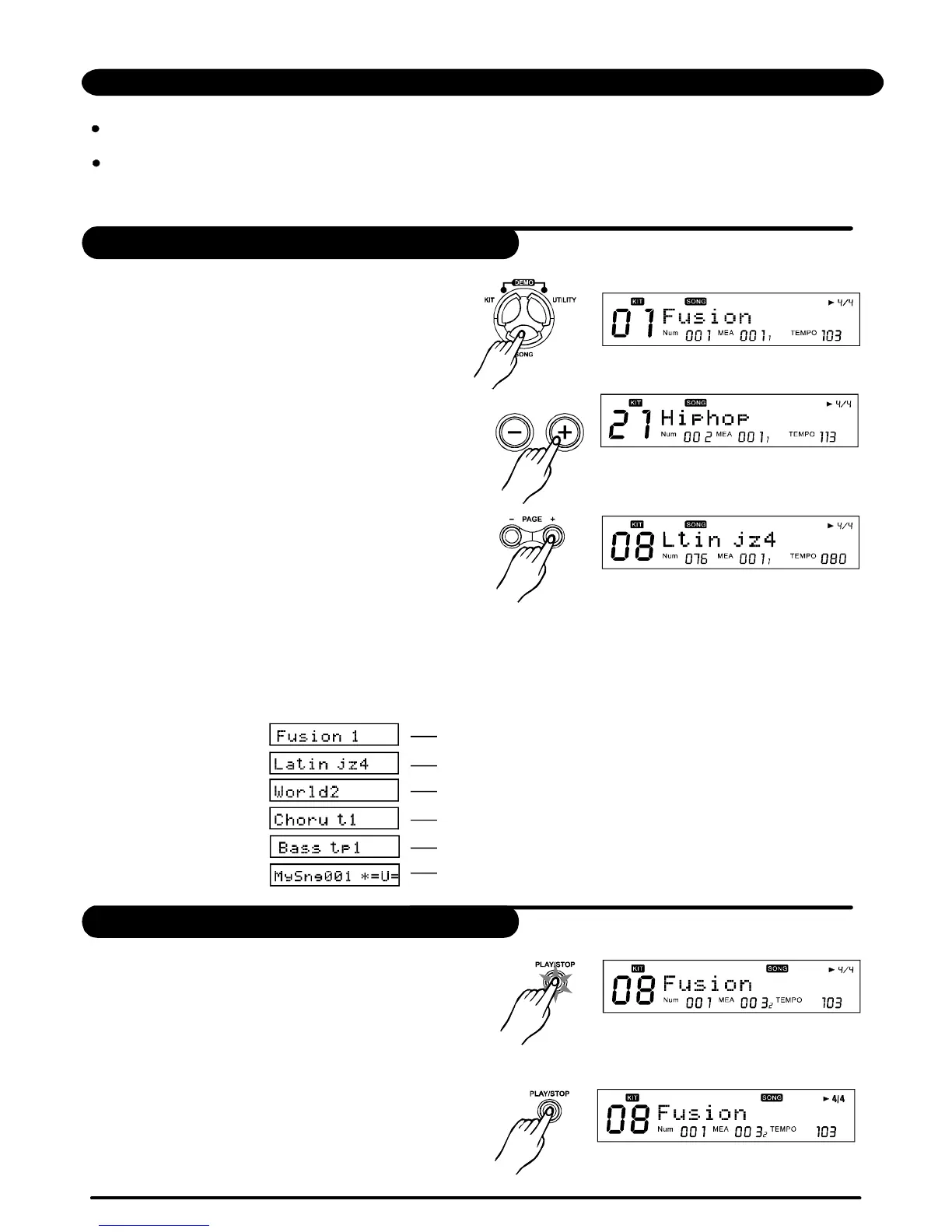
2.PressorDIALtoselecttheSong.
3.Presstoselectthesong
category.
[+]/[-]
[PAGE+]/[PAGE-]
>>Table3.1
SongPlayingBack
1.Presstoplayasong,[PLAY/STOP]
lights.(Duringplaybackofasong,youcanhavethe
pads'buttonscorrespondingtothedrumsbeing
playedinthepercussionpartlightup.)
2.Duringplaybackofasong,press
tostopplaybackofthesong,andreturntothe
beginningofthesong,[PLAY/STOP]lightgoesout.
[PLAY/STOP]
[PLAY/STOP]
SONGCATEGORY:
PatternLoop,1Shot,PercussionLoop,Hit,Tap,UserSong
1.Press,andtheSONGscreenappears:
SongNumber,SongName,Beat,Measure
Number-CurrentBeat,NewUserSong(“*”
indicatesanewUsersong);
[SONG]
23
SongChoosing
[SONG] PresetSongName(1stSongofPatternLoop)
[PAGE+] (1stSongof1Shot)
[PAGE+] (1stSongofPercussionLoop)
[PAGE+] (1stSongofHit)
[PAGE+] (1stSongofTap)
[PAGE+] UserSongName(1stSongofUser)
OperatingguideLLCDdisplay
PDF created with pdfFactory Pro trial version www.pdffactory.com


 To Next Page