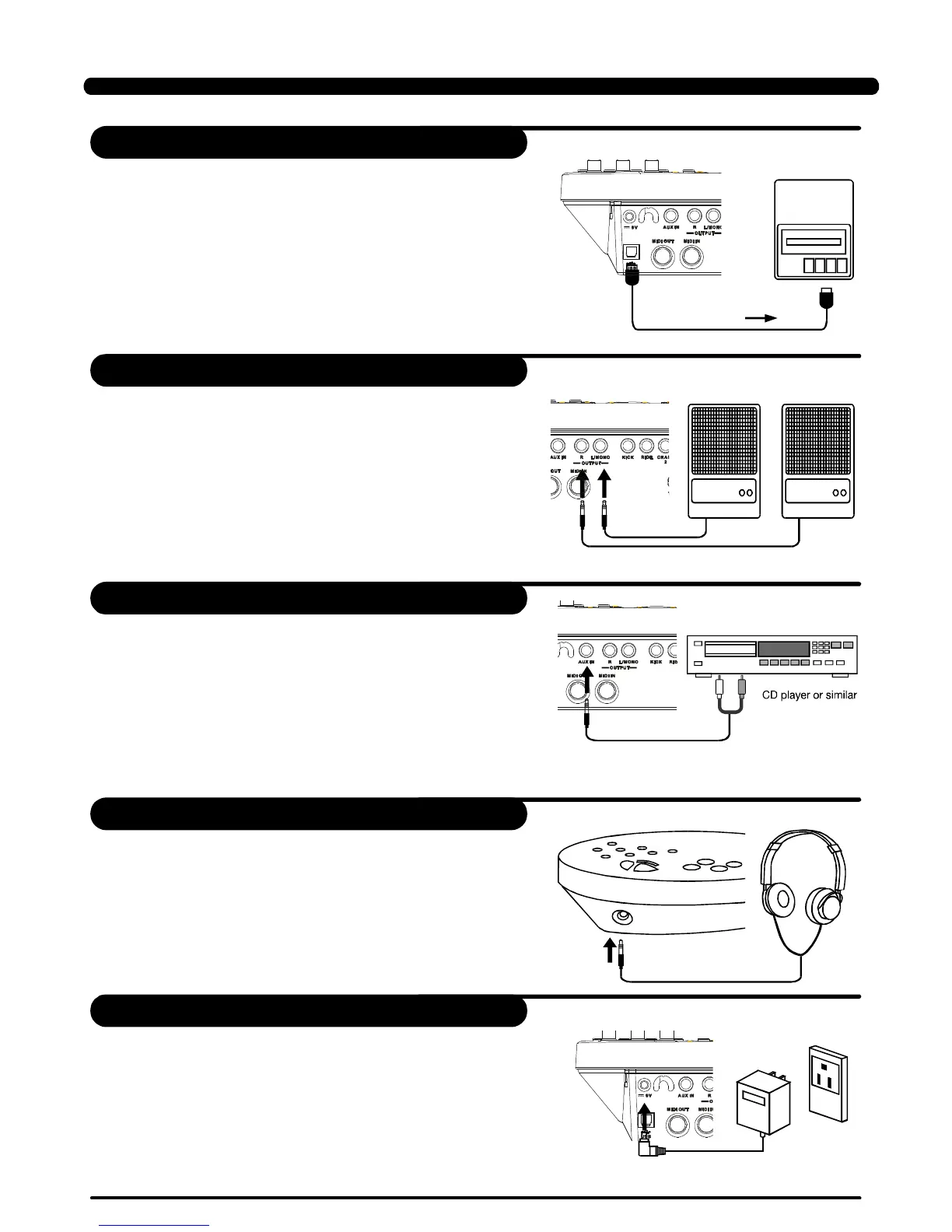
ThisisforyouwanttouseanexternalsoundmoduleorMIDI
sequencer.
ThedrumwilloutputalltheMIDIcodesgeneratedbyhitting
padsorsteppingpedalviatheMIDIoutputorUSBport.
ButclickingandtheMIDIcodesinsongsareexcluded.
TheUSBareonlyforMIDImessages.
MIDIclockswillbesentautomaticallyafterpower-on.
1. Whenyouwanttolistentothevoiceswithanamplifier,
connectamplifierswiththeOutputL/MONOandRjackson
therearpanel.(Formonauralplayback,usetheL/MONOjack;
forstereoplayback,connectbothL/MONOandRjacks.)
ThevolumeisadjustedwiththeVOLUMEknob.2.
1.
2.
TheaudiooutputofaCDplayer,orotheraudiosource,
toconnectwiththeAUXINjackontherearpanelcanbe
mixedwiththesoundofthedrum.Thisfunctionisconvenient
thatletsyouplayalongwithafavouritesong.
Thevolumeoftheexternalsignalisadjustedwiththe
VOLUMEknob.
MakesurethepowerisswitchedOFFandconnectthepower
adaptorwiththeDCINjackontherearpanel.
Toprotectthespeakers,amplifierandthedrummodulefrom
damage,rotatethevolumeknobtotheminimumvolumelevel
beforeswitchingthepowerON.
MakesurethepowerisswitchedOFFwhenconnectingdrum
modulewithexternaldevices.
Note:
1.
2.
ConnectthePowersupplyjack
MIDIData
MIDIdevice
Amplifier Amplifier
Anoptionalsetofstereoheadphonescanbeconnectedwith
thePHONESjacklocatedonthesideofthedrummodule.
Adjustthevolumetoacomfortablelevel.*
ConnectHeadphones
ConnectaMIDIandUSBdevice
Connectaaudioequipment
ConnectaCDplayer,etc.(Aux.Injack)
8
Setup
PDF created with pdfFactory Pro trial version www.pdffactory.com


 To Next Page