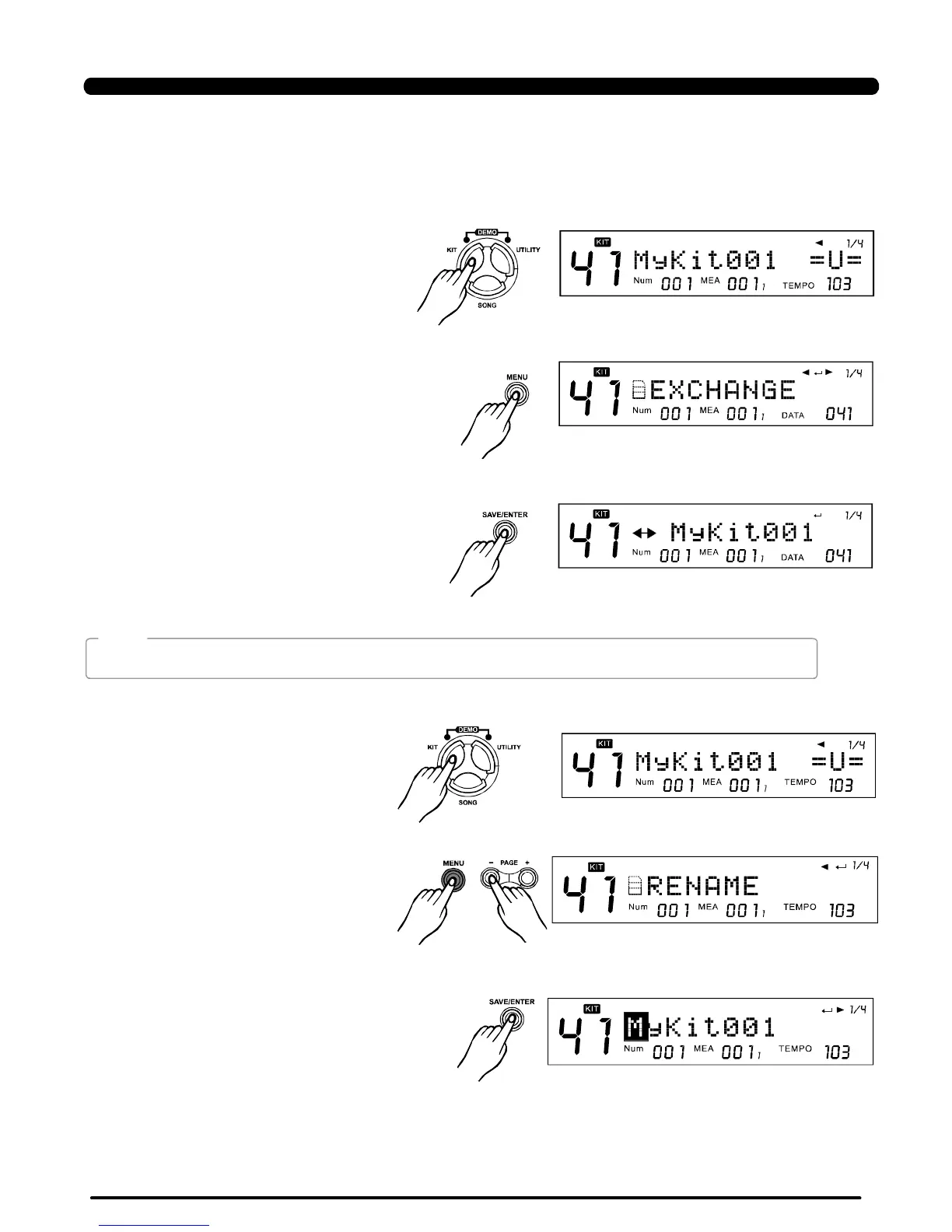
2)Pressthebutton,andthe
button,enterthemenu
displayed"EXCHANGE"
[MENU][PAGE+]/
[PAGE-]
Define:ChoosethatwhethersounddrumvoicewhenpadpatternisON.
ON:Defaultsetting.Whentriggeringthepad,soundthepadpatternalsowithdrumvoice;
OFF:Whentriggeringthepad,justsoundthepadpattern.
1)SelectaKit:
3.ExchangeKitOrder
3)Pressthebuttontosetexchange
position,thenpressthebuttontogo
backtothemenudisplayed"EXCHANGE"
[SAVE/ENTER]
[EXIT]
Whenexchangeoperationisdone,LCDdisplays"EXCHANGEOK!"temporarily,2secondslater,LCDshowstheKITmode
automatically,andoriginalKitisselected.(as"MyKit001"inthisexample).
4.Rename
1)SelectaKit:
18
2)Pressthebutton,thenpress
/button,enterthemenu
displayed"RENAME":
[MENU]
[PAGE+][PAGE-]
3)Pressthebuttontoenterthe
renameoperation,seethebasicoperation
indetail.
[SAVE/ENTER]
Rename
NOTE:
DrumVoc:
KIT
PDF created with pdfFactory Pro trial version www.pdffactory.com


 To Next Page