EasyManua.ls Logo

Mellanox Technologies MCX313A-BCBT? MCX314A-BCBT - User Manual

Mellanox Technologies MCX313A-BCBT? MCX314A-BCBT
65 pages
Print Icon
To Next Page IconTo Next Page
Loading...
www.mellanox.com
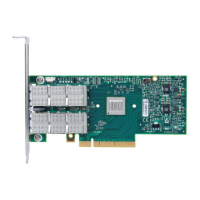
ConnectX®-3 Ethernet Single and Dual QSFP+
Port Adapter Card User Manual
P/N:
MCX313A-BCBT, MCX314A-BCBT
Rev 2.0

Table of Contents

Questions and Answers

  • D
    davistammyAug 1, 2025
    What to do if Mellanox Technologies MCX313A-BCBT? MCX314A-BCBT Computer Hardware adapter no longer works?
    • C
      Christy KlineAug 1, 2025
      If your Mellanox Technologies Computer Hardware adapter stops working, try the following: * Reseat the adapter in its slot or try a different slot. * Use another cable. * Reinstall the drivers, as network driver files may be damaged. * Reboot the server.
  • M
    Michelle WalshAug 7, 2025
    How to fix Mellanox Technologies MCX313A-BCBT? MCX314A-BCBT Computer Hardware server unable to find the adapter?
    • S
      scottdavidAug 7, 2025
      If the server is unable to find the Mellanox Technologies Computer Hardware adapter: * Ensure the adapter is correctly placed. * Verify adapter slot and adapter compatibility. * Install the adapter in a different PCI Express slot. * Use the drivers that came with the adapter or download the latest. * Update your motherboard to the latest BIOS. * Reboot the server.
  • D
    David MartinezAug 13, 2025
    Why is the Mellanox Technologies MCX313A-BCBT? MCX314A-BCBT link indicator light off?
    • B
      Brian AguilarAug 13, 2025
      If the link indicator light is off on your Mellanox Technologies Computer Hardware, consider these solutions: * Ensure that the adapter driver is loaded. * Try another port on the switch. * Make sure the cable is securely attached. * Check you are using the proper cables that do not exceed the recommended lengths. * Verify that your switch and adapter port are compatible.
  • B
    Brandon HendersonAug 19, 2025
    What to do if Mellanox Technologies MCX313A-BCBT? MCX314A-BCBT Computer Hardware adapters stopped working after installing another adapter?
    • J
      John OwensAug 19, 2025
      If Mellanox Technologies Computer Hardware adapters stopped working after installing another adapter: * Try removing and reinstalling all adapters. * Check that cables are connected properly. * Ensure your motherboard has the latest BIOS.
  • M
    Melissa ReidAug 25, 2025
    What to do if Mellanox Technologies Computer Hardware link light is on, but with no communication established?
    • B
      Bradley DaviesAug 26, 2025
      If the Mellanox Technologies Computer Hardware link light is on, but no communication is established: * Check that the latest driver is loaded. * Check that both the adapter and its link are set to the same speed and duplex settings.

Summary

Revision History

About this Manual

Technical Support

Contact methods for obtaining technical assistance and support.

Firmware and Software Updates

Guidance on how to find and download the latest firmware and software.

Introduction

Product Overview

Details on the ConnectX-3 adapter card, its part numbers, and specifications.

Features and Benefits

Key capabilities and advantages offered by the ConnectX-3 adapter.

Operating Systems;Distributions

Supported operating systems and distributions for the adapter.

Interfaces

Ethernet Interface

Details on Ethernet port compliance with IEEE 802.3 standards.

PCI Express Interface

Information on PCI Express version, lanes, and speed support.

Hardware Installation

System Requirements

Prerequisites for hardware and software before installation.

Safety Precautions

Critical safety guidelines for handling and installing the adapter.

Card Installation Instructions

Step-by-step guide for physically inserting the card into a PCI Express slot.

Driver Installation

Linux Driver

Guide for installing the MLNX_EN driver on Linux systems.

Windows Driver

Guide for installing the WinOF VPI driver on Windows systems.

VMware Driver

Instructions for installing the Mellanox OFED driver for VMware ESXi.

Updating Adapter Card Firmware

Troubleshooting

General

Common troubleshooting steps for adapter-related issues.

Linux

Specific troubleshooting steps for Linux environments.

Specifications

MCX313 A-BCBT Specifications

Detailed specifications for the MCX313A-BCBT single-port card.

MCX314 A-BCBT Specifications

Detailed specifications for the MCX314A-BCBT dual-port card.

Adapter LED Operation

Explanation of the status indicated by the adapter's LEDs.

Interface Connectors Pinout

QSFP+ Connector Pinout

Pin configuration for the QSFP+ Ethernet connector.

PCI Express x8 Connector Pinout

Pin configuration for the PCI Express x8 edge connector.

Finding the MAC and Serial Number on the Adapter Card

Safety Warnings

Mellanox Technologies MCX313A-BCBT? MCX314A-BCBT Specifications

General IconGeneral
Product TypeNetwork Adapter
Model NumberMCX313A-BCBT, MCX314A-BCBT
Interface TypePCI Express 3.0 x8
Form FactorLow Profile
Maximum Data Rate40 Gbps
RoHS compliantYes
Supported ProtocolsEthernet
Number of Ports1 or 2
ChipsetConnectX-3
Connector TypeQSFP
Operating Temperature0°C to 55°C (32°F to 131°F)
Speed40Gbps

Related product manuals