5
Manage the most important initial settings
Set Language
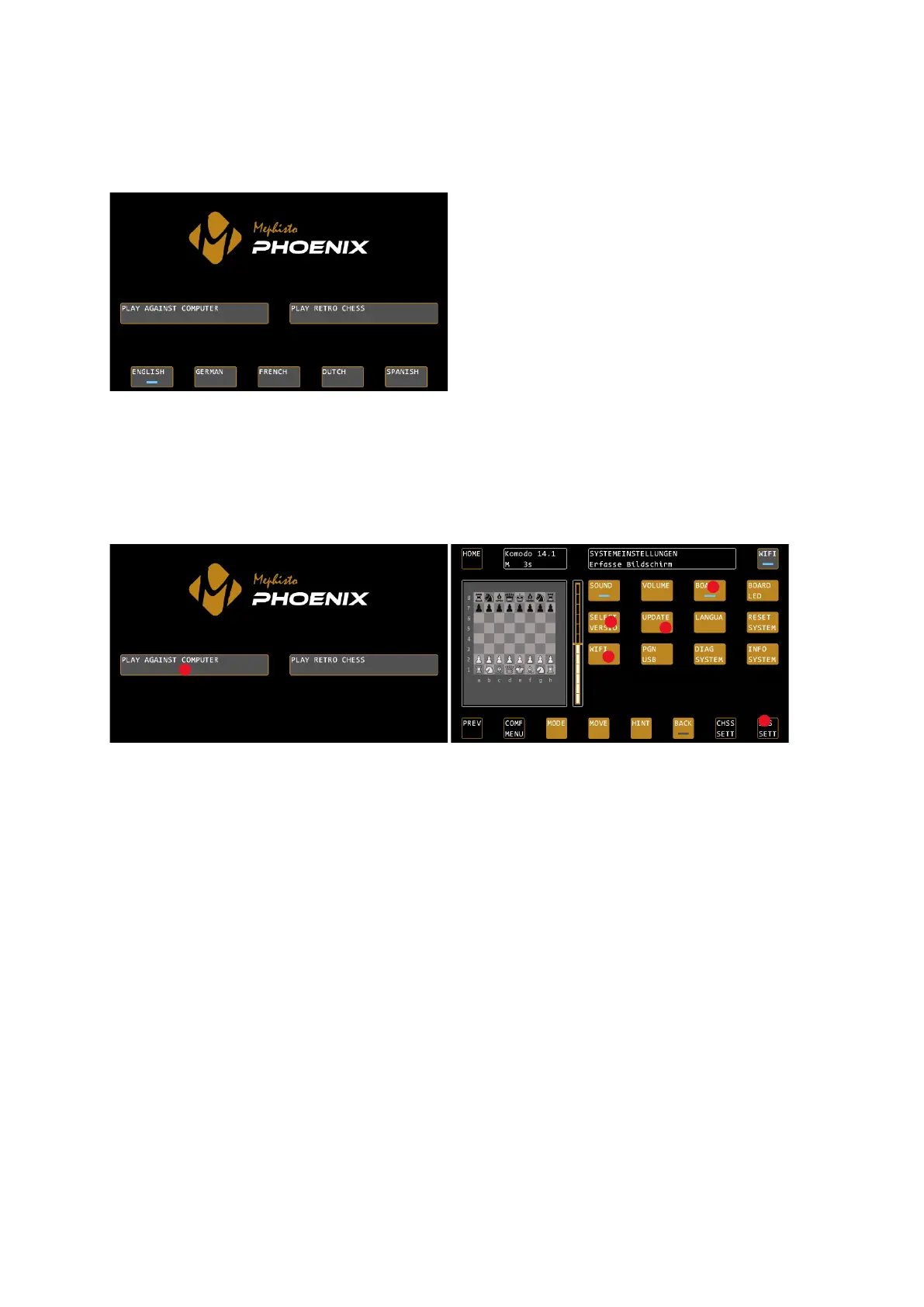
The language selection appears automatically at the first start of the Mephisto Phoenix:
Confirm the desired system language. You can choose between English, German, French, Dutch and Spanish.
You can also find the settings for the system language in the "PLAY AGAINST COMPUTER" mode under SYS SETT
/ LANGUA.
SYS SETT – main system settings
The system settings of the Mephisto Phoenix can be found in "PLAY AGAINST COMPUTER" mode under the SYS
SETT button, at the bottom right of the display:
Determine board orientation (BOARD)
Indicate whether the cable leads away from your chessboard to the right or to the left. Under SYS SETT / BOARD
you can change this. If the cable leads to the right (you are sitting in front of the logo badge), then the LED on
the BOARD button must light up. If the cable leads away to the left, tap the button once.
Turn on WiFi (WIFI)
Turn on the WiFi in the device to check for system updates. You can find the settings under SYS SETT / WIFI. For
more details on connecting to a WiFi network, see page 19.
Check for updates (UPDATE)
Check if there are system updates for your chess computer. After you have successfully connected the WiFi,
press UPDATE under SYS SETT to start the update process. See page 18 for more details.
Select the latest version (SELECT VERSIO)
If updates have been found and installed for your system, you must now select the latest version. Under SYS
SETT, press SELECT VERSIO, confirm with CONFIRM, and confirm again with CONFIRM (the system displays the
current version in the status box). The system now restarts with the latest version. See page 18 for more details.
Starting a game now
You can now start your first game with the Mephisto Phoenix. To do this, the board must be connected to the
computer.
If not already done, select “PLAY AGAINST COMPUTER” mode, or exit the system settings so that you can see the
chessboard display on the control screen.
Now please set up the pieces in their initial position.


 To Next Page