6
The computer is now ready to play with its default settings. First, however, please select a suitable game profile.
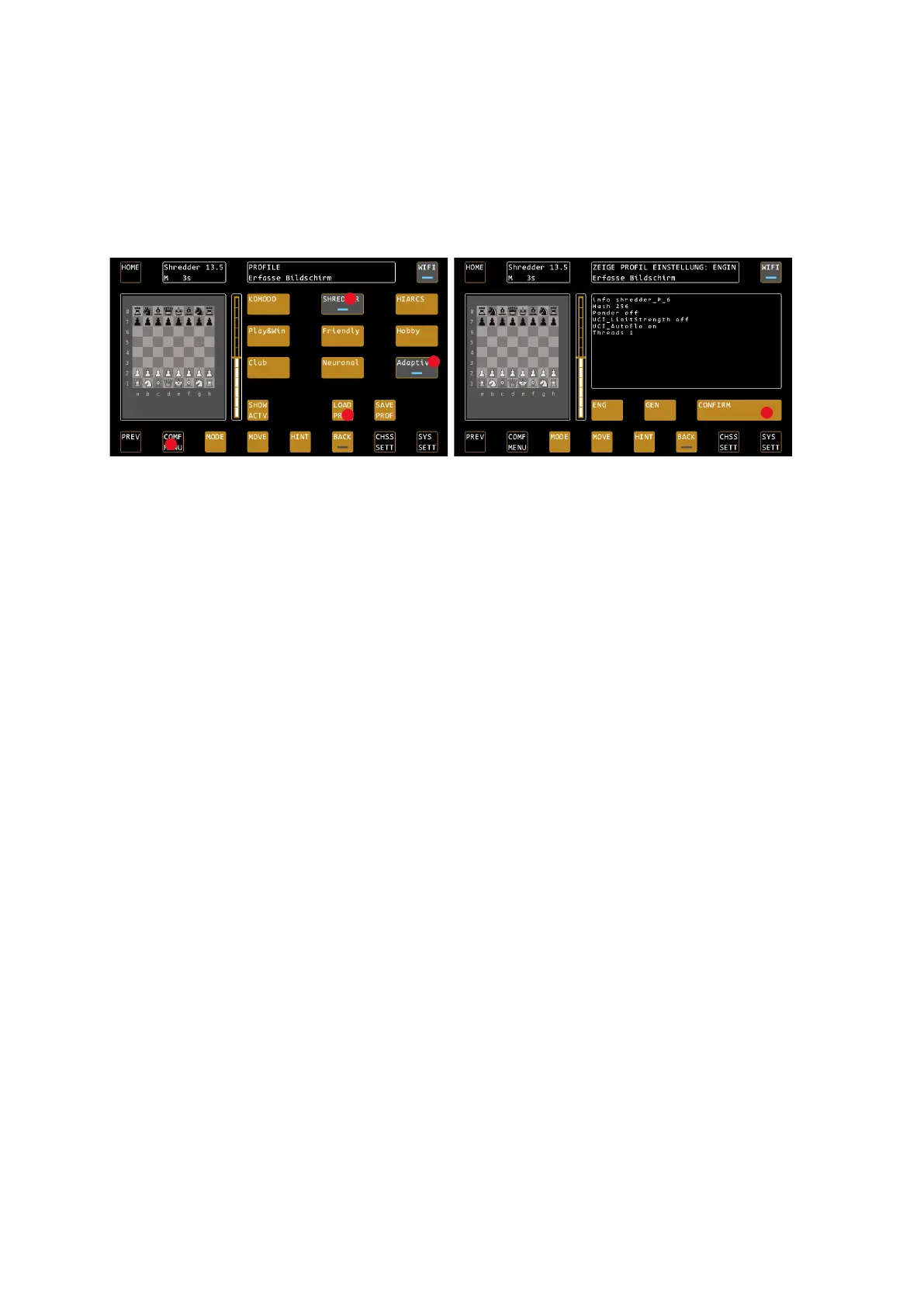
In the example, we now start with the adaptive SHREDDER mode, which also shows you your own ELO rating.
To do this, press COMF MENU (COMFORT MENU) and select the SHREDDER chess engine in the top row. The
selection is indicated by a blue LED. Now select the last profile "Adaptive", the selection is confirmed again with
the blue LED.
Now press LOAD PROF (LOAD PROFILE) to preview the profile parameters. Confirm this with CONFIRM.
You now start a game against the Engine Shredder in adaptive mode. This mode starts at 1400 ELO and changes
its ranking depending on the win or loss of the game. After a few games, you will always have an equal opponent
with this mode and can easily track your development based on your ELO rating.
Main tips for operation
In the following, we would like to give you a few tips on the key operating logics of the system.
Which parameters are loaded automatically when the system is restarted?
After a restart of the system, the general system settings, as last used outside the profiles, are reloaded, the so-
called "Profile 0". These include the SYSTEM SETTINGS (volume, led settings, etc.) in particular, but also the most
recently used engine, the configuration of the analysis box, the configuration of the opening books and the
selected time setting.
All engine-specific parameters, the so-called UCI settings, are NOT loaded automatically. For example, the ELO
setting as well as specific engine options such as "Use NNUE" or "Skill Level".
Also, the settings that you may have used by loading a profile in the previous session will NOT be loaded
automatically.
TIP: If you want to play regularly with consistent settings, we recommend that you save them in a profile in the
COMFORT MENU and load them immediately after starting the system.
For this purpose, the COMFORT MENU "remembers" which profile you last used and highlights this in grey.
Changing settings during a game
If you change settings during a running game, please note that some settings can only be activated with the
next "New Game" command. These include, in particular, settings with a significant influence on the playing
strength, such as the ELO limitation of the engine.
If you are not sure whether the changes made are immediately active, select COMF menu / SHOW ACTV to view
the current settings. Parameters marked with an " * " will not be activated until the next new game. See also
page 11.


 To Next Page