7
How do I get back to the main menu?
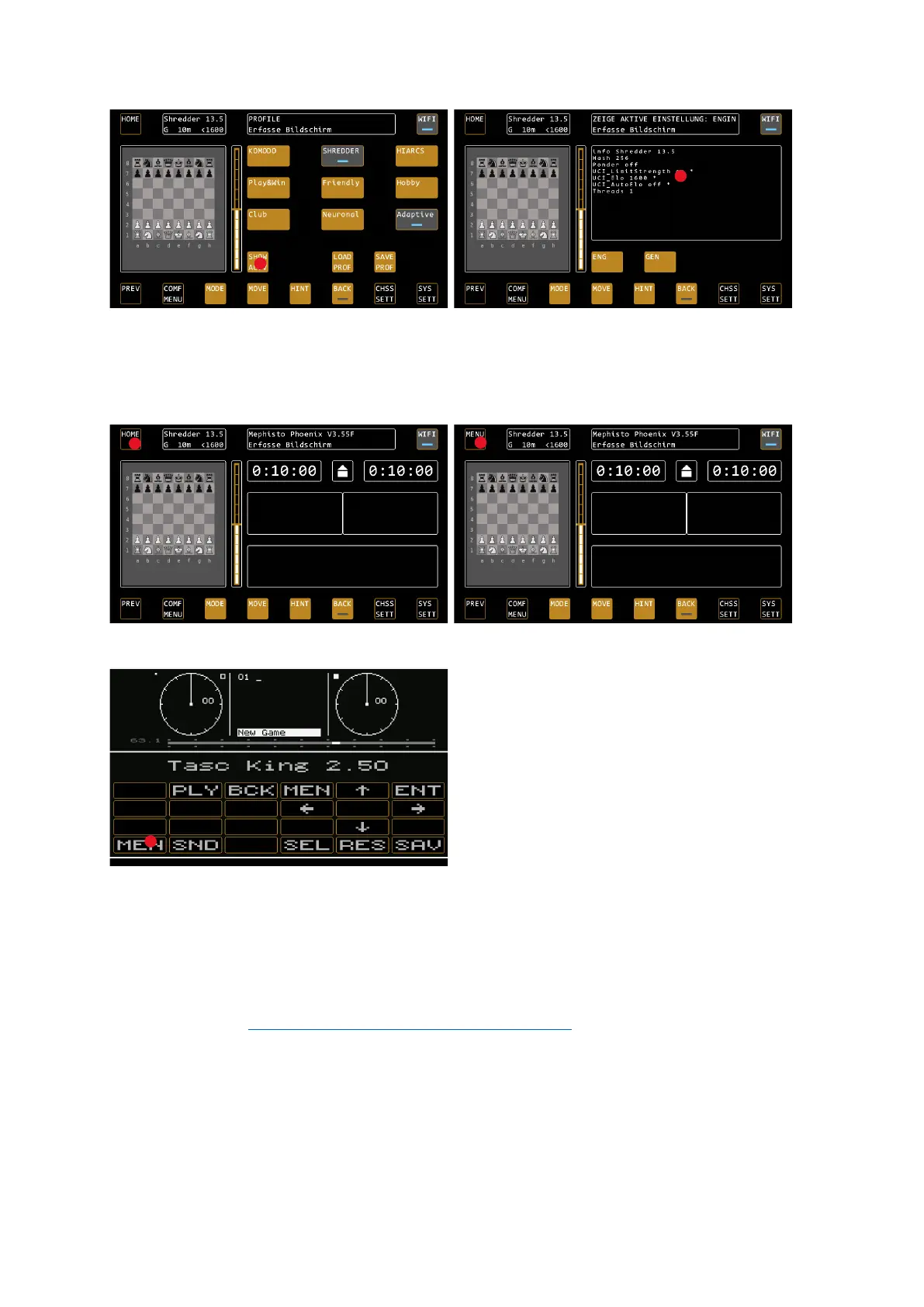
To return to the main menu, i.e. to select the operating modes of the chess computer, proceed as follows:
1) From the PLAY AGAINST COMPUTER mode, press HOME a second time in the control screen. The button
changes to MENU, press again to return the main menu.
2) From the emulations by pressing the MEN key (bottom left) in an emulation.
Meaning of the status LEDs in the buttons
The blue status LEDs in the buttons usually mean "ON" (blue) or "OFF" (grey). An exception is the COMFORT
MENU, where the blue LED marks the selected profile, which is loaded with LOAD PROFILE.
Software version
This manual is based on software version V3.55E, as of August 2022. Due to permanent improvements to the
system, details can deviate from the procedure described here. For detailed descriptions of individual functions,
please see our FAQ at https://computerchess.com/mephisto-phoenix/#faq
.
3. OPERATION MODES
Main menu
In the main menu, select how you want to use the chess computer. The offered modes depend on which
software licenses have been purchased for your device.


 To Next Page