8
"PLAY AGAINST COMPUTER" MODE
This is the main operating mode of the chess computer. Here you can play against various chess programs,
analyze or play in 2-player mode. You can also find the system settings such as volume, WiFi, the led control of
the board, etc., here.
PLAY RETRO CHESS MODE
In this mode you will find the emulations of old chess computers. You can play against these old programs.
4. THE CHESS COMPUTER MODE “PLAY AGAINST COMPUTER”
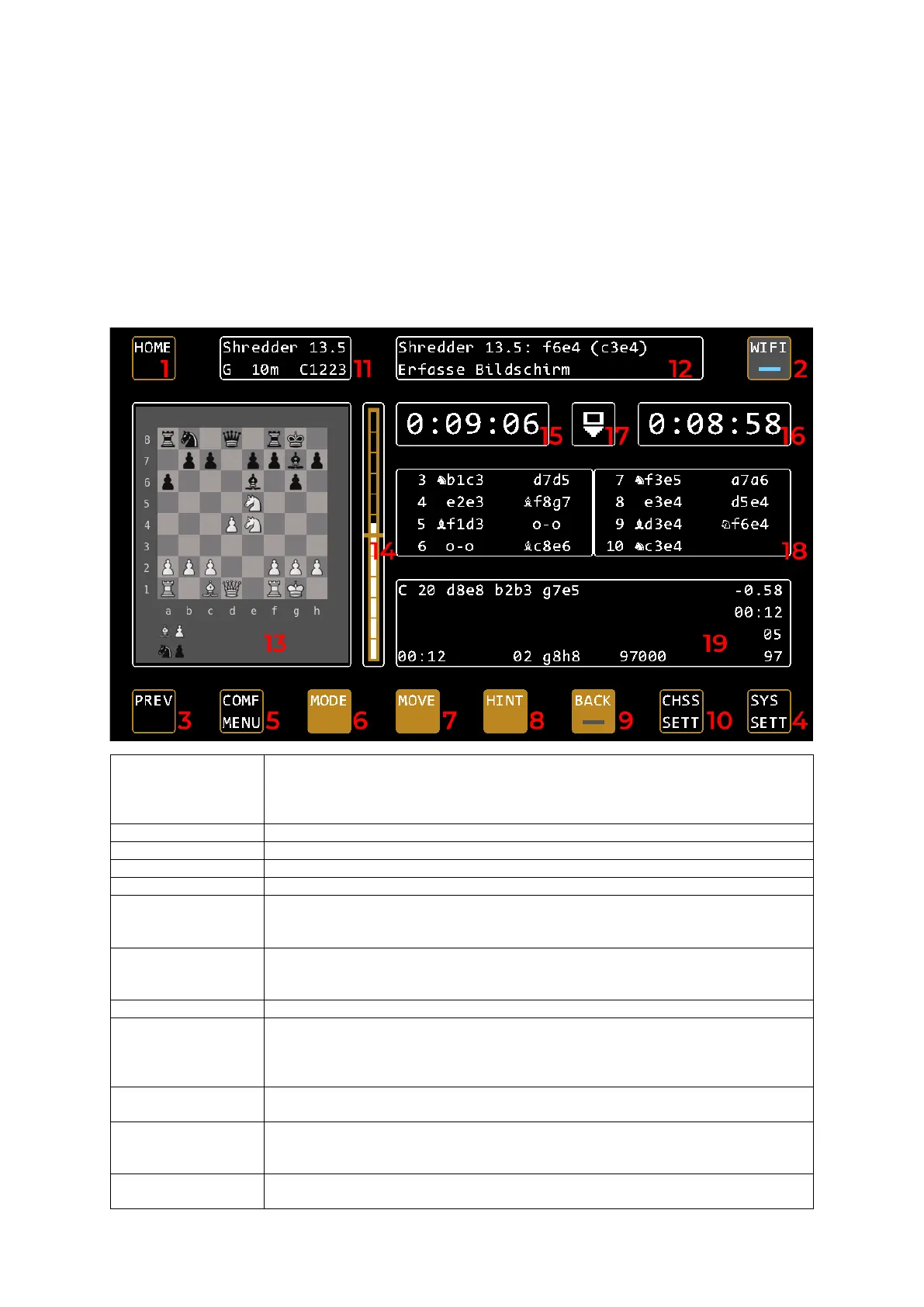
Controls on the control screen
1: HOME & MENU HOME returns you to the control screen at the touch of a button, no matter where
you are in the menu.
If you press HOME again on the control screen, the menu button appears. This takes
you back to the main menu to select the operating mode.
Go back a level in the menu
Profile selection, quick engine selection and preferred engine settings
Mode selection, here you can switch between the game modes single player, two
player, analysis and position input. You can also start a new game here.
Note: You can also start a new game by building the initial position on the board.
7: MOVE Allows you to have the moving side moved by the computer immediately. If the
computer is already calculating, this cancels its calculation and the computer plays
the best move found so far.
Get tip on current position from computer
9: BACK Activates the move back mode. The led turns on, you can now undo the moves
according to the LED display on the board. Once you are done, deactivate the mode
by pressing this button.
Note: You can also start the move back mode directly on the board.
10: CHSS SETT Here you will find chess-specific settings such as game strength, game duration,
opening books, display settings and engine-specific settings.
Here you will find the chess-specific settings such as game strength, game duration,
opening books, display settings and engine-specific settings. (U = User / C =
12: Status box Here you can see system messages. In the game, for example, the last move of the
engine, in the menu the top and selected submenu item.


 To Next Page