VESSEL MENU
eng 121
When the gauge is installed on a vessel with a two‑stroke
engine, "Tank 2" will automatically default to oil.
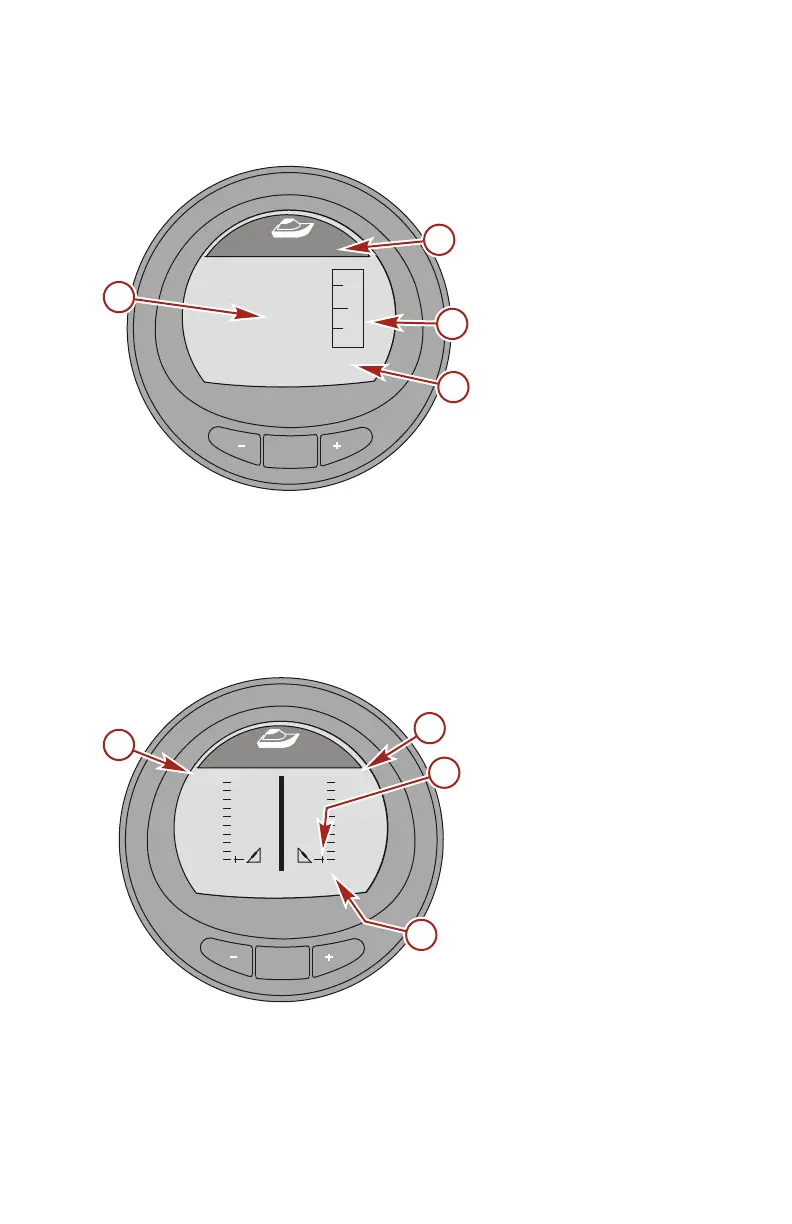
a - Tank level
percentage
b - Tank type
c - Tank level
d - Tank location
Press the "–" button to return to the "Main Menu," or press the
"MODE" button to go to the next screen.
Tabs Screen
The "Tabs" screen displays the port tab and starboard tab
position with a bar graph and numbers.
a - Port tab bar graph
b - Starboard tab bar
graph
c - Bar graph pointer
d - Tab position number
Press the "–" button to return to the "Main Menu," or press the
"MODE" button to go to the next screen.
MODE
36638
[ NEXT ]
Water Tank
[ EXIT ]
E
F
STBD
0
%
a
b
c
d
MODE
36900
Tabs
[ EXIT ] [ NEXT ]
STBD
PORT
0.0 0.0
b
a
c
d










 To Next Page