Installers manual 10.03.02-R03 (201058) EN SDA-04 (SW 5.xx) - SDA-04DCB2 (SW 22.00) Page 17 of 55
7. Configuration
As the (end) user of an SDA-04 or SDA-04DCB2 controller, you have the possibility to change a few
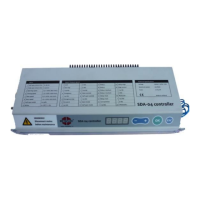
parameters yourself. To this end, there are 4 push buttons on the controller "-", "+", "OK" and "ESC".
Up to the moment that you activate the controller configuration menu, the
door can be operated and it may move.
Please take note of this and take appropriate measures to prevent it.
Activating the parameter menu: Press the OK button for 4 seconds.
Note : During the time that the parameter menu is activated
it is not possible to move the door using the motor.
After activating the parameter menu, parameter 1 will be the first to be displayed.
The number to the left of the display shows the parameter number.
The number to the right shows the value that has been set.
7.1.1 Viewing a parameter.
Once in the parameter menu, you can view the value of the parameter by pressing the
"-" and the "+" keys. The meaning of each number is shown later in this guide.
7.1.2 Changing a parameter
Select the parameter you want to change.
Then press "OK". If a parameter can be changed, it will flash.
You can now use the "-" and "+" keys to change the corresponding parameter.
Confirm with "OK" and press "ESC" to return to the parameter selection menu.
7.1.3 Leaving the parameter menu
Leave the menu by pressing the "ESC" key twice in succession.
The parameter menu is closed at the time that the controller returns to the
home screen and no more parameters are visible.
Immediately after leaving the parameter menu, the door can be operated once
again and begin moving.
Please take note of this and take appropriate measures to prevent it.



 To Next Page