MI 3201 TeraOhm 5 kV Plus Measurements
30
Legend of displayed symbols:
DIAGNOSTIC TEST
Name of selected function
SETTING PARAMETERS:
Unominal 5000V
Set test voltage – step 25 V
Time1 01min
Time node to take R1min result
Time2 02min
Time node to take R2min result and
calculate DAR
Time3 03min
Time node to take R3min result and
calculate PI
DD on/off ON
ON: DD enabled, OFF: DD disabled
Graph R(t) ON
Enable/Disable Graph R(t)
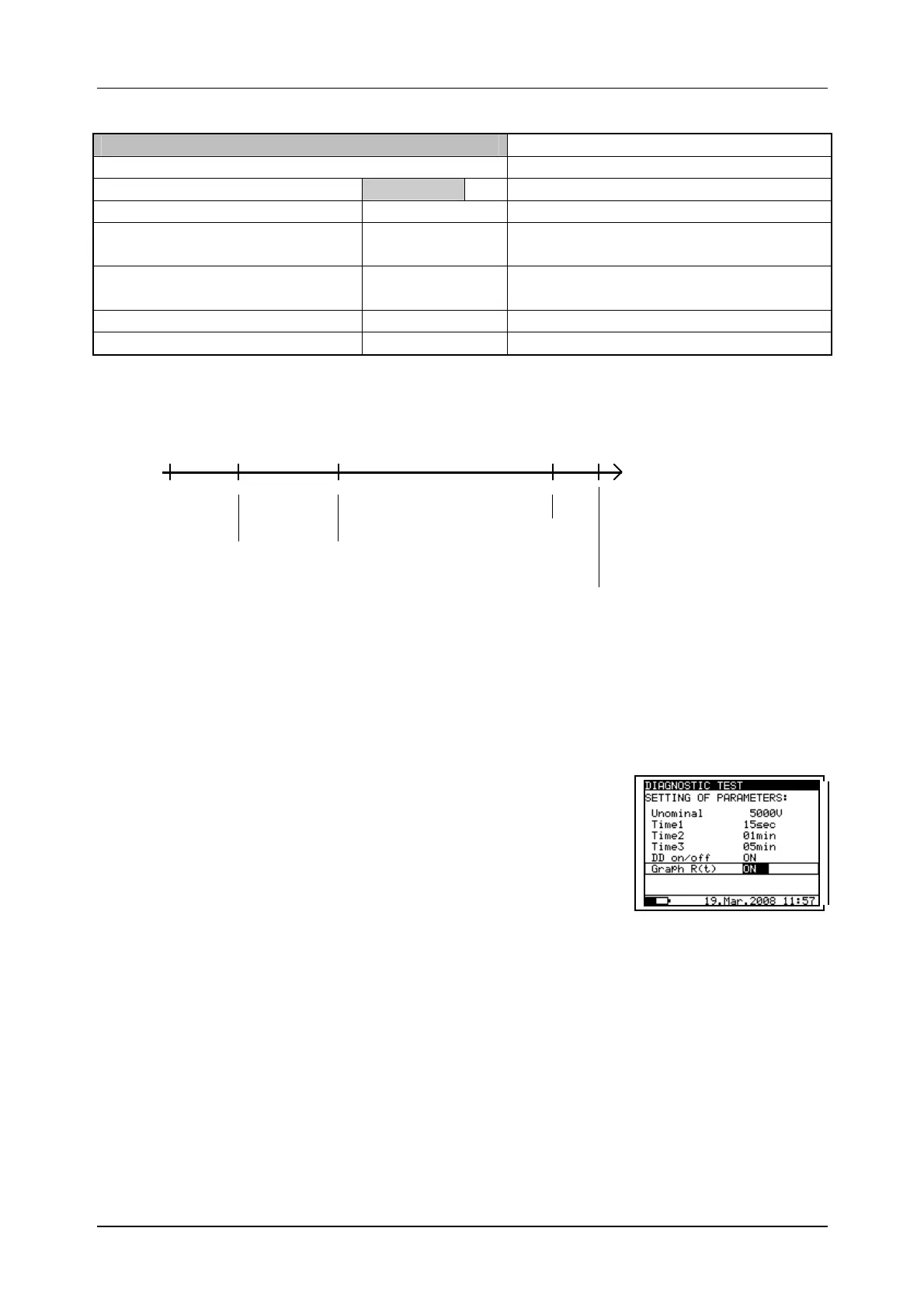
Time1, Time2 and Time3 are timers with the same start point. The value of each
presents the duration from the start of the measurement. The maximum time is 100 min.
The following Fig. 19 shows the timer relationships.
0 Time1 Time2 Time3 t
Start
R15s R01min
DAR
R03min
PI
Stop
(if enabled DD)
Time1 Time2
Time2 Time3
Fig. 19. Timer relations
Enable/Disable the graph R(t) and Set-up the graph R(t)
parameters in the Diagnostic Test function:
- Press the SELECT key, Set-up menu appears on display,
see the Fig. 20.
- Select the parameter Graph R(t) to be set using the and
keys;
- Enable/Disable the graph R(t) using the and keys.
- Press the SELECT key to Set-up the parameters of the
graph R(t), see the Fig. 21. Press the ESC key to return
to basic Set-up menu in the Diagnostic Test function.
- Complete the set-up adjustments pressing either the ESC
key or START/STOP key (to run the measurement
directly). The last displayed settings are stored.
Fig. 20. Set-up menu in
Diagnostic Test
measurement




 To Next Page