Operating Instruction X-Type plus
Operating instructions X-Type plus V1-3.docx Page 26 of 45
8. Danger Zones
Danger zones are the areas of the machine which during operation involve a certain risk for people
owing to mechanical movement. This comprises all areas of the machine which involve rotary
motion, clamping or other movements.
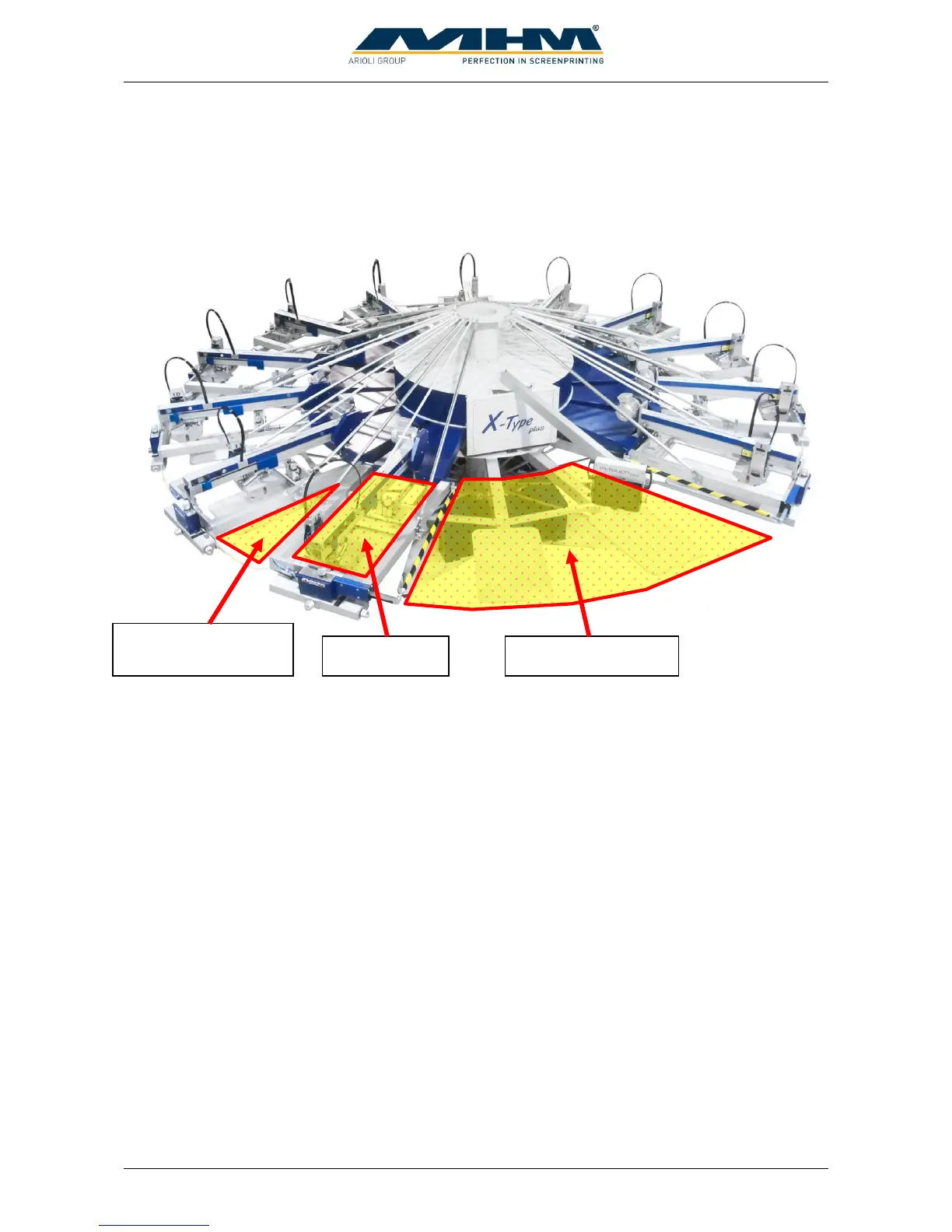
In this connection we indicate the following danger zones:
Manual Work Area with Locating Surface and Unloading Point
The manual work area is located in the front of the machine and is used for applying the
substrate to the pallet as well as unloading it from the latter. When applying or unloading
substrates, operators must always stand in front of and not between the pallets, in order to
prevent getting caught between pallet and print station or control panel in case of a rotary
motion of the carrousel (index).
Area between Two Print Stations
Access to the area between two print stations is barred by safety cables. This area also
involves the risk of getting caught between a pallet and a print station.
Printing Area
The working/printing area involves the risk of getting limbs jammed between the squeegee
carriage and rigid mechanical parts. Do not reach into these zones during the printing
movement.
If any work is to be carried out with or on the machine that requires entering or placing one's hands
into any of the danger zones, make sure that the machine is stopped and restart is blocked by at least
one of the following conditions.
1. The Control ON/OFF switch has been switched OFF.
2. The EMERGENCY STOP push button has been pressed.
3. One of the respective safety cables has been disconnected.



 To Next Page