Operating Instruction X-Type plus
Operating instructions X-Type plus V1-3.docx Page 43 of 45
10. Maintenance of the Synchroprint
The Synchroprint has been designed to operate ‘maintenance-free’ as far as possible. Only a few
important service measures are necessary by the operator.
Remove all residues from the Synchroprint remaining
from production materials such as inks and adhesives
etc. Clean, tidy and sweep the printshop area.
Check inspection glass on
water separator/trap
The inspection glass of the water separator/trap must
be checked for condensed water. The level must not
exceed the red mark; otherwise the automatic relief
aperture may become clogged or defective.
Wash off all anodized parts of the Synchroprint with
an appropriate cleaner. Clean all inspection glasses
and displays. Clean or replace the protective foil on
the touch screen.
Cleaning the Control
Panel
The control terminal must only be cleaned with a dry
cloth or appropriate monitor-cleaning cloth. If any
aggressive cleaners or solvents are applied, the surface
of the keypad will be damaged or destroyed, resulting
in cancellation of the warranty.
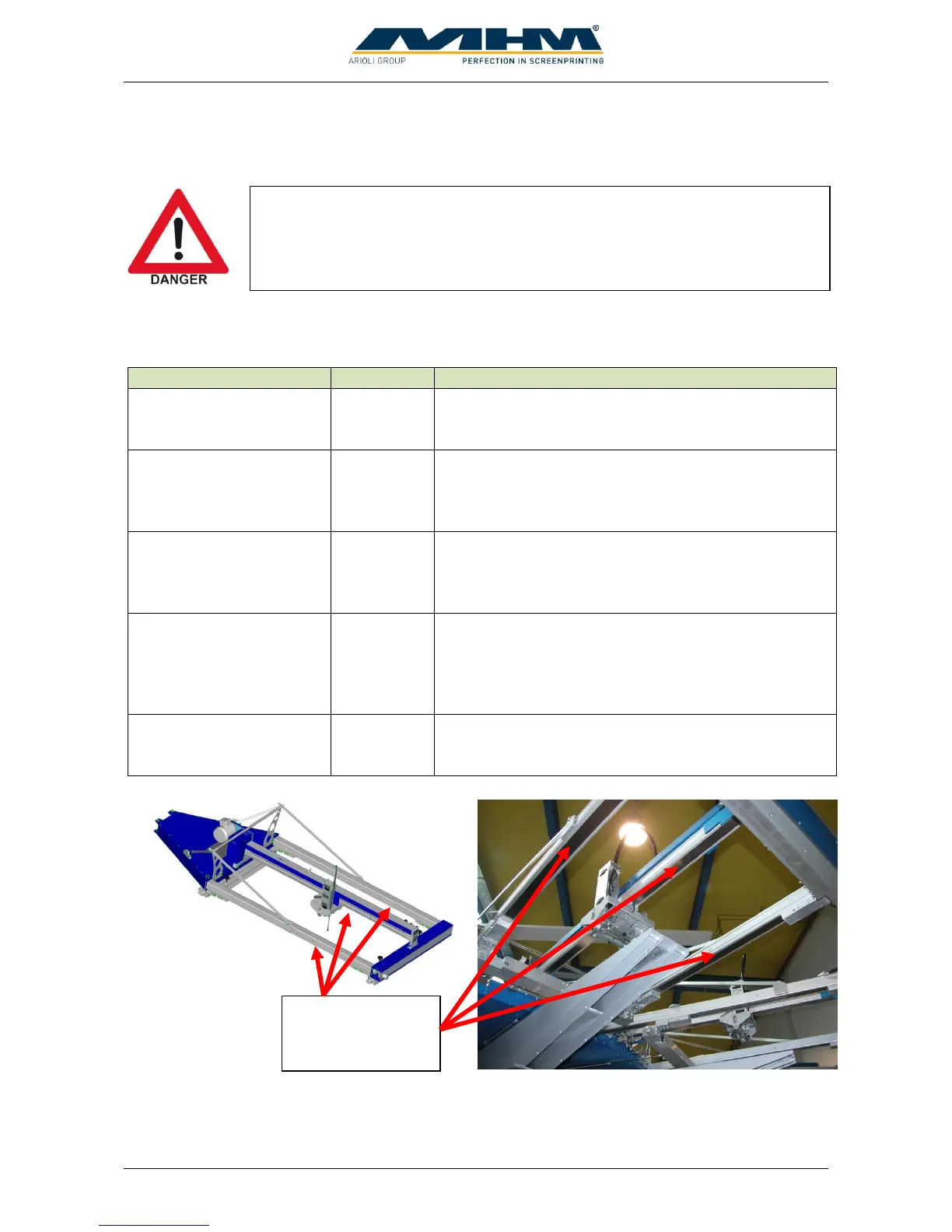
Wipe clean the sealing
band on the underside of
all the linear profiles
The sealing band on the underside of the linear
profiles must be wiped clean thoroughly and
lubricated with an oil-soaked cloth.
Sealing band on
the underside of
the linear profiles
Before doing maintenance work the machine must be cut off from the supply
voltage using the main power switch).



 To Next Page