CE-500 MDT Hardware Guide
F
F
i
i
x
x
e
e
d
d
-
-
M
M
o
o
u
u
n
n
t
t
e
e
d
d
D
D
e
e
v
v
i
i
c
c
e
e
I
I
n
n
s
s
t
t
a
a
l
l
l
l
a
a
t
t
i
i
o
o
n
n
1. Determine the optimal positioning of the CE-50X device in the vehicle that provides easy access and
clear view.
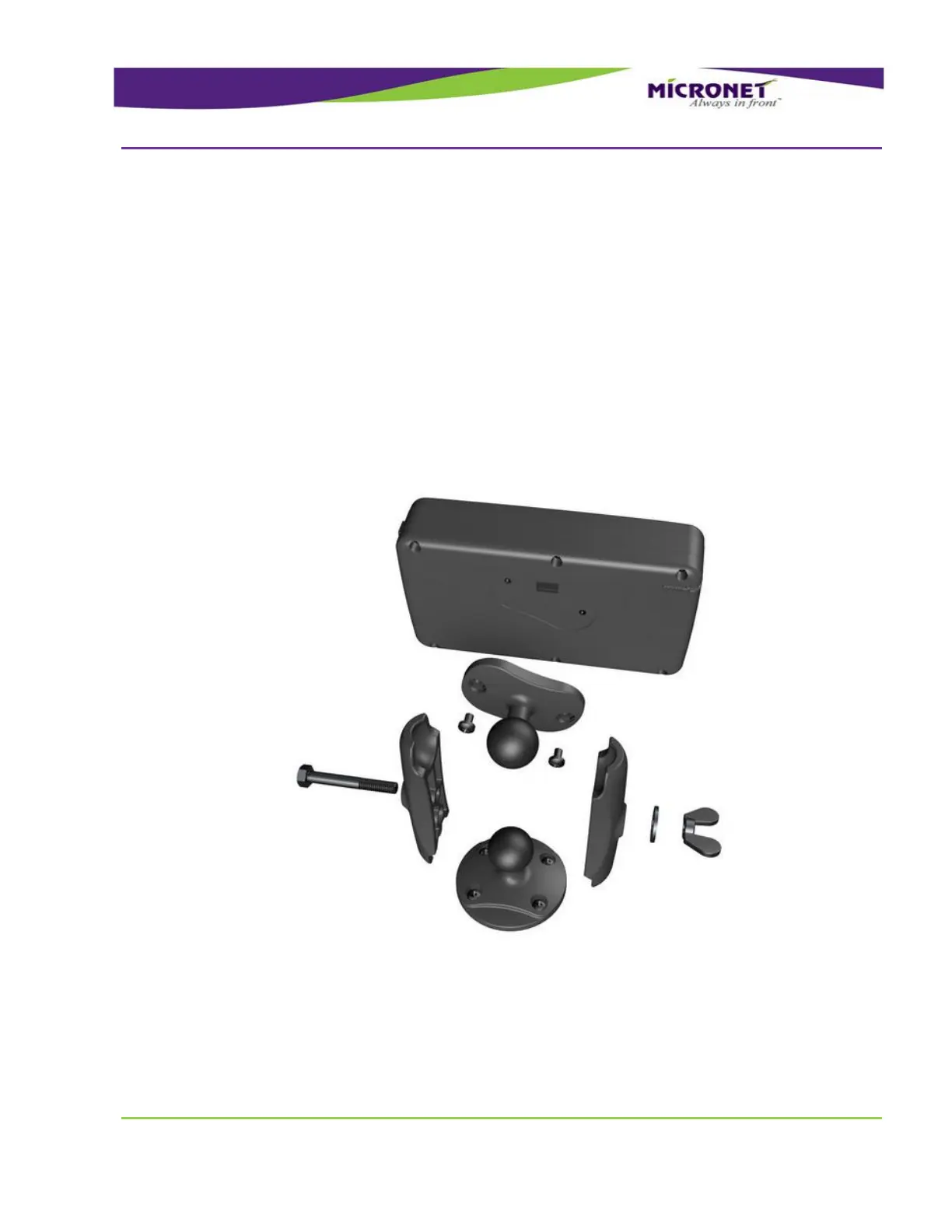
2. Attach the base of the mounting-arm assembly to the dashboard or cabin.
3. Assemble the stand parts on the mounting-arm base.
4. Attach the mounting arm to the rear panel of the device using the mounting screws inserts.
5. Perform electrical installation. See Electrical Installation, on page 83
6. Install the CE-50X device on the mounting arm.
7. Adjust the optimal device position and fix it by closing the mounting-arm wing nut.
8. Arrange the cables using a plastic strip.
Figure 55 – Components for Fixed-Mounted Device Installation


 To Next Page