Lens Selection
Selecting a Lens
A
HAWK MV-4000 Smart Camera Guide A-3
Choosing the Correct Lens Quality for the Application
The secondary consideration during lens selection is lens quality. Not all lenses are
created equal. Lenses are specified in combination with the sensor pixel size to which
they are able to resolve.
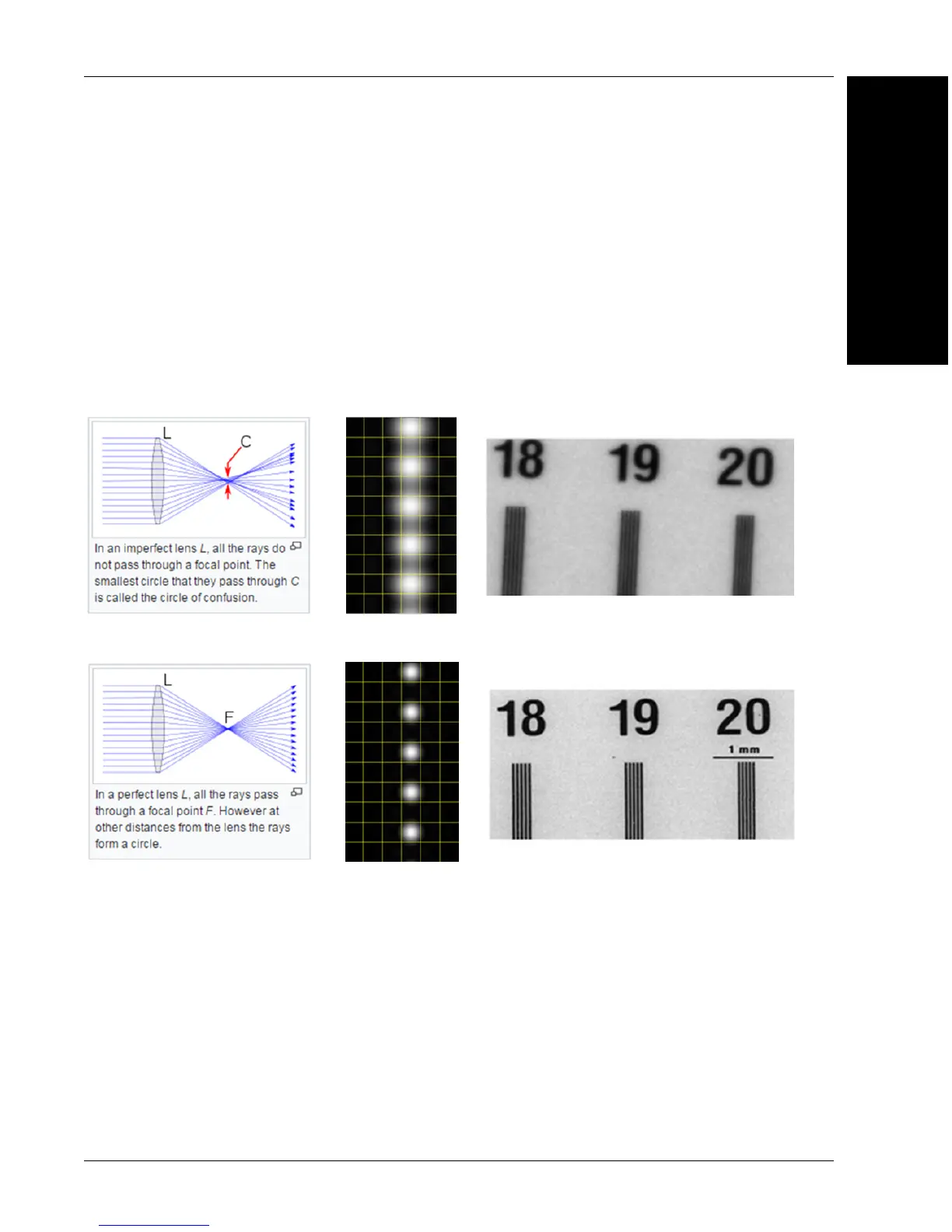
The diagrams below illustrate this concept. A lower-quality, lower-cost lens will create
some blur in the image, while a higher-quality, higher-cost lens will not. The choice of lens
will depend on the application requirements.
The first of the diagrams below shows an image blur created by a lens not matched with
the pixel size. The second of the two diagrams shows a crisp image created with a lens
matched with the pixel size.
The HAWK MV-4000 sensors all have a pixel size of 4.8 microns.
The standard HAWK MV-4000 comes with 3 lens types:
• The first is a standard, low-cost lens for 5 to 7 micron pixels. This lens is adequate for
most inspection and reading applications.
• The second lens type is for 3.45 micron pixels. This lens is appropriate for most
gauging and code verification applications.
• The third lens type is also for 3.45 micron pixels, but is sized for the 1” sensor type
used in the 5 MP sensor.
Crisp Image Created with a Higher-Quality, Higher-Cost Lens Matched to Pixel Size
Blurred Image Created with a Lower-Quality, Lower-Cost Lens Not Matched to Pixel Size



 To Next Page