GR8-1200 OEM
Midtronics Inc. 7000 Monroe Street Willowbrook, IL 60527
www.midtronics.com
18
Chapter 2: Overview
Admin Menu
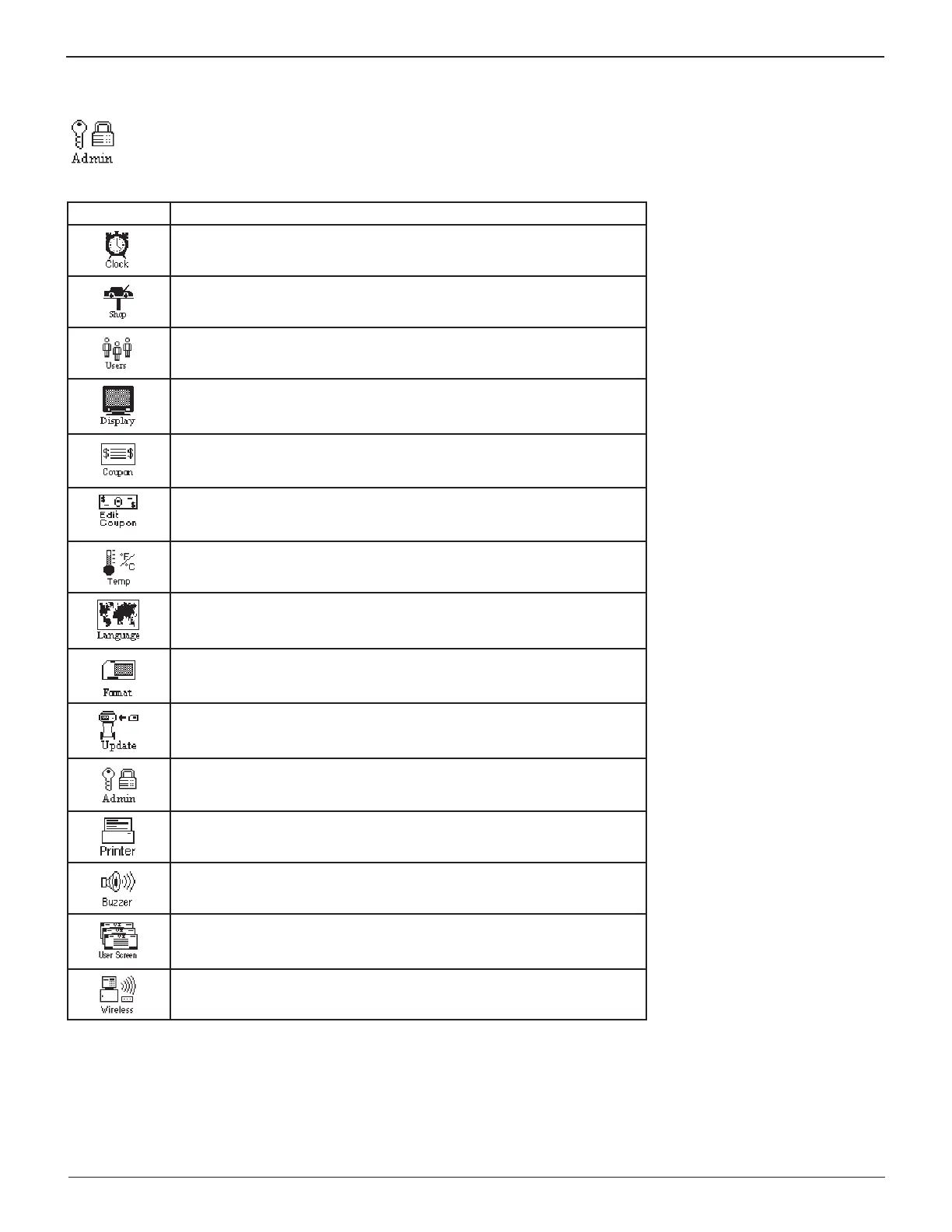
The Admin Menu lets you customize your analyzer to suit your needs. Before testing, check default values to see what
options you may want to change.
Table 7: Admin Men Icons
Menu Icon Description
Settings to adjust the time.
Enables you to add a custom header to printed test results.
Add, edit, or delete User IDs.
Settings to adjust the screen contrast and backlight time.
If you’ve created a coupon in the Edit Coupon utility, use Coupon to turn it
on and off.
Enables you to create a coupon at the bottom of printed test results.
Allows you to select degrees in C or F for temperature measurements.
Sets the language of the display and printouts.
Formats the data card to receive data. Also erases all data on the card.
Updates the GR8 software using fi les on an data card.
Offers additional administration options such as showing the user ID and
headers for printouts.
Select between internal or IR external printer.
Allows you to turn the buzzer OFF. Default is ON.
User-defi ned questions with the answers stored in data fi les on the data
card.
Scans for interference and recommends the best channel for wireless
communication.


 To Next Page