GR8-1200 OEM
Midtronics Inc. 7000 Monroe Street Willowbrook, IL 60527
www.midtronics.com
24
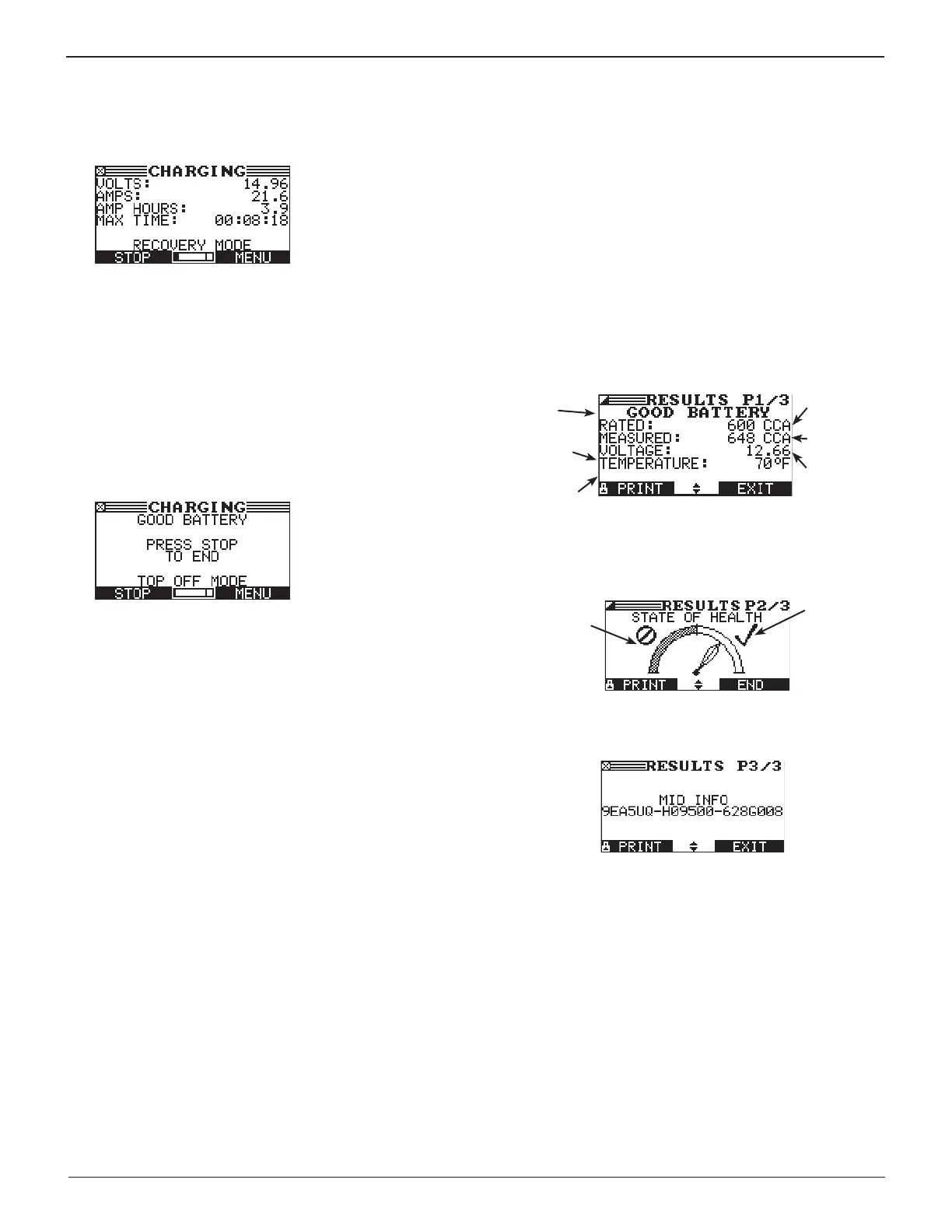
Recovery Mode
In some cases the GR8 goes into Recovery Mode before dis-
playing the nal results. Recovery Mode optimizes the charge
for a hard-to-charge battery.
The maximum charge time in Recovery Mode is 1.5 hrs for
customer vehicles and 3 hrs for dealer vehicles, although
most batteries will nish charging sooner. During Recovery
Mode the charger continuously analyzes the battery to make a
decision as quickly as possible.
Top-Off Mode
Following the Diagnostic Charge Mode process the GR8 will
prompt you to stop the process or continue on in Top-O
Mode. After two minutes the GR8 will automatically enter Top-
O mode if there is no user input
This mode occurs automatically at the end of the charge cycle
to allow the charger to ll a good battery to capacity. Top-
O Mode ends when the battery’s acceptance of the charge
current goes below 2 amps, or when you press the STOP
button.
Aborting a Charge Session
If you need to abort the charging session, press and hold the
STOP key until the charging session is aborted. After aborting,
select NEXT to return to the Main Menu.
Completing a Charge Session
The charge session is complete when the proper amount of
charge is put back into the battery or the remaining estimated
time to charge counts down to zero.
If the GR8 nds that the battery is bad before the end of the
estimated time to charge, it displays the decision REPLACE
BATTERY or BAD CELL-REPLACE and the results.
If charging at the side posts or jump start posts and the test
data is inconclusive, the GR8 displays the decision JUMP
START POST or SIDE POST TEST. A JUMP START POST decision
prompts you to test at the battery. A SIDE POST TEST decision
prompts you to test using the side post adapters.
When the decision is GOOD BATTERY, the GR8 gives you
the option of topping o the battery’s charge level before it
displays the results.
Diagnostic Charge Results
Use the UP or DOWN ARROW keys to scroll to each screen. To
return to the Main Menu, press the EXIT soft key. To print, press
the PRINT soft key.
Screen 1 of 3
Measured
voltage
Measured
capacity
Selected
rating
Replaced
AMP Hours
Battery
decision
Maximum
Charging Time
Screen 2 of 3
Replace
Range
Good
Range
Screen 3 of 3
Chapter 5: Diagnostic Charging


 To Next Page