Operating the washing machine
15
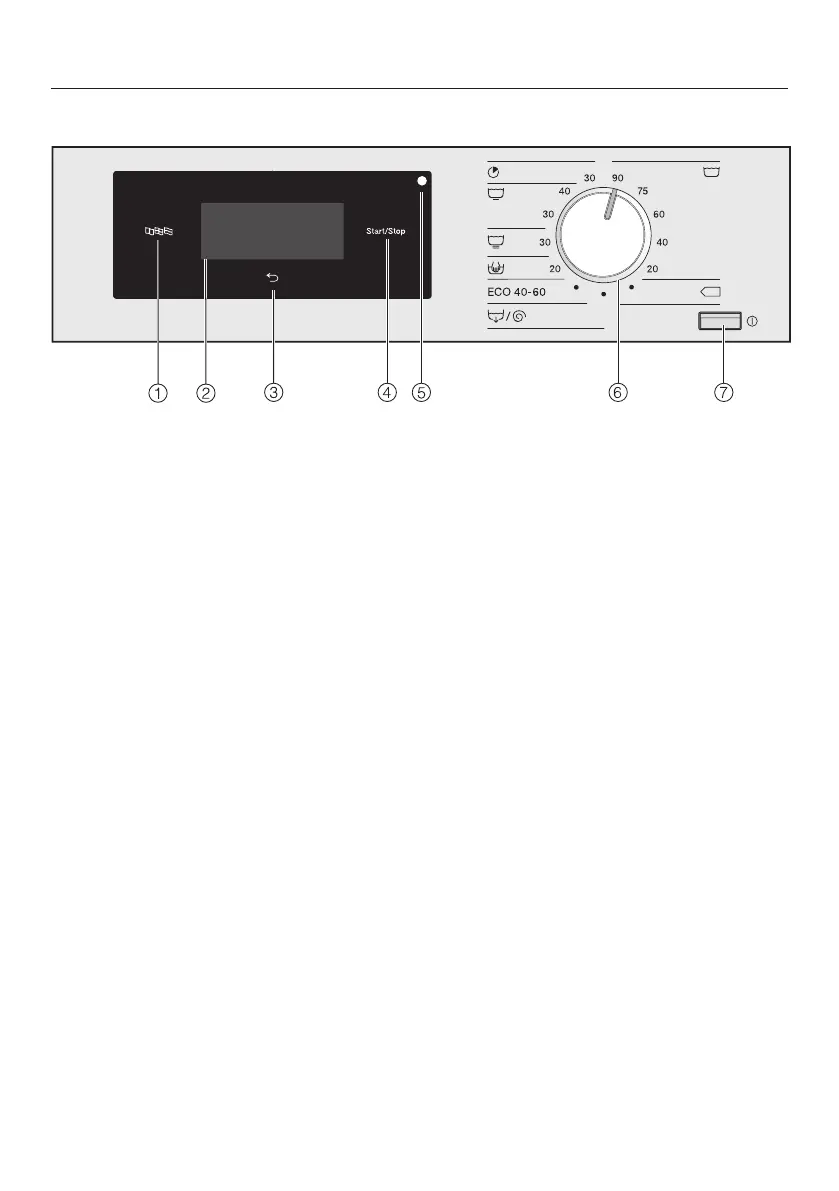
Control panel
a
Language sensor control
For selecting the current user lan-
guage.
The system language is displayed
again at the end of the programme.
b
Touch display with sensor con-
trols
Displays the selected programme.
The programme settings are selec-
ted using the sensor controls in the
touch display.
c
Back sensor control
Takes you back one level in the
menu.
d
Start/Stop sensor control
Starts the selected programme and
cancels a programme once it has
started.
e
Optical interface
For the Customer Service Depart-
ment.
f
Programme selector
For selecting the wash programme.
The programme selector can be
turned clockwise or anticlockwise.
g
button
For switching the washing machine
on and off.
The washing machine switches itself
off automatically to save energy. It is
switched off 15minutes after the
end of the programme/Anti-crease
phase, or after being switched on if
no further selection is made.



 To Next Page
 Loading...









