OM-261050 Page 42
SECTION 10 − OPERATION
O
10-1. Remote Devices Connections
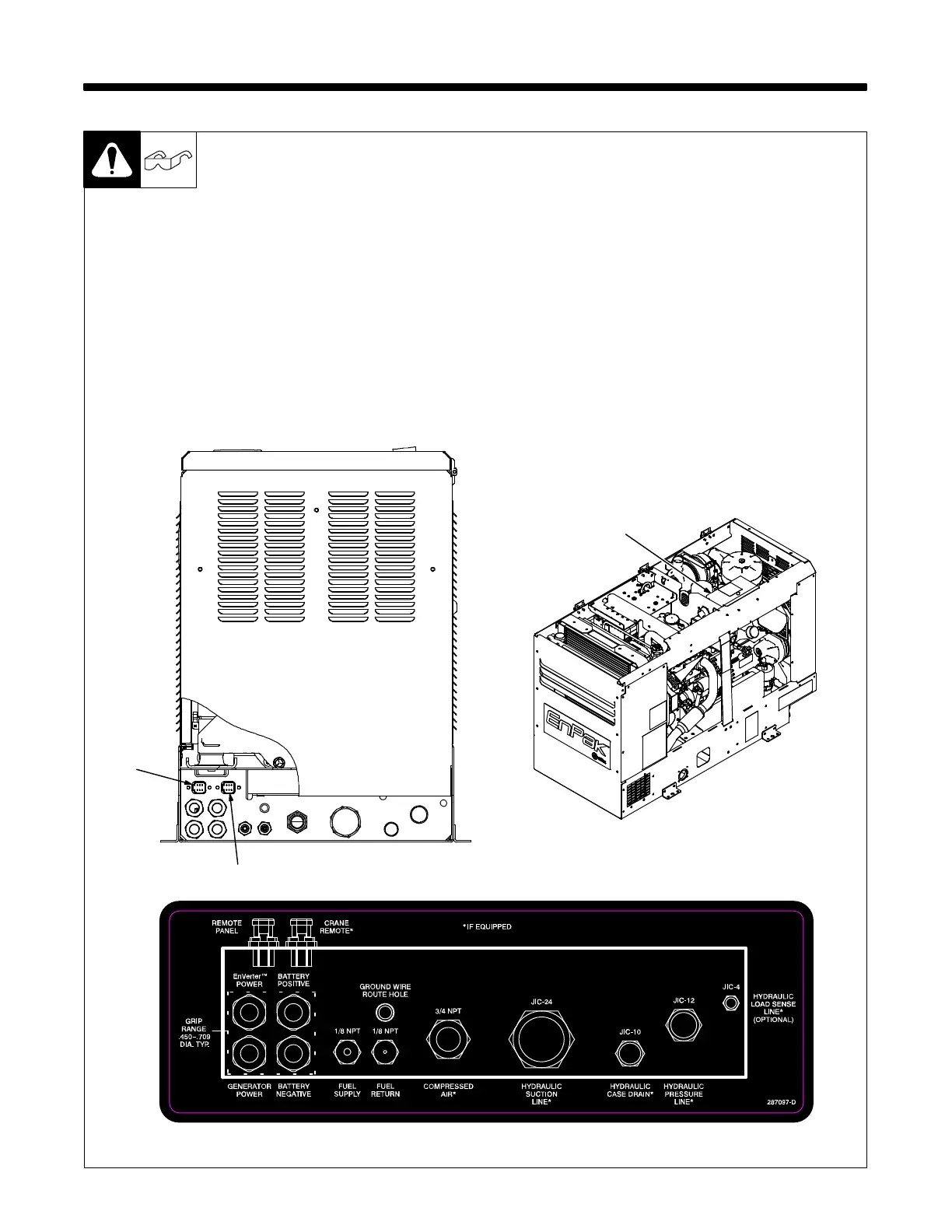
265 802-A / 287 097
1 EnPak Remote Panel Connection
Receptacle RC12
Mount remote panel inside of truck body
cabinets where easily accessible. Connect
interconnecting cable Part No. 244283
between remote panel and RC12.
2 Crane Remote Connection
Receptacle RC13
NOTICE − Connect to this receptacle only
when EnPak is equipped with hydraulic
power source used to power a hydraulic
crane apparatus.
Crane remote control provided by crane
manufacturer. Connect appropriate har-
ness adapter into the crane harness (see
instructions provided with harness adapter
kit). Connect interconnecting cable Part
No. 244283 between crane remote and
RC13.
Contact Factory for list of harness adapters
available.
Optional Engine Remote Start/Stop Us-
ing Ground Signal
3 Service Panel
Locate wire 120 in the harness close to the
Service Panel control board. It will have a
fast on connector on the end of it.
Connect signal wire from start/stop switch
to this wire 120 and route the wire out
through the base of the unit. The signal
from the switch must be a “ground” signal
when the switch is activated and no signal
when the switch is not activated.
The EnPak control will detect a ground sig-
nal and will start the engine if it is not run-
ning, or it will stop the engine if it is running.
1
2
3







 To Next Page