. A complete Parts List is available at www.MillerWelds.com
OM-272989 Page 33
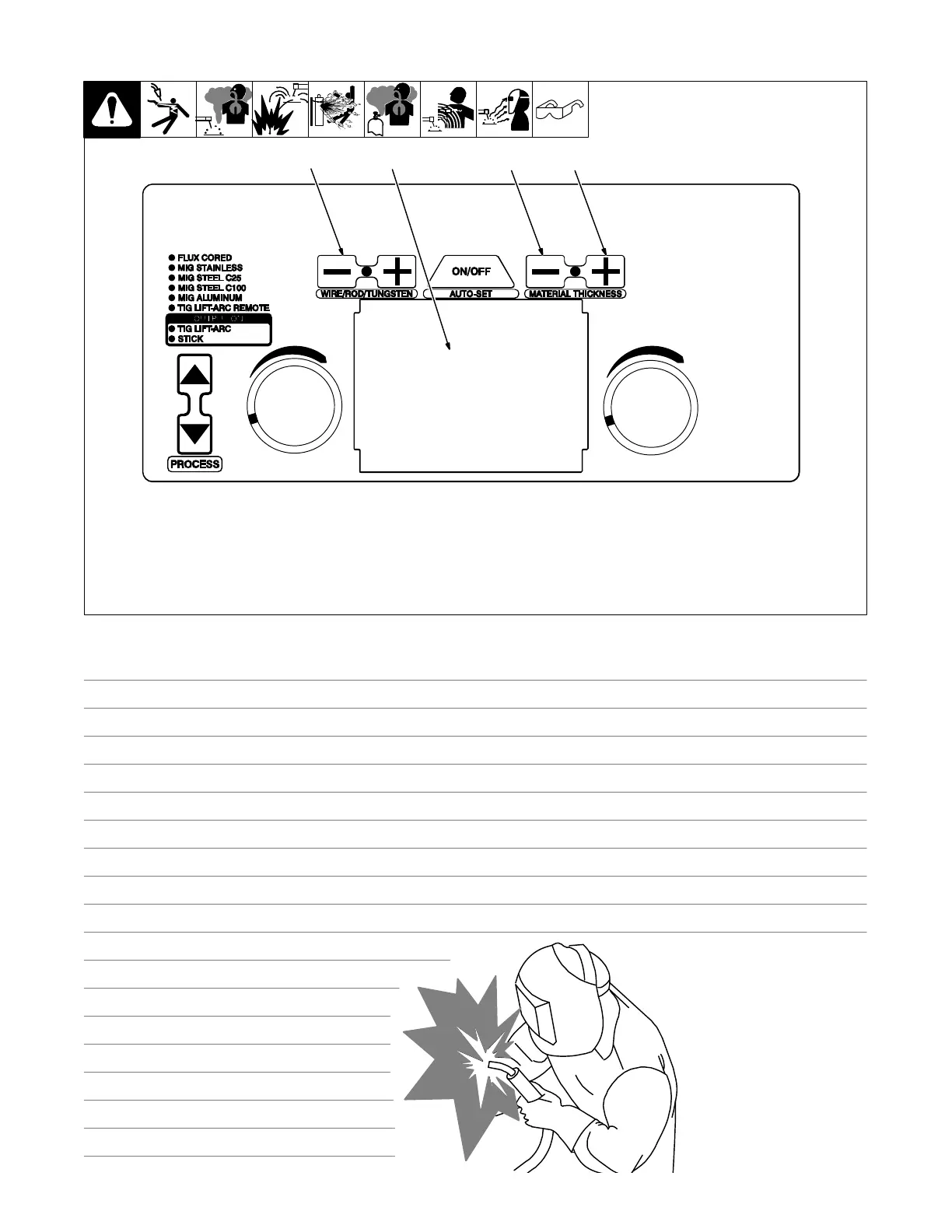
6-4. Entering Setup Menu
1 Wire/Rod/Tungsten Minus (−) Button
2 Material Thickness Minus (−) Button
3 Material Thickness Plus (+) Button
4 Display
To enter the setup menu, simultaneously
press then release the Wire/Rod/Tungsten
Minus (−) button and Material Thickness
Plus (+) button. After entering the setup
menu, the Material Thickness light will flash.
To move to the next setup menu, press the
Material Thickness Plus (+) button.
To move to the previous setup menu, press
the Material Thickness Minus (−) button.
To exit the setup menu, simultaneously
press then release the Wire/Rod/ Tungsten
Minus (−) button and the Material Thickness
Plus (+) button.
Ref. 271491A
1
234
Notes
Work like a Pro!
Pros weld and cut
safely. Read the
safety rules at
the beginning
of this manual.










 To Next Page