OM-4422 Page 32
6-5. Remote Voltage/Amperage Control
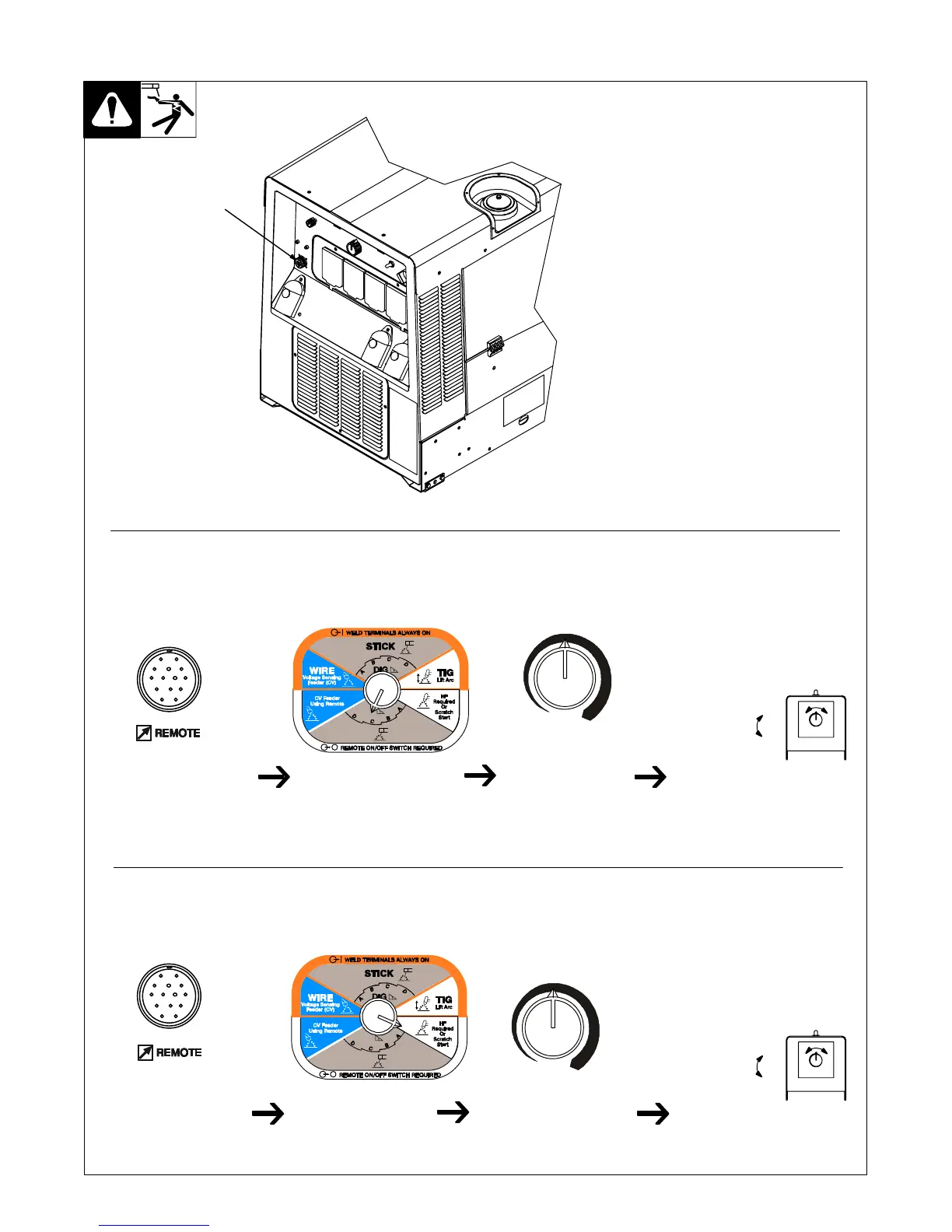
1 Remote 14 Receptacle RC14
Connect optional remote control to RC14 (see
Section 5-9).
When a remote control is connected to the
Remote receptacle, the Auto Sense Re-
mote feature automatically switches volt-
age/amperage control to the remote con-
trol. When a device is connected to the Re-
mote receptacle, remote voltage/amper-
age control is always available regardless
of the position of the Process/Contactor
switch.
0774 / Ref. 214 778-B / 803 562
Example: Combination Remote Amperage Control (Stick)
Adjust Optional Remote Control
Set V/A Control
Mid-Range: About 205A
Set Remote Process
(Only If Remote On/Off
Control Is Desired)
Example: Combination Remote Amperage Control (TIG)
Adjust Optional Remote Control
Set V/A Control
Mid-Range: About 205 A
In Example:
Process = Remote Stick
Min = 20 A DC
Max = 205 A DC
Max (205 A DC)
Min (20 A DC)
In Example:
Process =Remote TIG
Min = 20 A DC
Max = About 205 A DC
Max (205 A DC)
Min (20 A DC)
Connect Remote
Control To Remote
Receptacle RC14
Connect Remote
Control To Remote
Receptacle RC14
Set Remote Process
(Only If Remote On/Off
Control Is Desired)
1






 To Next Page