5. Commissioning
MiR Fleet PC Getting Started (en) 01/2021 - v.1.5 ©Copyright 2019-2021: Mobile Industrial Robots A/S. 49
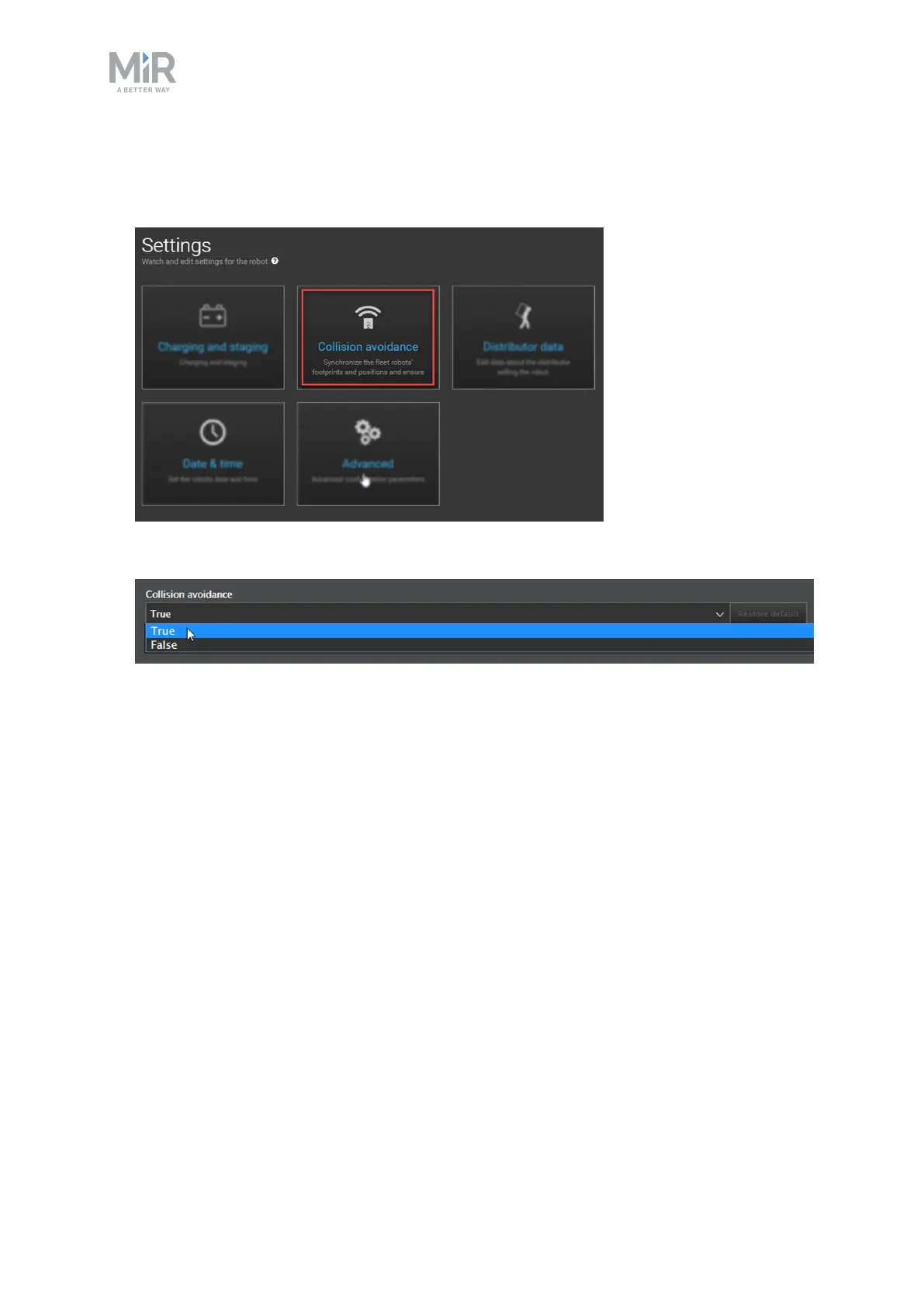
To enable collision avoidance, follow these steps:
1. Go to System > Settings and select Collision avoidance.
2. Check that Collision avoidance is set to True.
5.12 Using Limit-robots zones
A Limit-robots zone is one of two fleet-specific zones you can use. They are used to limit the
number of robots in a certain area. Only a set number of robots connected to MiR Fleet can
be in a Limit-robots zone at the same time.
In all scenarios where there is a possibility of robots blocking each other, a Limit-robots zone
can be useful. They are also useful if you want to limit the traffic in areas.
For example, when a robot undocks from a charging station or pallet rack it mutes its
Protective fields. If another robot is docking to an adjacent station or rack, the robots can
enter a deadlock when the undocking robot activates its Protective fields again.
To avoid this, you can place a Limit-robots zone just in front of the line of stations or racks.
This will make sure that when a robot is undocking, there are no other robots nearby to
trigger a Protective stop deadlock.



 To Next Page