MAINTENANCE
Mirage 2000/4000/6000 User’s Manual
4-5
Turn off the projector
Turn the projector off and allow the cooling fans to stop automatically before
proceeding with Step 2.
Unplug the projector
When the cooling fans have stopped, turn main power off and unplug the projector.
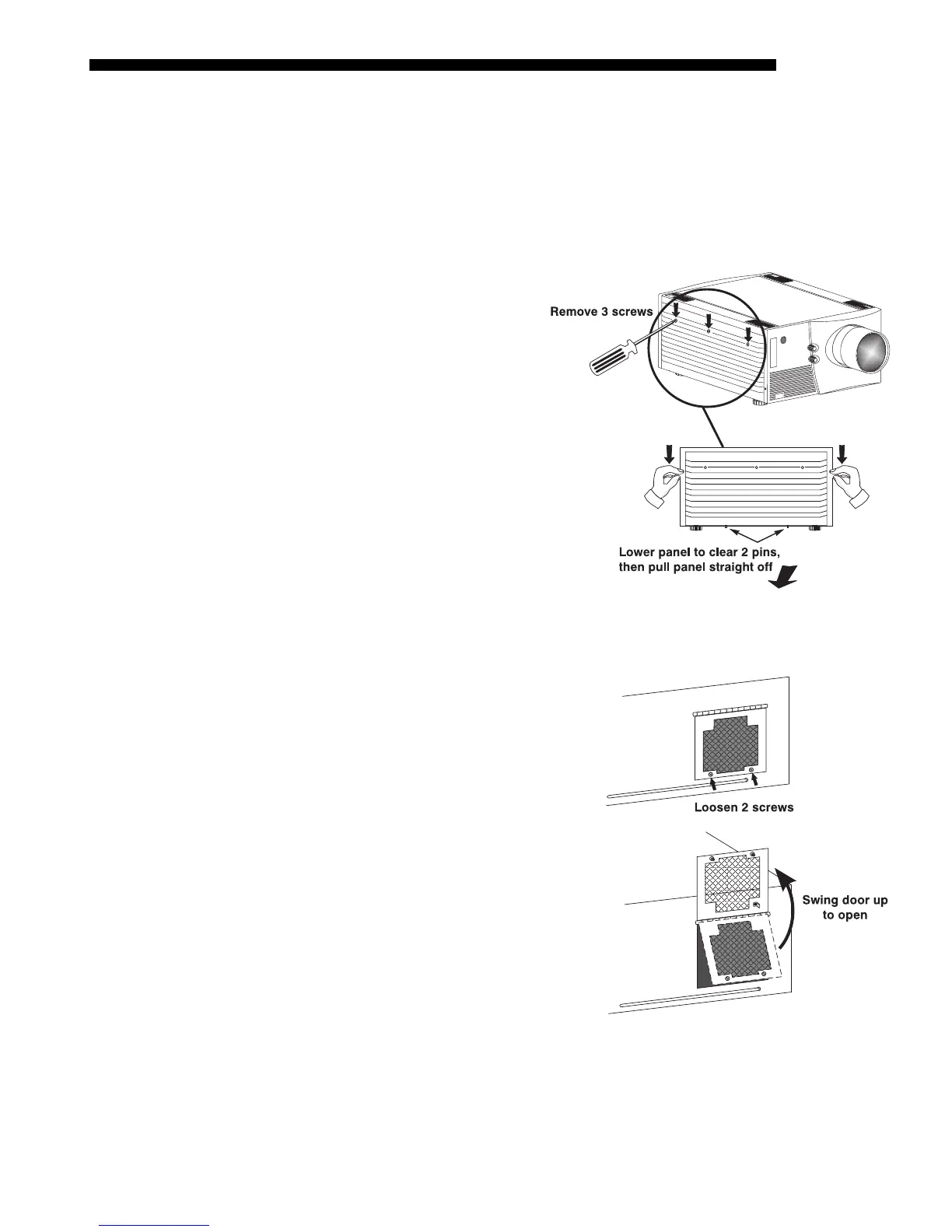
Remove the left side panel
• See Figure 4.2. Remove
the 3 screws securing the
projector’s left side panel.
• Lower the panel slightly
to clear two pins at the
bottom edge of the
projector.
• Pull the panel off to
expose the lamp door
near the front corner.
Open the lamp door
• See Figure 4.3. Loosen the 2
screws fastening the lamp door
shut.
• Lift the door fully open (it will
stay up).
STEP 1
'
STEP 2
'
STEP 3
'
Figure 4.2. Remove the left side panel
STEP 4
'
Figure 4.3. Open the lamp door



 To Next Page