OPERATION
3-56
Mirage 22000/4000/6000User’s Manual
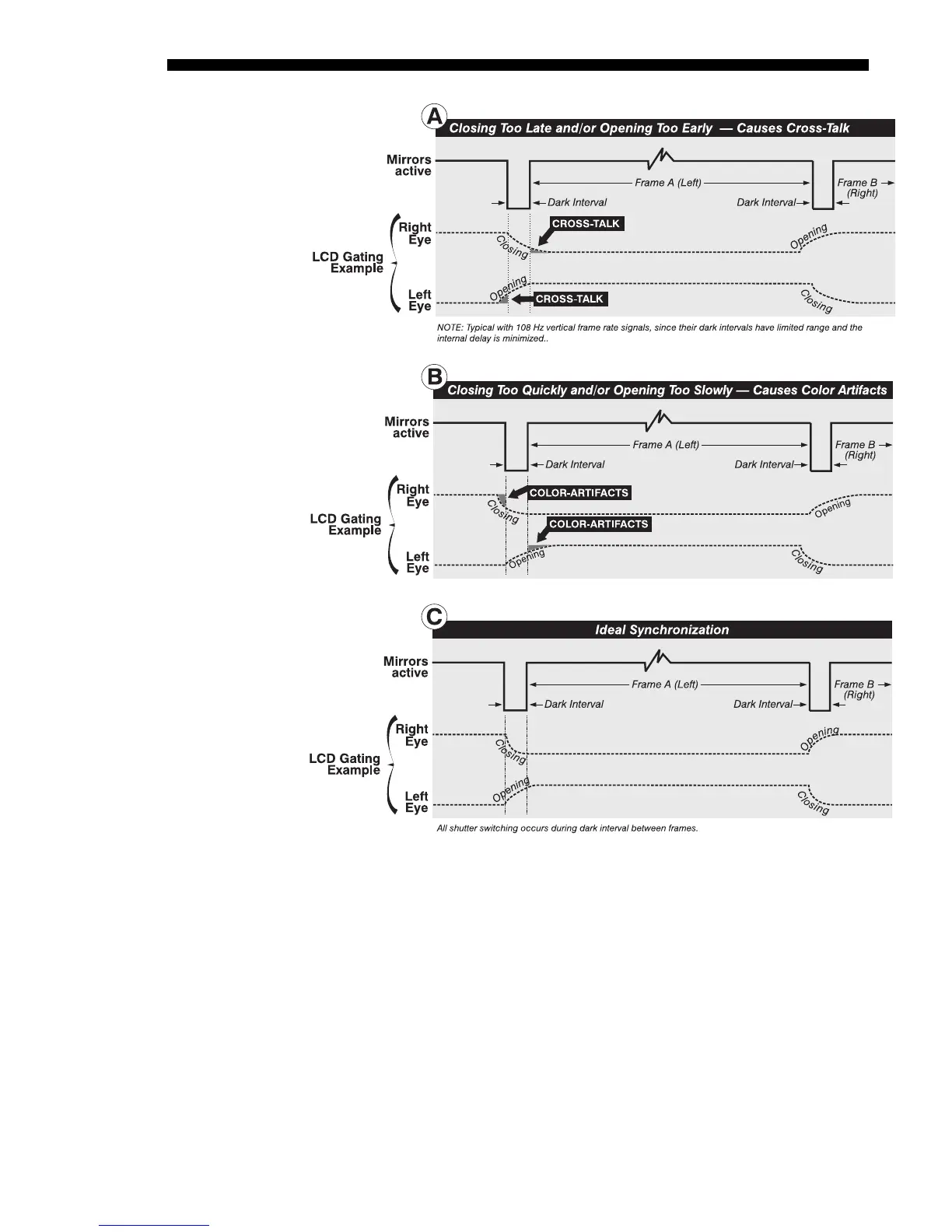
Figure 3.36. Examples of Poor and Ideal Synchronization
2) “Dark Interval” projector control (note: not always required). For slower
gating technologies, you may also need to artificially increase the amount of
dark time between displayed frames so that shutters have even more time to
open/close and each eye sees the full display intended for it (Figure 3.36B).
Symptoms are more subtle than cross-talk—if the dark interval is too brief for
proper gating, you may notice an apparent color temperature problem, with
some whites or grays appearing with a slight red, green or blue tint. This color
artifact is particularly easy to diagnose in a grayscale test pattern displayed in
3D mode (i.e., with Minimum Delay). In the Image Settings menu, increase
the “Dark Interval” as necessary until the grayscale is correct—you may also
have to increase the internal delay when using a longer Dark Interval. Note
that the Dark Interval default is approximately 375 µs, but slidebar values
range from 0-255 and do not indicate µs.



 To Next Page