Introduction
1
Introduction
About this Guide
This guide provides instructions for installing, configuring, and troubleshooting the Mitel
®
3300
CITELlink Gateway. It is intended for qualified 3300 ICP technicians.
The guide contains the following sections:
• Introduction—provides an overview of the gateway and lists related documentation and
safety notices.
• Before You Begin—sets out the steps for preparing the site for installation.
• Installation—describes how to install the gateway unit, register supported Nortel Net-
works™ Meridian 1 IP sets, as well as test and troubleshoot the installation.
• Configuration—describes how to configure the gateway for DHCP or static IP addressing
and how to upgrade software.
• Appendixes—provide additional information such as technical specifications, wiring
charts, phone key layouts, and configuration tool commands.
About the 3300 CITELlink Gateway
The 3300 CITELlink Gateway is a network interface that provides supported Meridian 1 sets
with connectivity on the Mitel 3300 Integrated Communications Platform (ICP).
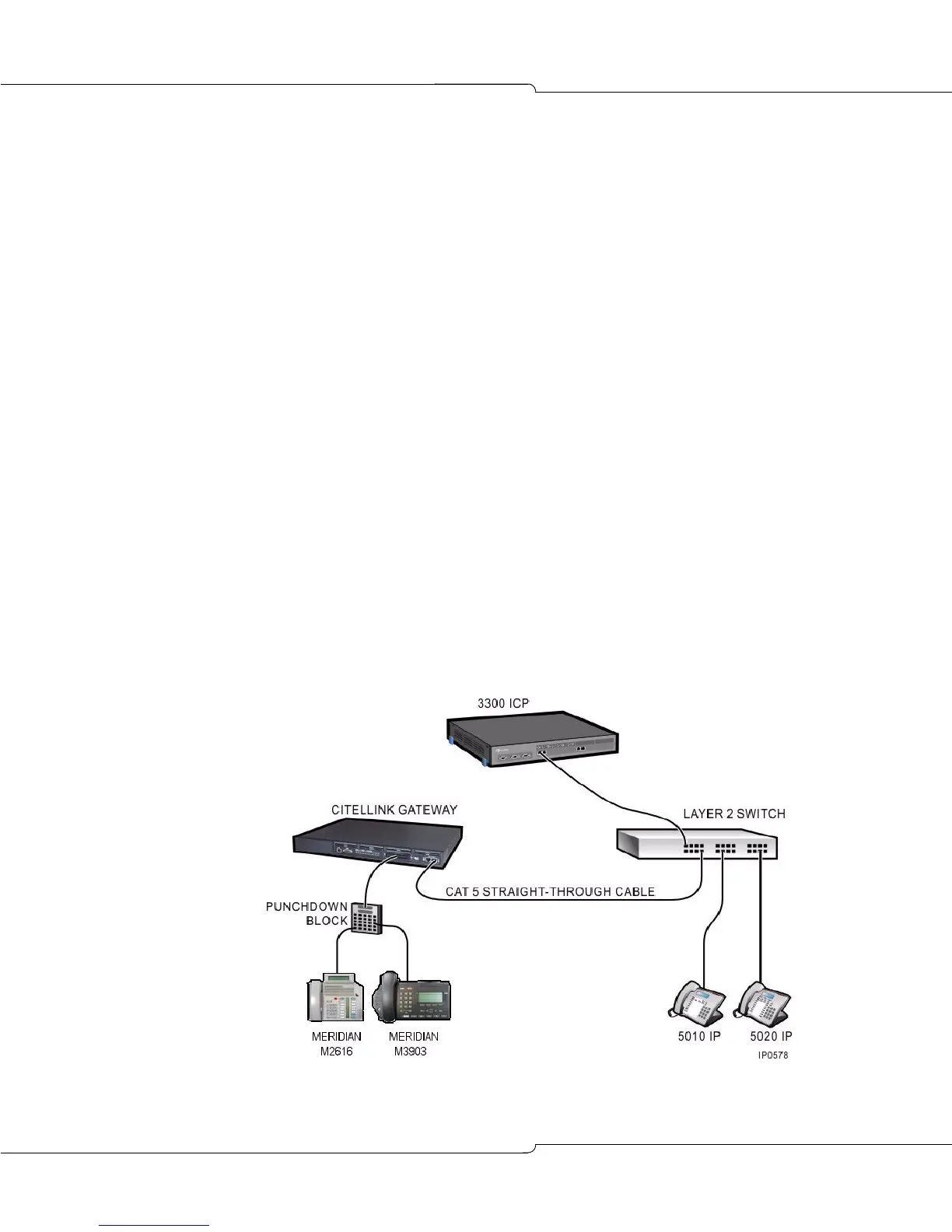
The unit connects to the 3300 ICP controller through a Layer 2 switch and to a maximum of 24
Meridian 1 sets through standard wiring, punchdown blocks, and connectors.(See FIGURE 1.)
Meridian 1 sets are line powered from the gateway.
Figure 1: Standard CITELlink Gateway Configuration













 To Next Page