To Next Page


G
garciajohnAug 16, 2025
How to change the name on Mitel IP Phone display?
- TTina DavidsonAug 16, 2025
If the name displayed on your Mitel IP Phone is incorrect, your system administrator is responsible for assigning display names.

How to change the name on Mitel IP Phone display?
If the name displayed on your Mitel IP Phone is incorrect, your system administrator is responsible for assigning display names.
How to change the time on Mitel 5360 IP Phone?
If you cannot change the time and date on your Mitel IP Phone display, your system administrator programs the time and date. Contact them if the date and time are incorrect.
How to use star codes on Mitel 5360?
To use the local telephone company star codes or the Outgoing Call access code with your Mitel IP Phone, dial a Select Line Group number before using the star codes. For example, if your system uses the default Select Line Group numbers, dial 92001 to access that line. After you hear a dial tone, you can dial the star code and the number.
Why can't I program speed dial on Mitel 5360 IP Phone?
If you cannot program a Station Speed Dial number to the button you want on your Mitel IP Phone, ensure you have stored the number with a Station Speed-Dial bin before assigning it to a programmable button.
How to program System Speed-Dial numbers on Mitel 5360 IP Phone?
System Speed Dial numbers on your Mitel IP Phone are programmed by your system administrator.
What to do if Mitel 5360 IP Phone shows NO CALL TO HANDOFF?
If the display on your Mitel IP Phone shows NO CALL TO HANDOFF when you try to use the Dynamic Extension Express – Handoff feature (388), it could be due to several reasons: * The call wasn't routed by Dynamic Extension Express. * The system hasn't recognized the call as valid yet. * You're using an unsupported extension or a phantom extension. * You attempted the handoff as the other party disconnected. * The call was terminated.
What to do if Mitel 5360 has audio problems?
If you are experiencing audio issues like echo, distortion, or choppiness on your Mitel IP Phone, contact your system administrator for assistance.
Why can't I use Agent Help on Mitel 5360?
If you cannot use Agent Help, Record-a-Call, or Station Monitor feature on your Mitel IP Phone, it might be because your system uses Peer-to-Peer (P2P) audio. These features are unavailable during a P2P call. Contact your system administrator for more details.
What to do if Mitel 5360 IP Phone is not working?
If your Mitel IP Phone is not working properly, contact your system administrator for assistance.
Why I can't use features on Mitel 5360 IP Phone?
If you cannot use a feature described in this guide for your Mitel IP Phone, it might not be enabled. Contact your system administrator for more information.
Explains the function of various buttons on the 5360 IP Phone.
Lists common feature codes for quick access to phone functions.
Guidelines for programming emergency numbers and making test calls.
Explains safety symbols and their meanings in the documentation.
Information on user serviceable parts and repair procedures.
Details on how the IP phone handles software updates.
Guidance on proper disposal of the electronic equipment.
Basic safety precautions for reducing risks when using the IP phone.
Introduction to the Mitel 5360 IP Phone User Guide and its scope.
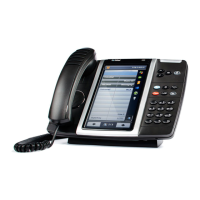
Overview of the 5360 IP phone's hardware features and capabilities.
Detailed explanations of the phone's various components and their functions.
Instructions on how to adjust the IP phone stand for optimal viewing.
Procedures for answering incoming internal and external calls.
How to handle a call when another call is already in progress.
How to automatically answer incoming calls when picking up the handset.
How to activate and use the speakerphone function.
How to temporarily disable the microphone during a call.
Steps to transfer a call to another extension.
Steps to transfer a call to an external number.
How to answer calls ringing or holding at other extensions.
How to leave inter-station or voice messages for other users.
Steps to log into Automatic Call Distribution hunt groups to receive calls.
Information about the cordless module and its features.
Information on contacting the system administrator for support.
Descriptions and reasons for common error messages.
 General
| Protocols | SIP, MiNet |
|---|---|
| Power over Ethernet (PoE) | Yes (802.3af) |
| Audio | Wideband audio |
| Expansion Module Support | Yes |
| Speakerphone | Full-duplex |
| Headset Port | Yes |
| Codec | G.711, G.729 |
| Ethernet Ports | Dual 10/100/1000 Mbps Ethernet ports (Gigabit) |
| Programmable Keys | 48 programmable soft keys |