Mitel
®
5360 IP Phone User Guide – , April 2013 Page 81
Cordless Devices
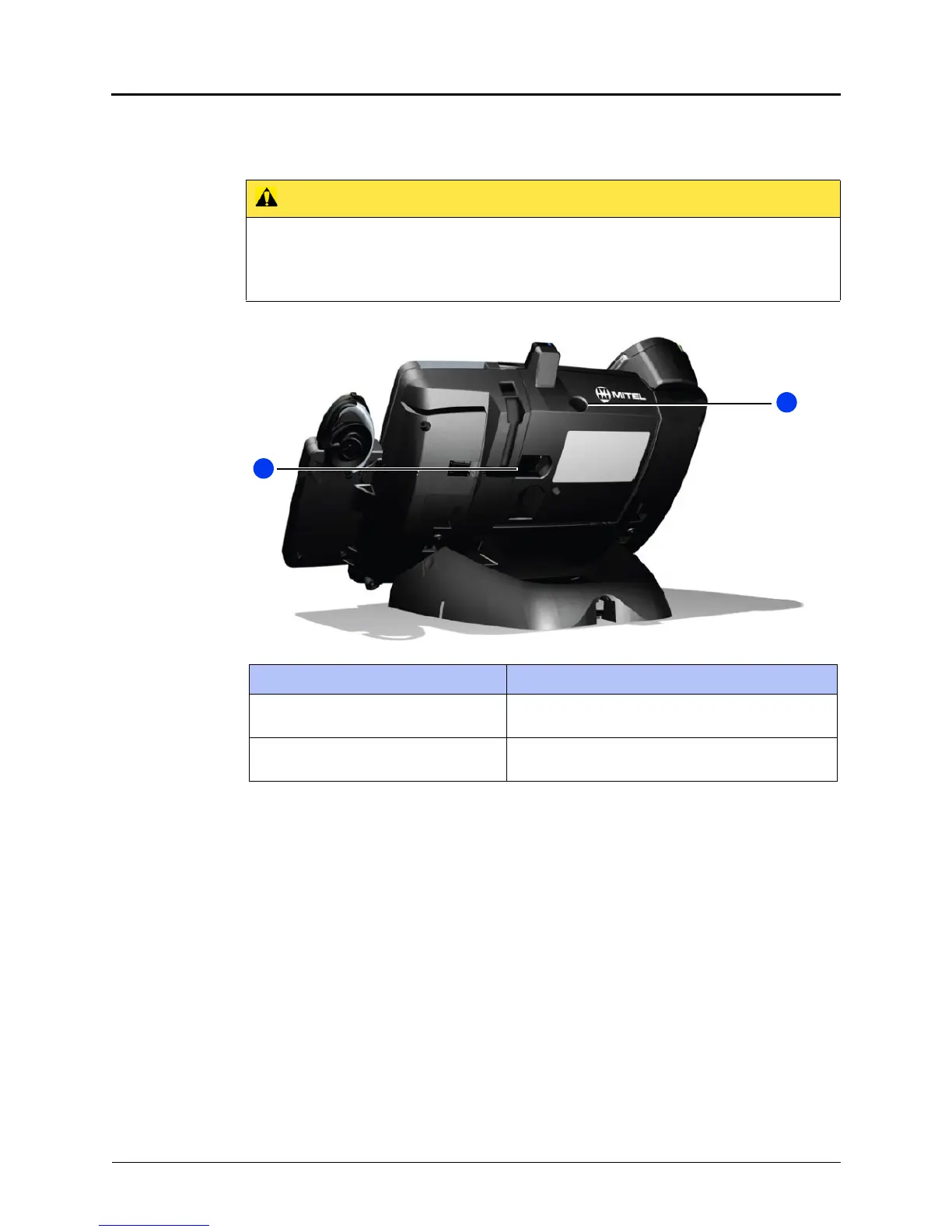
Cordless Module
The cordless module is shown here.
Handset and Headset Combinations
The following combinations of corded and cordless headset and handset are supported on the
5360 IP Phone:
• Corded handset only
• Corded handset and corded headset
• Cordless handset only
• Cordless handset and cordless headset
• Corded handset and cordless headset
• Corded headset and cordless handset
The DECT Cordless Handset, DECT Cordless Headset, and Bluetooth Handset are all Mitel-
branded accessories available only from Mitel. Bluetooth headsets are third-party accessories
available from a variety of manufacturers.
CAUTION
Phone Damage Hazard. Attempting to remove the back plate on the IP phone to install the
cordless module before disconnecting the IP phone power supply may damage the IP
phone. For information about installing the cordless module, refer to the installation docu-
mentation that is shipped with the unit.
Feature Function
1 – Cordless Module pairing button Initiates pairing between the cordless module and a
cordless device.
2 – Cordless Headset Cradle cable
(DECT only)
Connects to the cordless module to provide power
to the charging cradle.



 To Next Page